
Nagios Installation On Ubuntu 10.04 (Lucid Lynx) - Page 3
This tutorial exists for these OS versions
- Ubuntu 22.04 (Jammy Jellyfish)
- Ubuntu 20.04 (Focal Fossa)
- Ubuntu 18.04 (Bionic Beaver)
- Ubuntu 16.04 (Xenial Xerus)
- Ubuntu 15.04 (Vivid Vervet)
- Ubuntu 14.04 LTS (Trusty Tahr)
On this page
- Now We Will Disable AppArmor
- Create Folder For Nagios And Nagios Plugins
- Now Let's Install The Required Programs For Nagios
- Nagios User Setup
- Download And Unzip Nagios And Nagios Plugins
- Install Nagios
- Nagios Password
- Install Nagios Plugins
- Change Default Email Address For Nagios Admin
- Postfix Configuration For A Smarthost Relay
- Installation Script For Nagios
Now We Will Disable AppArmor
/etc/init.d/apparmor stop
update-rc.d -f apparmor remove
aptitude remove apparmor apparmor-utils
Create Folder For Nagios And Nagios Plugins
mkdir /downloads
Now Let's Install The Required Programs For Nagios
Make sure you select Smarthost option when installing Postfix:
aptitude -y install apache2 libapache2-mod-php5 build-essential libgd2-xpm-dev postfix
Now let's update everything on this system:
aptitude update
aptitude safe-upgrade
Nagios User Setup
useradd -m -s /bin/bash nagios
passwd nagios
usermod -G nagios nagios
groupadd nagcmd
usermod -a -G nagcmd nagios
Download And Unzip Nagios And Nagios Plugins
cd /downloads
wget http://prdownloads.sourceforge.net/nagios/nagios-3.2.3.tar.gz
wget http://prdownloads.sourceforge.net/nagiosplug/nagios-plugins-1.4.15.tar.gz
tar -zxf /downloads/nagios-3.2.3.tar.gz
tar -zxf /downloads/nagios-plugins-1.4.15.tar.gz
Install Nagios
cd /downloads/nagios-3.2.3
./configure --with-command-group=nagcmd
make all
make install
make install-init
make install-config
make install-commandmode
make install-webconf
Nagios Password
This is the password you will need to look at the nagios pages. If you install Nagios to a different directory please change this command to where the Nagios etc. folder will be.
htpasswd -c /usr/local/nagios/etc/htpasswd.users nagiosadmin
Enter your password when prompted.
Now we will restart Apache to make sure all of the changes take effect:
/etc/init.d/apache2 restart
Install Nagios Plugins
cd /downloads/nagios-plugins-1.4.15/
make
make install
Now we need to make Nagios start at bootup:
ln -s /etc/init.d/nagios /etc/rcS.d/S99nagios
Change Default Email Address For Nagios Admin
Open your favorite editor and open /usr/local/nagios/etc/objects/contacts.cfg and change this:
nagios@localhost
To this:
[email protected]
Once you have saved your changes to the contacts.cfg we need to verify that there are no errors in the configuration of Nagios.
/usr/local/nagios/bin/nagios -v /usr/local/nagios/etc/nagios.cfg
Here is what you should see. It is okay to have a couple of warnings, but you can't have any errors.
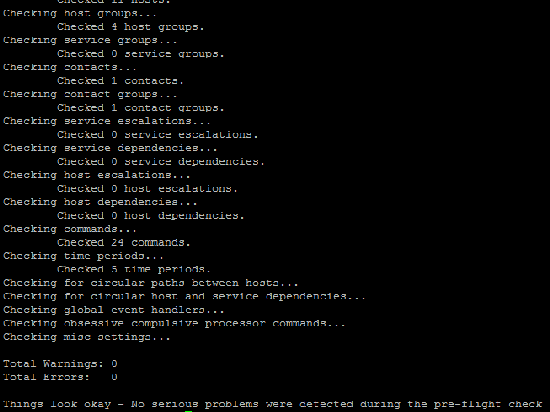
Now we are going to start nagios:
/etc/init.d/nagios start
Postfix Configuration For A Smarthost Relay
postconf -e 'relayhost=yourmailserver.com'
postconf -e 'smtp_sasl_auth_enabled = yes'
postconf -e 'smtp_sasl_password_maps = hash:/etc/postfix/sasl_passwd'
postconf -e 'smtp_sasl_security_options ='
echo "yourmailserver.com emailusername:emailpassword" > /etc/postfix/sasl_passwd
Now we will need to change the password file attributes so only root has access to read it.
chown root:root /etc/postfix/sasl_passwd
chmod 600 /etc/postfix/sasl_passwd
postmap /etc/postfix/sasl_passwd
Now we are going to set the map that will change your outbound messages from nagios to your email server username/email address.
echo "nagios [email protected]" /etc/postfix/canonical
echo "canonical_maps = hash:/etc/postfix/canonical" >> /etc/postfix/main.cf
postmap /etc/postfix/canonical
Now we are going to restart Postfix:
/etc/init.d/postfix restart
Now that this all has been completed you can restart your system.
Once your system has come back up you will be able to login to the website and look at your first Nagios installation.
http://yourserver/nagios/
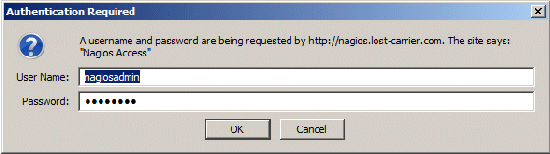
Now login with the nagiosadmin username and password we created earlier:
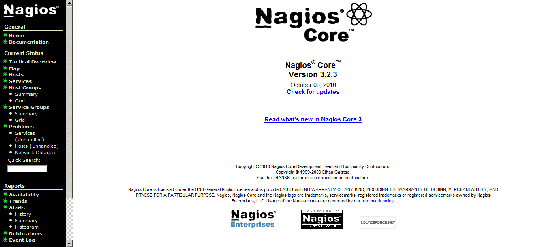
Now here is what you will see once you are logged in.
Installation Script For Nagios
Here is the installation script I have created to handle most of the work for installing Nagios. Please note the top of the script, you will need to define some of the variables for the installation to work correctly.
#!/bin/bash
#
# AUTHOR : rbishop
# DATE : 01.27.2011
#
# PROG.-NAME : nagios-setup.sh
#
# FUNCTION : Installing Nagios on your System
#
#
#######################################################################

#######################################################################
##                                                                   ##
##             Configurable Settings for this Script                 ##
##

WWWGROUP=www-data
WWWUSER=www-data
NAGIOSROOT=/usr/local/nagios
DOWNLOADS=/downloads
NAGIOSADMIN=nagiosadmin
POSTFIXETC=/etc/postfix
NAGIOSIP=
MAILSERVERDOMAIN=
MAILSERVERUSER=
MAILSERVERPASS=


##                                                                   ##
##            END Configurable Settings for Script                   ##
##                                                                   ##
#######################################################################
time {

set -e

echo "***** Starting Nagios Quick-Install:  *****"
echo ""
echo `date`

echo "*******************************************"
echo "*******************************************"
echo "**                                       **"
echo "**          Disabling AppArmor           **"
echo "**                                       **"
echo "*******************************************"
echo "*******************************************"

/etc/init.d/apparmor stop
update-rc.d -f apparmor remove
aptitude remove apparmor apparmor-utils

echo "*******************************************"
echo "*******************************************"
echo "**                                       **"
echo "**  Adding Required Folders for Install  **"
echo "**                                       **"
echo "*******************************************"
echo "*******************************************"

mkdir ${DOWNLOADS}

echo "*******************************************"
echo "*******************************************"
echo "**                                       **"
echo "** Updating Software Packages on Server  **"
echo "**                                       **"
echo "*******************************************"
echo "*******************************************"

aptitude -y install apache2 libapache2-mod-php5 build-essential libgd2-xpm-dev postfix

aptitude update

aptitude -y safe-upgrade

echo "*******************************************"
echo "*******************************************"
echo "**                                       **"
echo "**  Adding Nagios user login for nagios  **"
echo "**                                       **"
echo "*******************************************"
echo "*******************************************"

useradd -m -s /bin/bash nagios
passwd nagios
usermod -G nagios nagios
groupadd nagcmd
usermod -a -G nagcmd nagios
usermod -a -G nagcmd www-data

echo "*******************************************"
echo "*******************************************"
echo "**                                       **"
echo "**   Downloading and Unzipping Nagios    **"
echo "**                                       **"
echo "*******************************************"
echo "*******************************************"

cd ${DOWNLOADS}

wget http://prdownloads.sourceforge.net/nagios/nagios-3.2.3.tar.gz
wget http://prdownloads.sourceforge.net/nagiosplug/nagios-plugins-1.4.15.tar.gz

tar -zxvf ${DOWNLOADS}/nagios-3.2.3.tar.gz
tar -zxvf ${DOWNLOADS}/nagios-plugins-1.4.15.tar.gz

cd ${DOWNLOADS}/nagios-3.2.3

echo "*******************************************"
echo "*******************************************"
echo "**                                       **"
echo "**   Configuring nagios and installing   **"
echo "**                                       **"
echo "*******************************************"
echo "*******************************************"

read -p "Press Enter to continue..."

./configure --with-command-group=nagcmd

echo "*******************************************"
echo "*******************************************"
echo "**                                       **"
echo "**    Running Nagios Make All Command    **"
echo "**                                       **"
echo "*******************************************"
echo "*******************************************"

make all

echo "*******************************************"
echo "*******************************************"
echo "**                                       **"
echo "**  Running Nagios Make Install Command  **"
echo "**                                       **"
echo "*******************************************"
echo "*******************************************"

make install

echo "*******************************************"
echo "*******************************************"
echo "**                                       **"
echo "**   Running Make Install-Init Command   **"
echo "**                                       **"
echo "*******************************************"
echo "*******************************************"

make install-init

echo "*******************************************"
echo "*******************************************"
echo "**                                       **"
echo "**  Running Make Install-Config Command  **"
echo "**                                       **"
echo "*******************************************"
echo "*******************************************"

make install-config

echo "*******************************************"
echo "*******************************************"
echo "**                                       **"
echo "**   Running Make Install-CommandMode    **"
echo "**                                       **"
echo "*******************************************"
echo "*******************************************"

make install-commandmode

echo "*******************************************"
echo "*******************************************"
echo "**                                       **"
echo "**    Running Make Install-Webconf       **"
echo "**                                       **"
echo "*******************************************"
echo "*******************************************"

make install-webconf

echo "*******************************************"
echo "*******************************************"
echo "**                                       **"
echo "** Adding htpasswd login for nagiosadmin **"
echo "**                                       **"
echo "*******************************************"
echo "*******************************************"

htpasswd -c ${NAGIOSROOT}/etc/htpasswd.users ${NAGIOSADMIN}

echo "*******************************************"
echo "*******************************************"
echo "**                                       **"
echo "**          Restarting Apache            **"
echo "**                                       **"
echo "*******************************************"
echo "*******************************************"

/etc/init.d/apache2 restart

echo "********************************************"
echo "********************************************"
echo "**                                        **"
echo "** Configuring Nagios-Plugins for Install **"
echo "**                                        **"
echo "********************************************"
echo "********************************************"

cd ${DOWNLOADS}/nagios-plugins-1.4.15/

./configure --with-nagios-user=nagios --with-nagios-group=nagios

echo "*******************************************"
echo "*******************************************"
echo "**                                       **"
echo "**   Running NagiosPlugin Make Command   **"
echo "**                                       **"
echo "*******************************************"
echo "*******************************************"

make

echo "*******************************************"
echo "*******************************************"
echo "**                                       **"
echo "**   Running NagiosPlugin Make Install   **"
echo "**                                       **"
echo "*******************************************"
echo "*******************************************"

make install

echo "*******************************************"
echo "*******************************************"
echo "**                                       **"
echo "**   Adding Nagios to Start on BootUp    **"
echo "**                                       **"
echo "*******************************************"
echo "*******************************************"

ln -s /etc/init.d/nagios /etc/rcS.d/S99nagios

echo "*******************************************"
echo "*******************************************"
echo "**                                       **"
echo "**    Checking Nagios Configuration      **"
echo "**                                       **"
echo "*******************************************"
echo "*******************************************"

${NAGIOSROOT}/bin/nagios -v ${NAGIOSROOT}/etc/nagios.cfg

echo "*******************************************"
echo "*******************************************"
echo "**                                       **"
echo "**           Starting Nagios             **"
echo "**                                       **"
echo "*******************************************"
echo "*******************************************"

/etc/init.d/nagios start

echo "*******************************************"
echo "*******************************************"
echo "**                                       **"
echo "**         Configuring Postfix           **"
echo "**                                       **"
echo "*******************************************"
echo "*******************************************"

postconf -e 'relayhost =${MAILSERVERDOMAIN}'
postconf -e 'smtp_sasl_auth_enable = yes'
postconf -e 'smtp_sasl_password_maps = hash:${POSTFIXETC}/sasl_passwd'
postconf -e 'smtp_sasl_security_options ='

echo "${MAILSERVERDOMAIN} ${MAILSERVERUSER}:${MAILSERVERPASS}" > ${POSTFIXETC}/sasl_passwd

chown root:root ${POSTFIXETC}/sasl_passwd
chmod 600 ${POSTFIXETC}/sasl_passwd

postmap ${POSTFIXETC}/sasl_passwd

echo "${MAILSERVERDOMAIN}" > ${POSTFIXETC}/sasl_passwd

echo "nagios nagios@${MAILSERVERDOMAIN}" > ${POSTFIXETC}/canonical

echo "canonical_maps = hash:${POSTFIXETC}/canonical" >> ${POSTFIXETC}/main.cf

postmap ${POSTFIXETC}/canonical

/etc/init.d/postfix restart

echo "*****************************************"
echo "*                                       *"
echo "*     Ending Nagios Quick-Install:      *"
echo "*                                       *"
echo "*****************************************"

echo "*******************************************"
echo "*******************************************"
echo "**                                       **"
echo "**   Now go to ${NAGIOSIP}/nagios/   **"
echo "**                                       **"
echo "*******************************************"
echo "*******************************************"

}





