
Setting Up An Android App Build Environment With Eclipse, Android SDK, PhoneGap (Debian Squeeze) - Page 5
7.2 Creating An Android App From Eclipse
In the ~/tweetme/tweetme/ directory, run:
droidgap create
(If you get the error message droidgap: command not found, please run
export PATH="$HOME/android-sdk-linux_x86/tools:$HOME/android-sdk-linux_x86/platform-tools:$HOME/phonegap-phonegap-android/bin:$PATH"
and try again. )
This will create the directory ~/tweetme/tweetme_android which contains everything we need to build our final app from it. The ~/tweetme/tweetme_android/assets/www/ directory contains our HTML, CSS, JavaScript sources plus the phonegap.0.9.4.js file.
cd ../tweetme_android/
ls -l
falko@debian:~/tweetme/tweetme_android$ ls -l
total 44
-rw-r--r-- 1 falko falko 2000 Mar  2 15:52 AndroidManifest.xml
drwxr-xr-x 3 falko falko 4096 Mar  2 15:52 assets
drwxr-xr-x 2 falko falko 4096 Mar  2 15:52 bin
-rw-r--r-- 1 falko falko  696 Mar  2 15:52 build.properties
-rw-r--r-- 1 falko falko 2891 Mar  2 15:52 build.xml
-rw-r--r-- 1 falko falko  363 Mar  2 15:52 default.properties
drwxr-xr-x 2 falko falko 4096 Mar  2 15:52 libs
-rw-r--r-- 1 falko falko  425 Mar  2 15:52 local.properties
-rw-r--r-- 1 falko falko 1159 Mar  2 15:52 proguard.cfg
drwxr-xr-x 7 falko falko 4096 Mar  2 15:52 res
drwxr-xr-x 3 falko falko 4096 Mar  2 15:52 src
falko@debian:~/tweetme/tweetme_android$
ls -l assets/www/
falko@debian:~/tweetme/tweetme_android$ ls -l assets/www/
total 212
-rw-r--r-- 1 falko falko   4233 Mar  2 15:52 index.html
drwxr-xr-x 2 falko falko   4096 Mar  2 15:52 jqtouch
-rw-r--r-- 1 falko falko  78601 Mar  2 15:52 jquery.js
-rw-r--r-- 1 falko falko 107394 Mar  2 15:52 phonegap.0.9.4.js
drwxr-xr-x 4 falko falko   4096 Mar  2 15:52 themes
falko@debian:~/tweetme/tweetme_android$
The libs/ directory contains the file phonegap.0.9.4.jar:
ls -l libs/
falko@debian:~/tweetme/tweetme_android$ ls -l libs/
total 128
-rw-r--r-- 1 falko falko 122991 Mar  2 15:52 phonegap.0.9.4.jar
falko@debian:~/tweetme/tweetme_android$
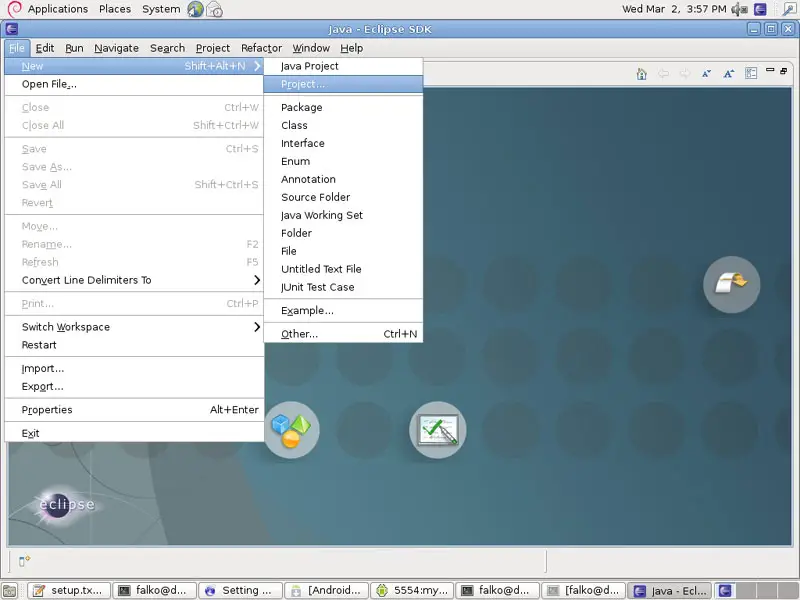
Now open Eclipse and go to File > New > Project...:
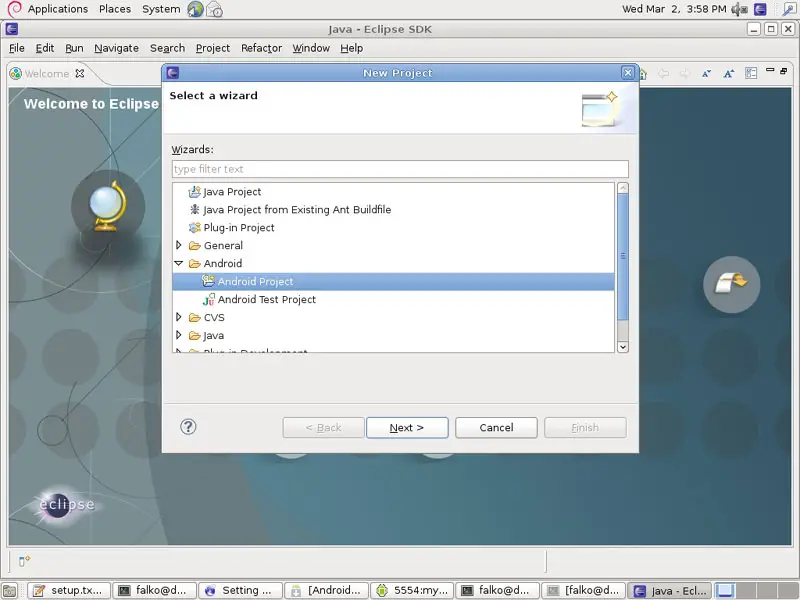
In the New Project window, select Android > Android Project and click on Next >:
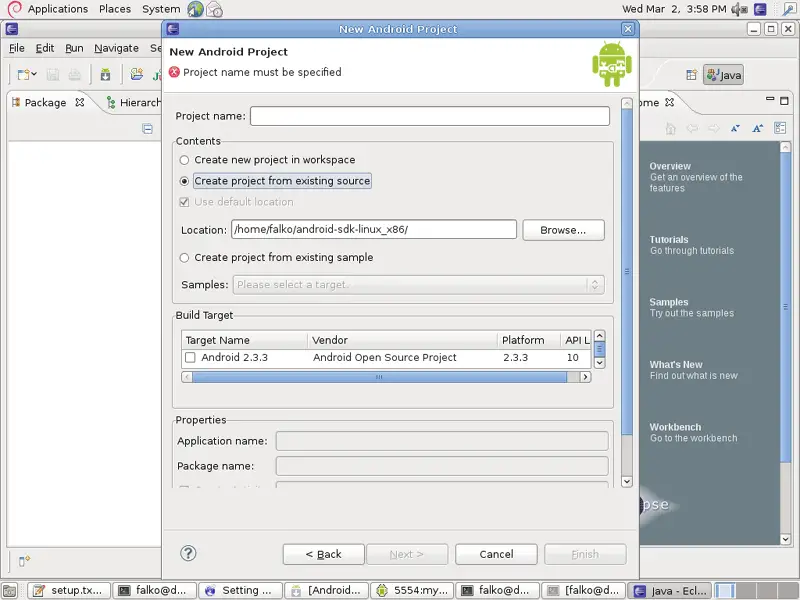
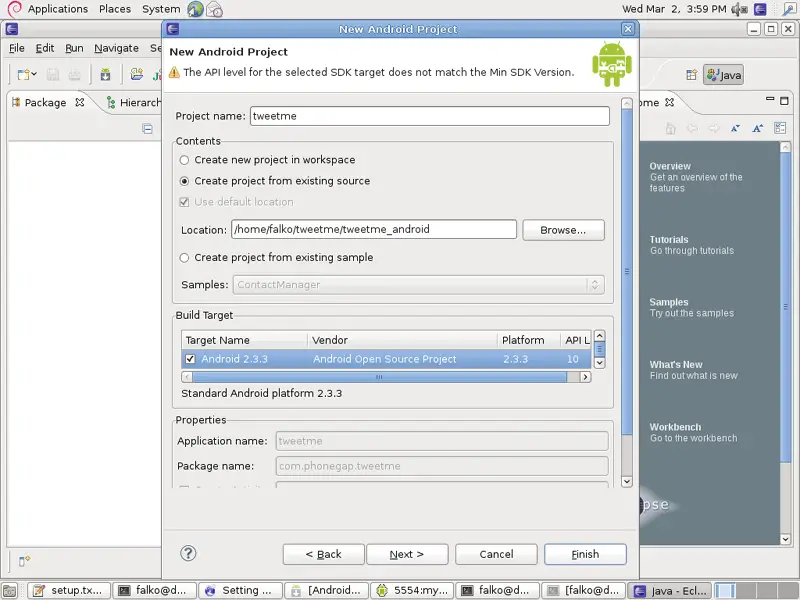
In the New Android Project window, select Create project from existing source (we have previously created the source by running droidgap create) and click on the Browse... button - don't fill out any other fields in that window:
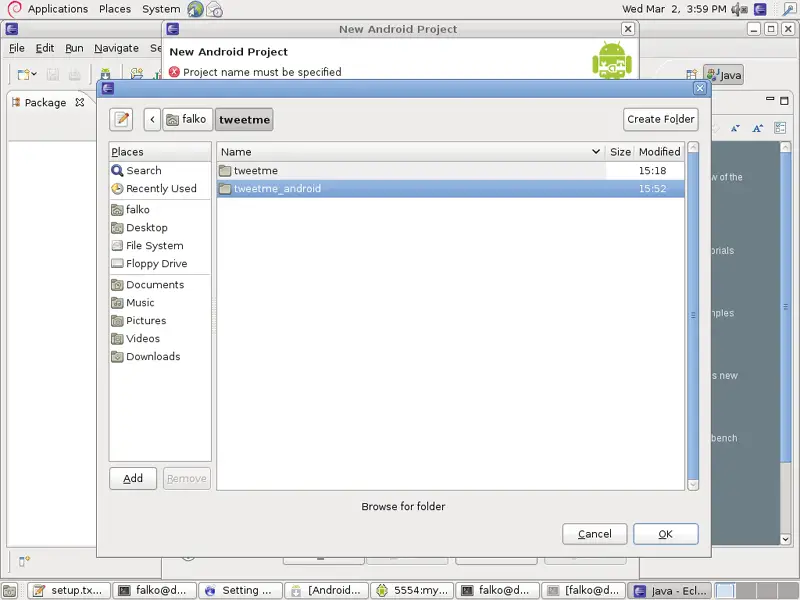
Select the ~/tweetme/tweetme_android directory and click on OK:
Back in the New Android Project window, all other fields should now be filled. Make sure you select a Build Target (I use Android 2.3.3 here). Click on Finish:
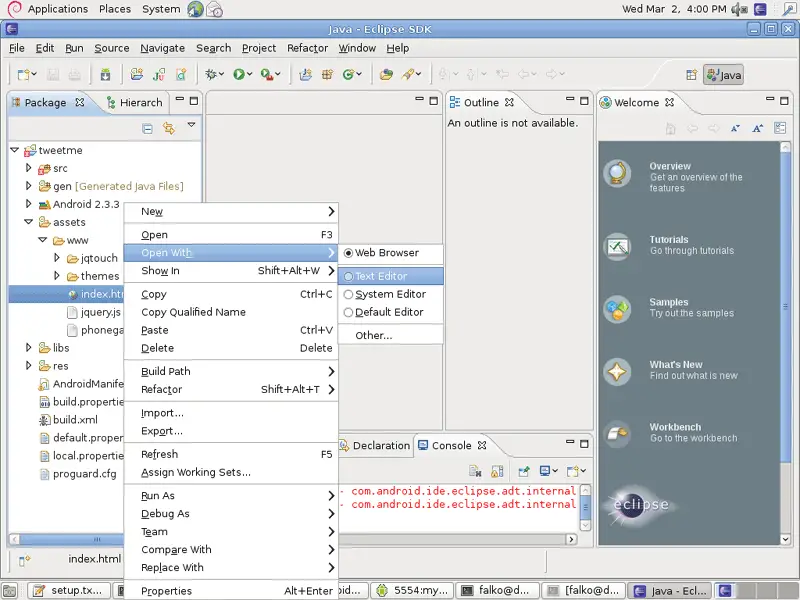
You should now see the source tree of your app in the left panel in Android. Right-click the assets/www/index.html file and select Open With > Text Editor:
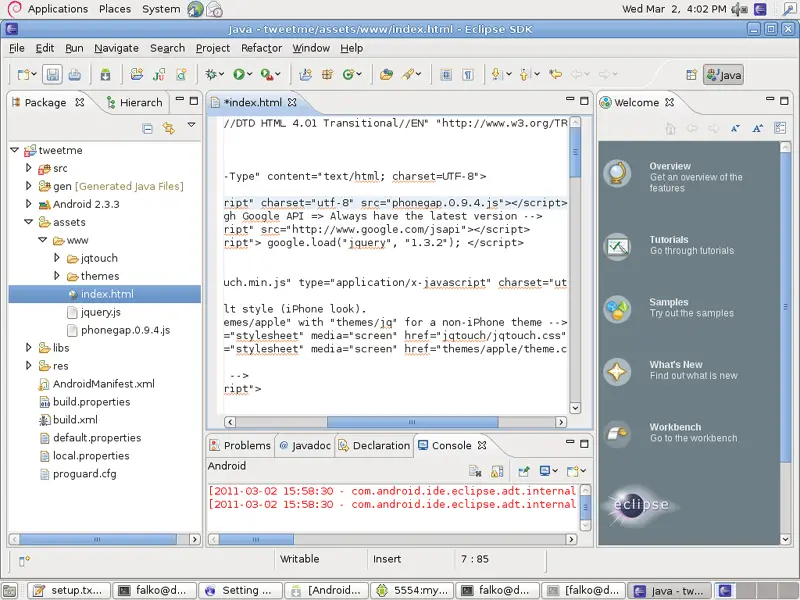
Add the phonegap.0.9.4.js file to the <head></head> section (before all other JavaScript files/JavaScript code).
Lets assume the file starts as follows:
<!DOCTYPE HTML PUBLIC "-//W3C//DTD HTML 4.01 Transitional//EN" "http://www.w3.org/TR/html4/loose.dtd">

<html>
  <head>
    <meta http-equiv="Content-Type" content="text/html; charset=UTF-8">
    <title>Tweetme</title>

    <!-- include JQuery through Google API => Always have the latest version -->
    <script type="text/javascript" src="http://www.google.com/jsapi"></script>
    <script type="text/javascript"> google.load("jquery", "1.3.2"); </script>

    <!-- import JQTouch -->
    <script src="jqtouch/jqtouch.min.js" type="application/x-javascript" charset="utf-8"></script>

    <!-- Import JQTouch default style (iPhone look).
       Replace the string "themes/apple" with "themes/jq" for a non-iPhone theme -->
    <link type="text/css" rel="stylesheet" media="screen" href="jqtouch/jqtouch.css">
    <link type="text/css" rel="stylesheet" media="screen" href="themes/apple/theme.css">
[...]
|
Add the line <script type="text/javascript" charset="utf-8" src="phonegap.0.9.4.js"></script> before all other JavaScript so that it looks as follows:
<!DOCTYPE HTML PUBLIC "-//W3C//DTD HTML 4.01 Transitional//EN" "http://www.w3.org/TR/html4/loose.dtd">

<html>
  <head>
    <meta http-equiv="Content-Type" content="text/html; charset=UTF-8">
    <title>Tweetme</title>
    <script type="text/javascript" charset="utf-8" src="phonegap.0.9.4.js"></script>
    <!-- include JQuery through Google API => Always have the latest version -->
    <script type="text/javascript" src="http://www.google.com/jsapi"></script>
    <script type="text/javascript"> google.load("jquery", "1.3.2"); </script>

    <!-- import JQTouch -->
    <script src="jqtouch/jqtouch.min.js" type="application/x-javascript" charset="utf-8"></script>

    <!-- Import JQTouch default style (iPhone look).
       Replace the string "themes/apple" with "themes/jq" for a non-iPhone theme -->
    <link type="text/css" rel="stylesheet" media="screen" href="jqtouch/jqtouch.css">
    <link type="text/css" rel="stylesheet" media="screen" href="themes/apple/theme.css">
[...]
|
Now save the file.
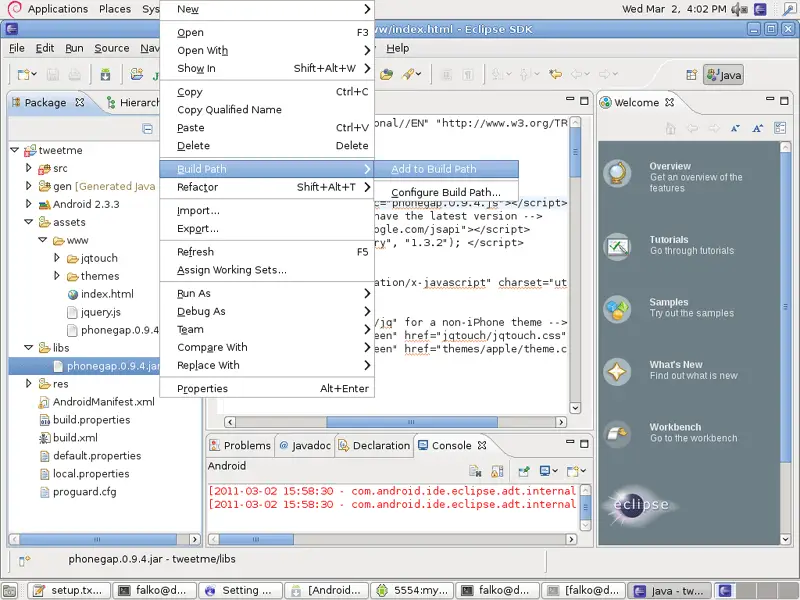
Next right-click the libs/phonegap.0.9.4.jar file and select Build Path > Add to Build Path:
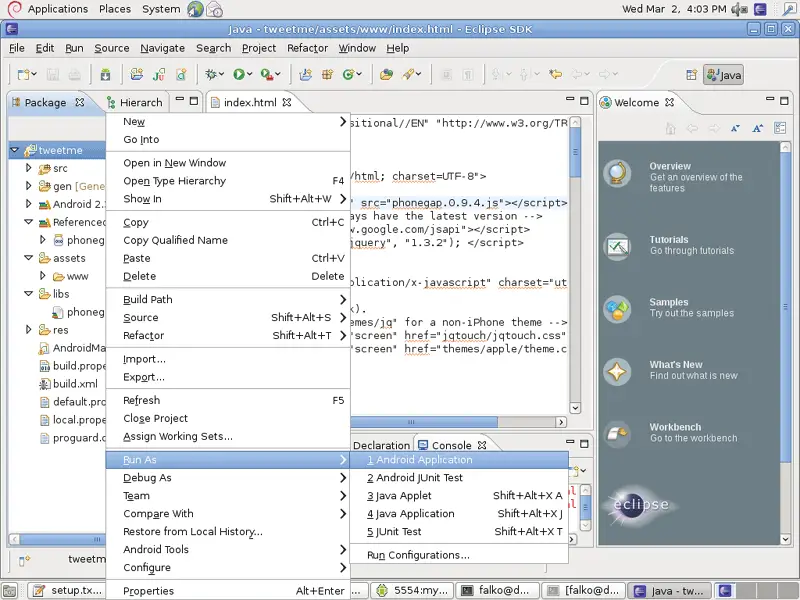
Now right-click the root of our source tree, tweetme, and select Run As > Android Application:
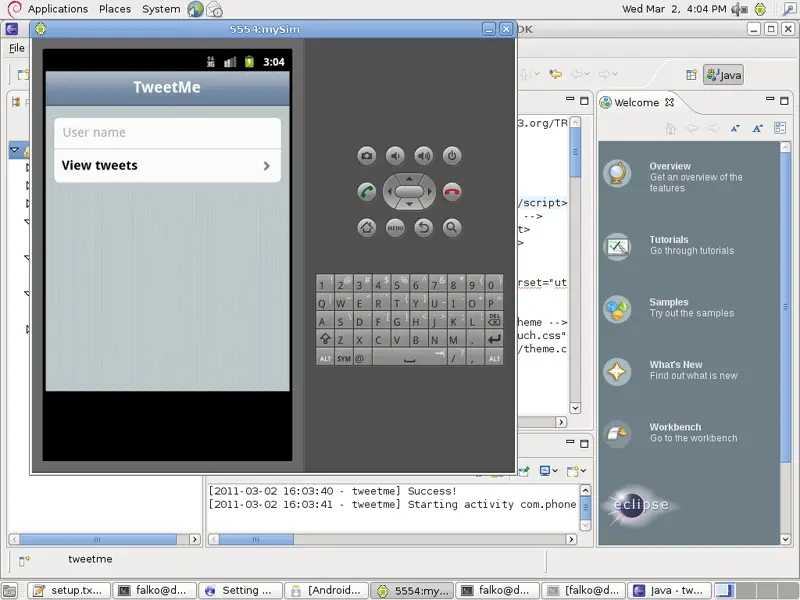
This will open our emulator and automatically start our app:
8 Using A Real Android Device
If you have a real Android smartphone and want to test your app on this device instead of the emulator, you have to first enable USB debugging on the device (Menu > Settings > Applications > Development > USB-Debugging) and then plug it into your Debian desktop using the device's USB cable.
Now check if Debian has correctly identified the device:
adb devices
If you see a lot of question marks like this...
falko@debian:~$ adb devices
List of devices attached
????????????        no permissions

falko@debian:~$
... then Debian did not identify your device. In this case become root...
su
... and make sure that the package usbutils is installed:
apt-get install usbutils
Then create the file /etc/udev/rules.d/51-android.rules...
gedit /etc/udev/rules.d/51-android.rules
... with the following contents:
SUBSYSTEM=="usb", SYSFS{idVendor}=="0bb4", MODE="0666"
|
Replace 0bb4 (this is for HTC phones) with the correct vendor ID which you can find here: http://developer.android.com/guide/developing/device.html#VendorIds
Then run:
chmod a+r /etc/udev/rules.d/51-android.rules
cd /home/falko/android-sdk-linux_x86/platform-tools/
./adb kill-server
./adb start-server
Leave the root account:
exit
Plug out your phone and plug it back in, and Debian should now recognize it:
adb devices
falko@debian:~$ adb devices
List of devices attached
SH0ARPL12791        device

falko@debian:~$
If you have your app as an apk file, you can now install it onto your phone as follows:
adb -d install -r tweetme-debug.apk
(Please note that I use -d (for device) instad of -e (for emulator) here.)
9 Links
- Eclipse: http://www.eclipse.org/
- Android SDK: http://developer.android.com/sdk/index.html
- PhoneGap: http://www.phonegap.com/
- Debian: http://www.debian.org/
- jQuery: http://jquery.com/
- jQTouch: http://www.jqtouch.com/
- Tutorial: A simple Twitter client with JQTouch: http://www.timo-ernst.net/2010/08/tutorial-a-simple-twitter-client-with-jqtouch/





