The Perfect Server - Debian Lenny (Debian 5.0) With MyDNS & Courier [ISPConfig 3] - Page 5
17 Install SquirrelMail
To install the SquirrelMail webmail client, run
apt-get install squirrelmail
Then create the following symlink...
ln -s /usr/share/squirrelmail/ /var/www/webmail
... and configure SquirrelMail:
squirrelmail-configure
We must tell SquirrelMail that we are using Courier-IMAP/-POP3:
SquirrelMail Configuration : Read: config.php (1.4.0)
---------------------------------------------------------
Main Menu --
1. Organization Preferences
2. Server Settings
3. Folder Defaults
4. General Options
5. Themes
6. Address Books
7. Message of the Day (MOTD)
8. Plugins
9. Database
10. Languages
D. Set pre-defined settings for specific IMAP servers
C Turn color on
S Save data
Q Quit
Command >> <-- D
SquirrelMail Configuration : Read: config.php
---------------------------------------------------------
While we have been building SquirrelMail, we have discovered some
preferences that work better with some servers that don't work so
well with others. If you select your IMAP server, this option will
set some pre-defined settings for that server.
Please note that you will still need to go through and make sure
everything is correct. This does not change everything. There are
only a few settings that this will change.
Please select your IMAP server:
bincimap = Binc IMAP server
courier = Courier IMAP server
cyrus = Cyrus IMAP server
dovecot = Dovecot Secure IMAP server
exchange = Microsoft Exchange IMAP server
hmailserver = hMailServer
macosx = Mac OS X Mailserver
mercury32 = Mercury/32
uw = University of Washington's IMAP server
quit = Do not change anything
Command >> <-- courier
SquirrelMail Configuration : Read: config.php
---------------------------------------------------------
While we have been building SquirrelMail, we have discovered some
preferences that work better with some servers that don't work so
well with others. If you select your IMAP server, this option will
set some pre-defined settings for that server.
Please note that you will still need to go through and make sure
everything is correct. This does not change everything. There are
only a few settings that this will change.
Please select your IMAP server:
bincimap = Binc IMAP server
courier = Courier IMAP server
cyrus = Cyrus IMAP server
dovecot = Dovecot Secure IMAP server
exchange = Microsoft Exchange IMAP server
hmailserver = hMailServer
macosx = Mac OS X Mailserver
mercury32 = Mercury/32
uw = University of Washington's IMAP server
quit = Do not change anything
Command >> courier
imap_server_type = courier
default_folder_prefix = INBOX.
trash_folder = Trash
sent_folder = Sent
draft_folder = Drafts
show_prefix_option = false
default_sub_of_inbox = false
show_contain_subfolders_option = false
optional_delimiter = .
delete_folder = true
Press any key to continue... <-- press a key
SquirrelMail Configuration : Read: config.php (1.4.0)
---------------------------------------------------------
Main Menu --
1. Organization Preferences
2. Server Settings
3. Folder Defaults
4. General Options
5. Themes
6. Address Books
7. Message of the Day (MOTD)
8. Plugins
9. Database
10. Languages
D. Set pre-defined settings for specific IMAP servers
C Turn color on
S Save data
Q Quit
Command >> <-- S
SquirrelMail Configuration : Read: config.php (1.4.0)
---------------------------------------------------------
Main Menu --
1. Organization Preferences
2. Server Settings
3. Folder Defaults
4. General Options
5. Themes
6. Address Books
7. Message of the Day (MOTD)
8. Plugins
9. Database
10. Languages
D. Set pre-defined settings for specific IMAP servers
C Turn color on
S Save data
Q Quit
Command >> <-- Q
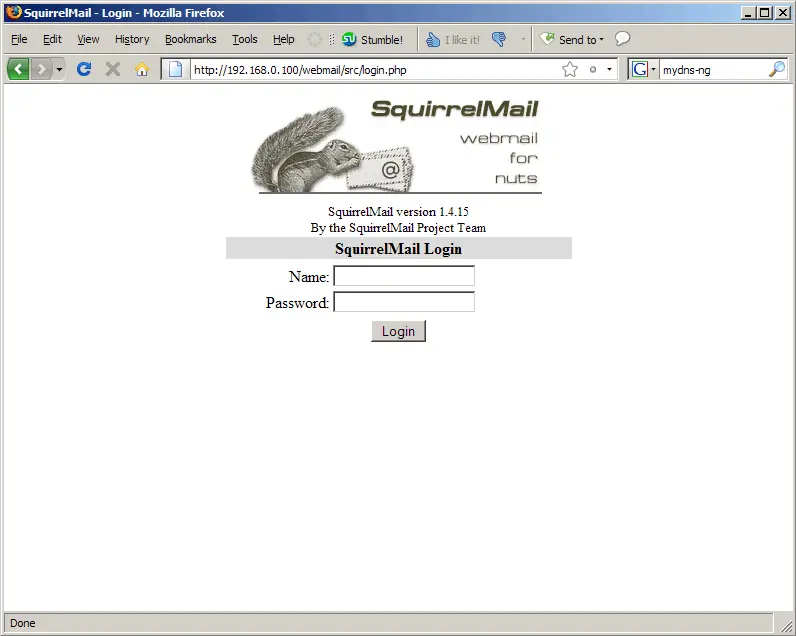
Afterwards you can access SquirrelMail under http://server1.example.com/webmail or http://192.168.0.100/webmail:
18 Install ISPConfig 3
To install ISPConfig 3 from the latest released version, do this:
cd /tmp
wget http://downloads.sourceforge.net/ispconfig/ISPConfig-3.0.1.tar.gz?use_mirror=
tar xvfz ISPConfig-3.0.1.tar.gz
cd ispconfig3_install/install/
(Replace ISPConfig-3.0.1.tar.gz with the latest version.)
The next step is to run
php -q install.php
This will start the ISPConfig 3 installer:
server1:/tmp/ispconfig3_install/install# php -q install.php
--------------------------------------------------------------------------------
_____ ___________ _____ __ _
|_ _/ ___| ___ \ / __ \ / _(_)
| | \ `--.| |_/ / | / \/ ___ _ __ | |_ _ __ _
| | `--. \ __/ | | / _ \| '_ \| _| |/ _` |
_| |_/\__/ / | | \__/\ (_) | | | | | | | (_| |
\___/\____/\_| \____/\___/|_| |_|_| |_|\__, |
__/ |
|___/
--------------------------------------------------------------------------------
>> Initial configuration
Operating System: Debian Lenny/Sid or compatible
Following will be a few questions for primary configuration so be careful.
Default values are in [brackets] and can be accepted with <ENTER>.
Tap in "quit" (without the quotes) to stop the installer.
Select language (en,de) [en]: <-- ENTER
Installation mode (standard,expert) [standard]: <-- ENTER
Full qualified hostname (FQDN) of the server, eg server1.domain.tld [server1.example.com]: <-- ENTER
MySQL server hostname [localhost]: <-- ENTER
MySQL root username [root]: <-- ENTER
MySQL root password []: <-- yourrootsqlpassword
MySQL database to create [dbispconfig]: <-- ENTER
MySQL charset [utf8]: <-- ENTER
Generating a 2048 bit RSA private key
..................................................................................................................+++
.........................................................................................................+++
writing new private key to 'smtpd.key'
-----
You are about to be asked to enter information that will be incorporated
into your certificate request.
What you are about to enter is what is called a Distinguished Name or a DN.
There are quite a few fields but you can leave some blank
For some fields there will be a default value,
If you enter '.', the field will be left blank.
-----
Country Name (2 letter code) [AU]: <-- ENTER
State or Province Name (full name) [Some-State]: <-- ENTER
Locality Name (eg, city) []: <-- ENTER
Organization Name (eg, company) [Internet Widgits Pty Ltd]: <-- ENTER
Organizational Unit Name (eg, section) []: <-- ENTER
Common Name (eg, YOUR name) []: <-- ENTER
Email Address []: <-- ENTER
Configuring Jailkit
Configuring SASL
Configuring PAM
Configuring Courier
Configuring Spamassassin
Configuring Amavisd
Configuring Getmail
Configuring Pureftpd
Configuring MyDNS
Configuring Apache
Configuring Firewall
Installing ISPConfig
ISPConfig Port [8080]: <-- ENTER
Configuring DBServer
Installing Crontab
no crontab for root
no crontab for getmail
Restarting services ...
Stopping MySQL database server: mysqld.
Starting MySQL database server: mysqld.
Checking for corrupt, not cleanly closed and upgrade needing tables..
Stopping Postfix Mail Transport Agent: postfix.
Starting Postfix Mail Transport Agent: postfix.
Stopping SASL Authentication Daemon: saslauthd.
Starting SASL Authentication Daemon: saslauthd.
Stopping amavisd: amavisd-new.
Starting amavisd: amavisd-new.
Stopping ClamAV daemon: clamd.
Starting ClamAV daemon: clamd .
Stopping Courier authentication services: authdaemond.
Starting Courier authentication services: authdaemond.
Stopping Courier IMAP server: imapd.
Starting Courier IMAP server: imapd.
Stopping Courier IMAP-SSL server: imapd-ssl.
Starting Courier IMAP-SSL server: imapd-ssl.
Stopping Courier POP3 server: pop3d.
Starting Courier POP3 server: pop3d.
Stopping Courier POP3-SSL server: pop3d-ssl.
Starting Courier POP3-SSL server: pop3d-ssl.
Restarting web server: apache2 ... waiting .
Restarting ftp server: Running: /usr/sbin/pure-ftpd-mysql-virtualchroot -l mysql:/etc/pure-ftpd/db/mysql.conf -l pam -E -A -u 1000 -O clf:/var/log/pure-ftpd/transfer.log -b -B
Installation completed.
server1:/tmp/ispconfig3_install/install#
The installer automatically configures all underlying services, so no manual configuration is needed.
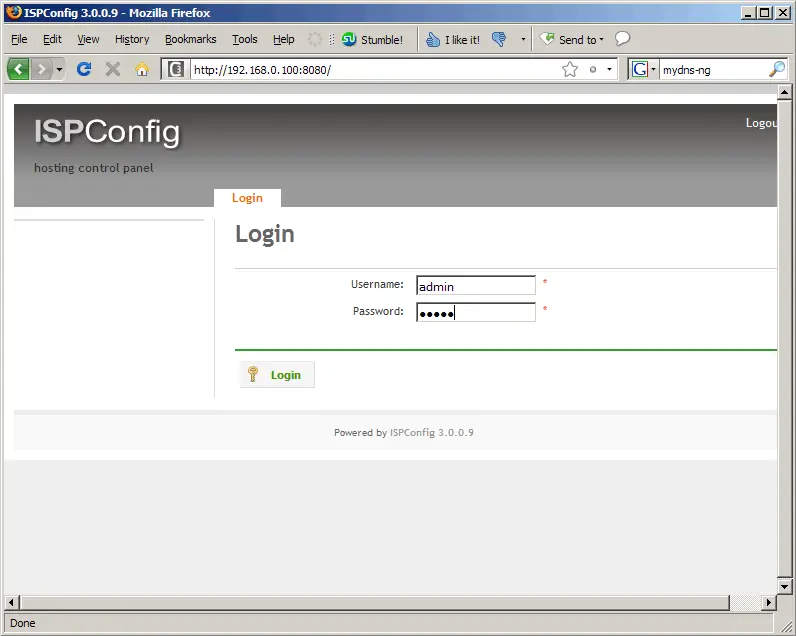
Afterwards you can access ISPConfig 3 under http://server1.example.com:8080/ or http://192.168.0.100:8080/. Log in with the username admin and the password admin (you should change the default password after your first login):
The system is now ready to be used.
18.1 ISPConfig 3 Manual
In order to learn how to use ISPConfig 3, I strongly recommend to download the ISPConfig 3 Manual.
On about 300 pages, it covers the concept behind ISPConfig (admin, resellers, clients), explains how to install and update ISPConfig 3, includes a reference for all forms and form fields in ISPConfig together with examples of valid inputs, and provides tutorials for the most common tasks in ISPConfig 3. It also lines out how to make your server more secure and comes with a troubleshooting section at the end.
19 Additional Notes
19.1 OpenVZ
If the Debian server that you've just set up in this tutorial is an OpenVZ container (virtual machine), you should do this on the host system (I'm assuming that the ID of the OpenVZ container is 101 - replace it with the correct VPSID on your system):
VPSID=101
for CAP in CHOWN DAC_READ_SEARCH SETGID SETUID NET_BIND_SERVICE NET_ADMIN SYS_CHROOT SYS_NICE CHOWN DAC_READ_SEARCH SETGID SETUID NET_BIND_SERVICE NET_ADMIN SYS_CHROOT SYS_NICE
do
vzctl set $VPSID --capability ${CAP}:on --save
done
19.2 SquirrelMail
Lots of people have reported problems (such as getting 404 Not Found errors) using the SquirrelMail webmail package in their web sites created through ISPConfig 3. This guide explains how to configure SquirrelMail on a Debian Lenny server so that you can use it from within your web sites (created through ISPConfig).
SquirrelMail's Apache configuration is in the file /etc/squirrelmail/apache.conf, but this file isn't loaded by Apache because it is not in the /etc/apache2/conf.d/ directory. Therefore we create a symlink called squirrelmail.conf in the /etc/apache2/conf.d/ directory that points to /etc/squirrelmail/apache.conf and reload Apache afterwards:
cd /etc/apache2/conf.d/
ln -s ../../squirrelmail/apache.conf squirrelmail.conf
/etc/init.d/apache2 reload
That's it already - /etc/apache2/conf.d/squirrelmail.conf defines an alias called /squirrelmail that points to SquirrelMail's installation directory /usr/share/squirrelmail.
Now go to the PHP open_basedir field on the Options tab of your web site in ISPConfig and add the directories /usr/share/squirrelmail and /etc/squirrelmail (that's the directory where SquirrelMail's configuration is stored) to the line, e.g. as follows:
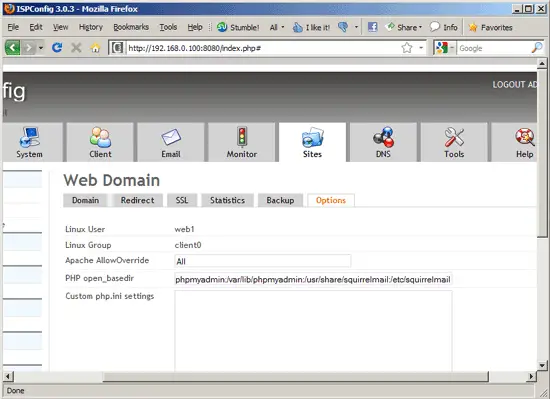
Wait two or three minutes until ISPConfig has updated the site configuration. You can now access SquirrelMail from your web site as follows:
http://www.example.com/squirrelmail
You can also access it from the ISPConfig control panel vhost as follows (this doesn't need any configuration in ISPConfig):
http://server1.example.com:8080/squirrelmail
If you'd like to use the alias /webmail instead of /squirrelmail, simply open /etc/apache2/conf.d/squirrelmail.conf...
vi /etc/apache2/conf.d/squirrelmail.conf
... and add the line Alias /webmail /usr/share/squirrelmail:
Alias /squirrelmail /usr/share/squirrelmail
Alias /webmail /usr/share/squirrelmail
<Directory /usr/share/squirrelmail>
Options Indexes FollowSymLinks
<IfModule mod_php4.c>
php_flag register_globals off
</IfModule>
<IfModule mod_php5.c>
php_flag register_globals off
</IfModule>
<IfModule mod_dir.c>
DirectoryIndex index.php
</IfModule>
# access to configtest is limited by default to prevent information leak
<Files configtest.php>
order deny,allow
deny from all
allow from 127.0.0.1
</Files>
</Directory>
# users will prefer a simple URL like http://webmail.example.com
#<VirtualHost 1.2.3.4>
# DocumentRoot /usr/share/squirrelmail
# ServerName webmail.example.com
#</VirtualHost>
# redirect to https when available (thanks [email protected])
#
# Note: There are multiple ways to do this, and which one is suitable for
# your site's configuration depends. Consult the apache documentation if
# you're unsure, as this example might not work everywhere.
#
#<IfModule mod_rewrite.c>
# <IfModule mod_ssl.c>
# <Location /squirrelmail>
# RewriteEngine on
# RewriteCond %{HTTPS} !^on$ [NC]
# RewriteRule . https://%{HTTP_HOST}%{REQUEST_URI} [L]
# </Location>
# </IfModule>
#</IfModule>
|
Then reload Apache:
/etc/init.d/apache2 reload
Now you can access Squirrelmail as follows:
http://www.example.com/webmail
http://server1.example.com:8080/webmail
If you'd like to define a vhost like webmail.example.com where your users can access SquirrelMail, you'd have to add the following vhost configuration to /etc/apache2/conf.d/squirrelmail.conf:
vi /etc/apache2/conf.d/squirrelmail.conf
[...] <VirtualHost 1.2.3.4:80> DocumentRoot /usr/share/squirrelmail ServerName webmail.example.com </VirtualHost> |
Make sure you replace 1.2.3.4 with the correct IP address of your server. Of course, there must be a DNS record for webmail.example.com that points to the IP address that you use in the vhost configuration. Also make sure that the vhost webmail.example.com does not exist in ISPConfig (otherwise both vhosts will interfere with each other!).
Now reload Apache...
/etc/init.d/apache2 reload
... and you can access SquirrelMail under http://webmail.example.com!
20 Links
- Debian: http://www.debian.org/
- ISPConfig: http://www.ispconfig.org/
Sub pages
Suggested articles
86 Comment(s)
Comments
If you are doing this setup on a VPS system (OpenVZ container), after the installation you should do the following steps:
1) Shutdown the vps
2) On the openvz server run the following script
VPSID=110
for CAP in CHOWN DAC_READ_SEARCH SETGID SETUID NET_BIND_SERVICE NET_ADMIN SYS_CHROOT SYS_NICE CHOWN DAC_READ_SEARCH SETGID SETUID NET_BIND_SERVICE NET_ADMIN SYS_CHROOT SYS_NICE
do
vzctl set $VPSID --capability ${CAP}:on --save
done
3) start the vps, and that's it! Your pure-ftp will now work without problems.
What if this is happening in a xen machine? can you help? I´m getting this message
server pure-ftpd: ([email protected]) [WARNING] Authentication failed for user
I don't see the user creation instructions on glancing through here. Check out the Perfect Server tutorial for Etch. I think it shows how to create email users.
Thank's a lot, fixed my line 135 error.
Greetings
.
One thing, which login info should readers use to login to SquirrelMail??? There was no prompt for user nor pass so i ASS-ume that it was root and root pass (that did not work) so I tried the user I created (admin....) and pass, but still nothing.
Any ideas???
thank you for your work. SUPER SUPER SUPER.........good luck
Worked for me also, just installed Debian today with this tut (really nice work Falko i can't thank ya enough, that would prly be considered as spam ;) I got 3 errors (didn't save the errormsg) but changing 5.0 to 5.0.1 did the trick.
I was getting an error upon trying this recently and here's how to fix it. The error I was receving was:
"Notice: Undefined variable: distver in /tmp/ispconfig3_install/install/lib/install.lib.php on line 135"
To fix this,
nano /tmp/ispconfig3_install/install/lib/install.lib.php
search for the distver
ctrl+w distver
edit where it says 5.0 to make it say 5.0.1
[...]
if(trim(file_get_contents('/etc/debian_version')) == '5.0.1' |...
[...]
and then try the install again
php -q install.php
Worked a treat for me! Thanks a million howtoforge! You have saved me ALOT of random searching once again and provide a source I can trust!
ISPConfig 3.0.1.3 is available for download. This release is a bugfix release for ISPConfig 3.
http://downloads.sourceforge.net/ispconfig/ISPConfig-3.0.1.3.tar.gz?use_mirror=
OK
;)
Thank you, this fixed my issue too.
Thanks,
Thanks for the fix to the line 135 problem. I changed it to 5.0.2 and bingo! It worked.
You're a lifesaver brother!
Install: perfect, 100% OK.
Thank you very much.
Hi Falko:
Thank you for your work.
I had a problem with mydns not compiling as it apparently wants source files for either mysql or postgresql. This is found on the ./configure.
Also a little scared to use this as you've not enabled the cert and started the admin process as https.
Thanks again for your work, and best wishes.
--Paul
I have problems with ftp as well. 530 incorrect login.
I had the 530 error with pure-ftp login until I did a restart:
shutdown -r now
Then it worked.
Thanks Falko.
A stupid mistake I found that out but comment wasn't posted yet to reply and withdraw. Thank you for a great setup.
now that ispconfig 3 got stable , i guess it isn't necessary to download it from svn right?
we can wget , tar -xfv , and run ./setup like the older ones.. correct?
hi
I got this error :
Parse error: syntax error, unexpected T_ELSEIF in /tmp/ispconfig3_install/install/lib/install.lib.php on line 83
and nothing in my http://domain.com:8080
thx in avance
Excellent write up! good job
Very important to know...
To make PureFTPD show hidden files you have to create a new file "DisplayDotFiles" in "/etc/pure-ftpd/conf/" with the value "yes". Falko or s.o. else already mentioned it in the english ispc forum, but i think this setting belongs to a "PERFECT" server :)
echo "yes" > /etc/pure-ftpd/conf/DisplayDotFiles
Worked almost perfectly. Did everything word for word except at the end where you want to log into ispconfig. You show as either your domain /8080 or ip /8080 neither worked but i tried using /ispconfig and it came right up. Thank you very much for this tutorial!!!!!!!!
It's :8080, not /8080.
Nice tutorial and everything is working but the mail server.
Though I read the following error appeared several times, none of the mentioned solutions worked out for me.
For my testing I used the provided VM and modified it aggording to my needs.
I changed the /etc/hosts and also the hostname but it is still showing server1.example.com
hostname and hostname -f are giving the new name...
But more urgent is:
I always get the error: ERROR: ERROR: Connection dropped by IMAP server.
part of my /var/log/mail.log:
Jun 1 20:34:31 mlabs postfix/qmgr[2790]: 8C28217C24E: from=<[email protected]>, size=995, nrcpt=1 (queue active)
Jun 1 20:34:31 mlabs postfix/smtpd[3406]: connect from p4FD72694.dip0.t-ipconnect.de[79.215.38.148]
Jun 1 20:34:31 mlabs postfix/smtp[3405]: warning: host mlabs.mine.nu[79.215.38.148]:25 greeted me with my own hostname server1.example.com
Jun 1 20:34:31 mlabs postfix/smtp[3405]: warning: host mlabs.mine.nu[79.215.38.148]:25 replied to HELO/EHLO with my own hostname server1.example.com
Jun 1 20:34:31 mlabs postfix/smtp[3405]: 8C28217C24E: to=<[email protected]>, relay=mlabs.mine.nu[79.215.38.148]:25, delay=4669, delays=4669/0.05/0.2/0, dsn=5.4.6, status=bounced (mail for mlabs.mine.nu loops back to myself)
Jun 1 20:34:31 mlabs postfix/smtpd[3406]: disconnect from p4FD72694.dip0.t-ipconnect.de[79.215.38.148]
Jun 1 20:34:31 mlabs postfix/cleanup[3410]: 6CBBE17C180: message-id=<[email protected]>
Jun 1 20:34:31 mlabs postfix/qmgr[2790]: 6CBBE17C180: from=, size=2895, nrcpt=1 (queue active)
Jun 1 20:34:31 mlabs postfix/bounce[3408]: 8C28217C24E: sender non-delivery notification: 6CBBE17C180
Jun 1 20:34:31 mlabs postfix/qmgr[2790]: 8C28217C24E: removed
Jun 1 20:34:31 mlabs postfix/local[3411]: 6CBBE17C180: to=<[email protected]>, relay=local, delay=0.04, delays=0.02/0.01/0/0.01, dsn=2.0.0, status=sent (delivered to command: procmail -a "$EXTENSION")
Jun 1 20:34:31 mlabs postfix/qmgr[2790]: 6CBBE17C180: removed
I'd appreciate any advise.
Hi,
i get this error when i tri to upgrade ispconfig to last version
server1:/tmp/ispconfig3_install/install# php -q install.php
ERROR: Stopped: Database already contains some tables.
Falko you truly are a super star
Worked first time.
I was previously running ubuntu 8.04 LTS with the final version of ISPConfig 2 which was working great. I really wanted to upgrade to ISPConfig 3 and also the security of the server in general but i could not find a subatable HOWTO and following the HOWTO on the ISPConfig website just left me more confused that ever.
I had always fancied using Debian as it was the base for Ubuntu it seemed logical for me to have a go.
Well I can report that everything for now is working perfectly.
Thank you once again Falko
Once again, it was a flawless installation, in under 2 hours time, ad working like a charm, now running to discover the new ISPConfig... Thanks Falko !
WW
I am seeing this ssl_error_rx_record_too_long error after trying to enable SSL on apache. Digging the web always leads me to previous version of apache conf, which used "site-available/default" instead of "default-ssl".
After reading /usr/share/doc/apache2.2-common/README.Debian.gz I realized I need to run:
a2ensite default-ssl
This command allows default-ssl.conf to be included by apache. Hope this helps.
Thanks, it works for me.
I follow instructions, but ISPConfig 3 is not charming, the FTP is creating a lot of problems, now I fix it, but instead to direct to the web root, goes to the main root.
Worked perfectly!
Thank you ver much!
postfix:~# /etc/init.d/apache2 restart
Restarting web server: apache2 failed!
postfix:~# vi /var/log/apache2/error.log
unable to start piped log program ' /usr/sbin/vlogger -s access.log -t "%Y%m%d-access.log" /var/log/ispconfig/httpd': No such file or directory
Unable to open logs
Solution:?!
ClamAV update process started at Wed Jun 24 05:34:37 2009
WARNING: Your ClamAV installation is OUTDATED!
WARNING: Local version: 0.95.1 Recommended version: 0.95.2
DON'T PANIC! Read http://www.clamav.net/support/faq
main.cld is up to date (version: 51, sigs: 545035, f-level: 42, builder: sven)
daily.cld is up to date (version: 9501, sigs: 30936, f-level: 43, builder: guitar)
--------------------------------------
Received signal: wake up
ClamAV update process started at Wed Jun 24 06:34:36 2009
WARNING: Your ClamAV installation is OUTDATED!
WARNING: Local version: 0.95.1 Recommended version: 0.95.2
DON'T PANIC! Read http://www.clamav.net/support/faq
main.cld is up to date (version: 51, sigs: 545035, f-level: 42, builder: sven)
Trying host db.local.clamav.net (138.123.96.134)...
Downloading daily-9502.cdiff [100%]
daily.cld updated (version: 9502, sigs: 30937, f-level: 43, builder: acab)
WARNING: Your ClamAV installation is OUTDATED!
WARNING: Current functionality level = 42, recommended = 43
DON'T PANIC! Read http://www.clamav.net/support/faq
Database updated (575972 signatures) from db.local.clamav.net (IP: 138.123.96.134)
Clamd successfully notified about the update.
You need to install Bastille for firewall functionality if IspConfig 3
# apt-get install bastille -y
Excellent!
I enabled squirrelmail for each virtual domain by adding the following line to the Sites:Options:Apache Directives...
Redirect /webmail http://privateserver.com/webmail
This is kinda ugly in that the user is redirected away from their domain. If instead I use...
Alias /webmail /var/www/webmail
...I get a page saying something like "file not found" in the web browser. Is there a clean/preferred way to enable squirrelmail within each virtual domain?
Thanks
Create a subdomain mail.domain.com and then en Sites:Options:Apache Directives...
Redirect /webmail http://mail.domain.com
Dear falko,
I have follow your tutorial step by step, and it's all work perfect without error:)
Very great tutorial!! Please keep posting, and i will waiting for your next tut...
It is as easy as to follow the steps one after another.
The result is a valuable and usefull system, that without the recipe could take someone to setup much more time and headache.
Perhaps it lacks a 2nd part about security and performance tuning,
Many thanks to the developers for making our lives easier and adding hours to our days.
Greetings!Very nice tutorial,i followed it step by step.
The problem is that in my case i can't acess my webmail server/ipsconfig3 from nowhere except the host.I done some google searching,and forum searching but nothing did the trick.
I have no great experience with servers,this is my debut and i do it mosly for practice.
If anyone have any ideas or can help would be much appreciated!
Thanks in advance
Everything worked okay. Only two things didn't work for me.
!) can not access server via server1.example.com (that's just an example), have to use the IP.
2) the default password and username for ISPConfig 3, except after changing the password neither the default or what I changed it to works.
Thanks for the help... your tutorial was perfect! I had been using an O'Reilly book with little success, but your tutorial was rock solid.
If you are experiencing FTP problems you probably have an OpenVZ container based hosting solution. If you can't get your host to run the vzctl set $VPSID --capability on the server then You wont be able to get your SQL-FTP users running.
Great tutorial. THANKS.
Im at the login page and i dont remember setting a user or password for squirrel admin.
The tutorial doesn't indicate if you have to create a user or password?
any help would be great. Thanks in advanced.
it shows this error.
Warning: Unknown: open_basedir restriction in effect. File(/usr/share/phpmyadmin/index.php) is not within the allowed path(s): (/var/www/clients/client1/web5/web:/var/www/clients/client1/web5/tmp:/usr/share/php5) in Unknown on line 0
Warning: Unknown: failed to open stream: Operation not permitted in Unknown on line 0
Fatal error: Unknown: Failed opening required '/usr/share/phpmyadmin/index.php' (include_path='.') in Unknown on line 0
/web[website_id]
maybe its this: (/var/www/clients/client1/web5/web:/var/www/clients/client1/web5/tmp:/usr/share/php5)
You should mention that you need to do a:
dpkg-reconfigure locales
and enable de_DE.iso-8839-1 for germand - just an example...
otherwise you will not be able to use squirrelmail in any other language than english.
Regards,
Andreas
I'm not sure I understand what you are bitching about.
If it's just installing linux then you should not be using the ISPConfig instructions. If you're new to linux try something user friendly like Ubuntu, Centos is not for beginners.
If you're complaining about ISPConfig get your around this 'It's not a plug'n play toy'. If you don't understand it go buy something from MS. Probably cost you thousands of dollars and then hundreds (perhaps thousands) more for support.
That's your choice learn or pay!
I hope that you are not a Linux developer, because you do not read and comprehend.
Like I said "I need to test some scripts in a "production" environment similar to the VPS they are going to be installed to.".
Which means that ISPConfig works on CentOS on the production server. So why on earth should I go test with another distro ? What kind of test is that ?
I merely thought to pickup some additional information or other approaches from first reading, then maybe trying this similar tut for Debian.
And pardon me for quoting from the ISPConfig readme, that support for CentOS is experimental. I can't see where I'm complaining about ISPConfig. Didn't mean to step on your virtual toes.
hello, i have the same problem when i do the symbolic link to webmail
ln -s /usr/share/squirrelmail webmail
in debian etch it is greatfull, but not here, i just can go to web page of squirrelmail with my ip and not with the domain. if i choose the domain the page it is completly in blank.
any ideas???
thanks
@Anonymous:
You missed the fact that the OS is dead after installation. We are talking about one distro, how "static" is that ? And it doesn't even install. There are no differences, there is nothing to interact with.
"PS: see you in two years." Nothing will have changed. Tempt me.
no need to tempt you, why should we care? may be we can help, but really don't care about what you choose , is your choice, not mine.
also if the case is to test some scripts on a vm, why didn't you downloaded an image? there are thousands and you can spend your time on more important subjects like to test the scripts ;)
Cheers
Esteban
hi folks,
thanks for this perfect tutorial.
it was working very well on a vserver with debian 5
the only thing i had to change was debian version from 5.0 to 5.0.3 in
/tmp/ispconfig3_install/install/lib/install.lib.php
to run the php -q install.php script
thanks a lot
ulf
Thanx a million, works like a charm!!!
Installed ISPConfig 3.0.1.6 prefectly with the use of this guide..
Awesome work :D
I had the same problem. The resolution was to add a domain and a user in ISPConfig. Use that user to login. So add the domain, "example1.com" and user named "test" select a password, then you can login is as [email protected] with the password you just created.
"There are so many clever, bright and inventive developers in the Open Source world. What's so difficult to come up with a decent installer ?"
We're not talking about a windows environment here where you click Next->Next->(scroll down EULA)->Next->untick Readme->Finish and it's done. It's much easier to create a *cough* installer when your OS is static but in the world of linux and freedom there is also differences between OS distros and sometimes even packages between versions of distros, so nothing is super full proof.
And we are talking about multiple pieces of software that can be pieced together in many ways then 1. When was the last time you got the same piece of windows software to interact with just about any other windows software to get a job well done. With linux, we can tie clam antivirus into postfix to scan mail, squid to scan browsing, filescannign within samba and more, and just one to mention.
The beautiful part is that there is a world community out there willing to help out those who are keen learners and eager to tinkle with Linux and understand why it didn't work or where the documentation may have gone wrong.
So I my suggestion is that when your frustrated that you windows has problems again and the professional MCSE is some dude that got his paper and yet still doesn't know how things work in windows or worse, can't help you... we'll be ready and happy to give you a hand.
PS: see you in two years.
Maybe I missed it but how do I configure ISPconfig without installing the desktop? You can only configure it from the host computer right? is there a way to bring up the browser from the command line? Sorry if it seems novice but this is the first debian server I have setup without installing the desktop. In the etch setup instructions I installed the desktop and then once the base system was installed it was easier because I could bring up the web browser with the instructions and just copy and paste apt-get install instructions instead of typing them.
ssh from an x window desktop (notebook/other pc or even windows machine with putty) then with firefox so you can do just that?
You can configure the server from any computer that can reach it over the network. Just open a browser on another computer and go to http://xx.xx.xx.xx:8080, using the IP address of the ISPConfig server in place of the xx's.
Guys and Gals,
I was here about 2 years ago. Thought I'd give it another go with Linux. I couldn't get it installed.
Yesterday I tried installing CentOS 5.3 and ISPconfig with the perfect server instructions on VMware WS 6.5.3.
"Determining IP information for ETH0 [FAILED]"
After a while a black screen with a blinking underscore cursor top left of the screen.
I deleted the VM and installed a couple of times more. Same results.
I realise that I can ignore the ETH0 timeout because ETH0 is by default for a cabled network. (although I do not have a wireless setup, but it possibly has to do with VMware)
But that black screen with a blinking cursor, why, why why so Spartan ?
Then I read in the ISPconfig readme that CentOS support was experimental, and Debian or Ubuntu were adviced for a production server. Sjeeez! I need to test some scripts in a "production" environment similar to the VPS they are going to be installed to.
So I come over here, and I see all the problems. I'm not even attempting an installation.
There are so many clever, bright and inventive developers in the Open Source world. What's so difficult to come up with a decent installer ?
All I can say is, see you again in 2 years. Nothing has changed. How the f.ck are we supposed to leave Windows behind us, and move to a Nix OS with this cr.p still going on ?
Hi Robert...
I suggest you stick with Microsoft products.
Cheers,
Scott
Quite funny that you complain in a Tutorial for debian Linux that centos does not work for you. So if you own a nokia phone, do you complain in a apple store that it does not work ;) If you had used debian, which this tutorial describes, it would have worked. As pointed out here already, Centos is complicated and not for beginners. So if you are a beginner, why dont you use easy to install Linux distribution like Debian or Ubuntu?
> So I come over here, and I see all the problems. I'm not even attempting an installation.
You will find only reports of problems as pople normally dont report successfull installs here. If I would follow your arguments, then cars in general seem not work. Everytime I go to a car repair shop, there are lots of non working cars. So if you go to a Linux help forum, why do you think poeple are reporting their problems here.
Thx, Robert.
You saved my day :) (I'm still smiling.)
Even though you kind of mixed your metaphors and generally expressed your self badly you got a point about most Linux's needing some heavy reworking. The real problem is not however in Linux setup. (Just install new Exchange/IIS/MySQL on the same server and see how impossible that is.) The problem is in the language we use to describe what we want done. What all Linux's really, really, really need is a drastic simplification of the language it's systems rely on. We need to get rid of all the old backage like /usr/bin, /bin etc. That's simply too confusing. That is the major reason why we still need Falco & Co. so badly :) To tone down (clarify) the language for the rest of us.
PS. If you don't understand what you are doing with any OS you need to call a professional. It does not matter how easy it's to install Windows it wont work for long if you mis-configure it. (Just like your original CentOS setup is. It's still a mystery to me why organizations choose RedHat/CentOS/Fedora. If you want commercial support choose Canonical or Novel)
Don't blame this install procedure for your failure with CentOS.
Debian is by far the easiest server to get going (easier than Windows) and to make it super easy this procedure is provided. I only have half a clue what I am doing because I don't have the time to get expert at this. Luckly I don't need to be an expert, I just follow this procedure and I end up with a fully working server.
The open source world has surpassed Windows Server for ease of use. It is so simple to apt-get install new packages, nothing could be easier. Plus being Linux there is no limitation on number of clients you can connect. I am not saying these never get hacked or never go wrong but they are virus free and easy to fix. If you can't fix it just build a new one and transfer the users files.
It's all pretty practical and easy as changing the brake pads or changing the oil on a car. Not something for non-techies but definitely definately something a competant computer person can do themselves.
So give it a go with Debian and stop whining like a little child ;-)
Okay you can access ispconfig remotely as well as squirrelmail. My new issue is I tried to login into SquirrelMail with the username and passwords that I login to the server with and none of them work. I even created a new user and tried to login. I have searched the web trying to find ways to troubleshoot but to no avail. Any ideas???
Hi
First of all I'm sorry for my bad english.
This Server isn't secure, I haven't seen any elaboration about DoS like synflooding, portscanning, ping of death ...
I wouldn't call this Server perfect because it's easy to Access skiddies, spam-mail-bots and so on
check http.www://netfilter.org for some more detailed explenations about security-problems
Hi First of all I'm sorry for my bad english. This Server isn't secure, I haven't seen any elaboration about DoS like synflooding, portscanning, ping of death ... I wouldn't call this Server perfect because it's easy to Access skiddies, spam-mail-bots and so on check http.www://netfilter.org for some more detailed explenations about security-problems
Great work, nearly everything works perfect.
There's only one problem for me. If I want to use phpmyadmin I get a blank screen. I'm not automatically logged in neither I have a login screen. This happens as user (where I only see my DBs) and also as reseller or admin.
Is there someone with the same problem?
If I will find out why, I will post the solution.
I'm currently running debian 5.0 (lenny) with isp config...
all is running just fine, install within 30 mins...perfect..
I'm currently trying to find out where the .vhost are being created.
it should be in /root/ispconfig/scripts/lin/lib.config.php
but i can's seem to trace the file..
Any suggestions?
Hi to all
i'm installed ispconfig 3 trunk to debian lenny 5.0.3 i see your guide and work but only to database, when i create a new domain site, domain email ftp user shell user and database.
to /var/www/clients there are not other such as in /var/vmail and in mysql
How i can resolve it
Any suggestions for people who don't want:
- postfix
- courier
- saslauthd
- rkhunter
- binutils
- Amavisd-new
- SpamAssassin
- Clamav
- FCGI
- suExec
- Pear
- PureFTPd
- Quota
- MyDNS
- Vlogger
- Webalizer
- Jailkit
- fail2ban
- SquirrelMail
on their server? Just a plain old AMP server that someone might want to manage with a web interface?
rofl... erm maybe you're at the wrong page then kid.
If you want 'amp'? I assume you still want on linux, so lamp? Then on your distro, you get the Apache package, mysql package and php and install them accordingly.. then stop moaning till you understand what the difference between these two server layouts mean.
This sets up as is on a 20gb drive in less than 2 gb of drive space. Add a GUI and it's 3.5gb.
Hy guys.
I'm new in lynux, but i have to resolve something. Maybe you could help me.
I get a mailserver installed and configured step by step using this page. I tried to send an email, but i get the following error:
An unknown error has occurred. Account: 'ns2.itteam.ro', Server: 'ns2.itteam.ro', Protocol: SMTP, Server Response: '421 Cannot connect to SMTP server 86.125.35.24 (86.125.35.24:25), connect error 10060', Port: 25, Secure(SSL): No, Server Error: 421, Error Number: 0x800CCC67
But i can download the e-mails what i get...
What should i do?
Thanks a lot
THANKS....
IT HELPED ALOT
I'm getting the following error when installing Ispconfig 3
chown: changing ownership of `/var/www/apps': Disk quota exceeded
chown: changing ownership of `/usr/local/bin/run-getmail.sh': Disk quota exceeded
But if I do df -h I have enough space.
Filesystem Size Used Avail Use% Mounted on
/dev/hdv1 76G 22G 54G 29% /
and If I want to visit the webpage I get you do not have permission access to / on this server
Sans parler anglais, le suivi de ce tutorial m'a permit d'installer ispconfig sur debian 5.04 sans aucune difficulté. Et cela fonctionne à merveille.
Merci pour ce travail magnifique et sans accroc.
Hi all,
I Got the same error : " permission access to / on this server " after all installation done
Any idea can help me.
Hi.
I installed this Debian server and isp3config, all working fine, thanks.
But, how do I get to see my website locally from another machine ? It works fine over the net.
Hello Community,
I was very glad to see my system working exactly as described on this perferct how-to, so firstly my best thanks for the author.
However after finishing with the installation and configuration, I'm still having some open points to fix:
- How can I create a subdomaine like "webmail.mydomain.tld" under wich I'll be able to reach my Squirrelmail-interface?
=> By the way: I create a subdomain already under ispconfig-cp with the following settings:
Redirect type: L
Redirect Path: /../../webmail/ (this is the problematic setting for me to fix!)
the with this settings, then when I call "webmail.mydomain.tld" , apache returns an 403-Forbidden Error. I know that the default-user, which I used to create the website and subdomains on ispconfig has no access-rights on the symlink /var/www/webmail/, so and I'm wondering now how to include this on its site-dir /var/www/mydomain.tld/web in order to get access to squirrelmail-dir. For any help I will be very thankfull.
Regards
Perfect HowTo
Thanks
help me
splet:/tmp/ispconfig3_install/install# php -q install.php
--------------------------------------------------------------------------------
_____ ___________ _____ __ _
|_ _/ ___| ___ \ / __ \ / _(_)
| | \ `--.| |_/ / | / \/ ___ _ __ | |_ _ __ _
| | `--. \ __/ | | / _ \| '_ \| _| |/ _` |
_| |_/\__/ / | | \__/\ (_) | | | | | | | (_| |
\___/\____/\_| \____/\___/|_| |_|_| |_|\__, |
__/ |
|___/
--------------------------------------------------------------------------------
>> Initial configuration
Parse error: syntax error, unexpected T_STRING in /tmp/ispconfig3_install/install/lib/install.lib.php on line 69
Yes, very good HowTo. ISPConfig is working now. So i will go and have a look at the system.
Thanks a lot for your work !!!
Really Great Tutorial!!! This went in a lot smoother for debian than centos 5.5.
The only problem I had was a blank screen when i went to 'addy' http(s)://xxx.xxx.xxx.xxx:8080 I found out that apache2 wasn't up and running.
Solution I used: (after installing ispconfig the first time)
/etc/init.d/retwork restart
cd /tmp/ispconfig. (insert build here or just * if you have only one folder with Ispconfig in it.)
php update.php (then answer the questions you did when first install)
this should restart apache2 server.
Hope this helps any one else that is suffering from "operator 'head-space'" like I was :)
Shane :)
I know this post is really old and probably because of that what im trying isnt working but here is my question =>
If i acesss :
192.168.0.100 --> it works and go to the page locate in www
https://192.168.0.100:8080 --> it works and go to the page of isp
https://192.168.0.100:8080/webmail --> it works and go to the page of squirrelMail
The problem is that it only works with the http(s) and if i put
http://server1.example.com:8080/ or http://server1.example.com:8080/webmail/
it dont works....
Anybody knows how to make it works without the (s) and the 2 links above???
English |
Deutsch