
How To Set Up suPHP With PHP4 And PHP5 - Page 3
7 suPHP and PHP5
In this section we install PHP5 and make it work with suPHP. The PHP4-CGI will not be removed by this!
7.1 Install PHP5
As there is no official PHP5 package for Debian Sarge, we must install third-party packages. There are some repositories like backports.org or dotdeb.org that provide such packages. In the following, we will install the PHP5-CGI package from dotdeb.org.
Add the following lines to /etc/apt/sources.list (don't remove the other repositories!):
vi /etc/apt/sources.list
deb http://packages.dotdeb.org stable all |
Then run
apt-get update
Install php5-cgi like this:
apt-get install php5-cgi
7.2 Configure Apache
The headline is a little bit misleading. Actually we don't have to change the Apache configuration. We still have our vhost like above:
<VirtualHost 1.2.3.4> |
All we have to do to make our www.example.com vhost use PHP5 is change the x-httpd-php line in /etc/suphp.conf. It must now point to our php5-cgi binary:
vi /etc/suphp.conf
[handlers] |
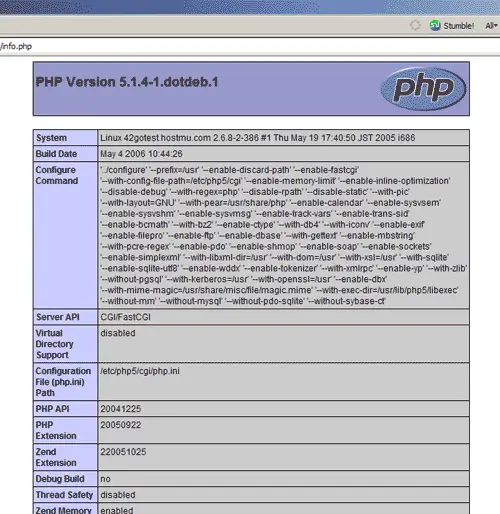
You don't even have to restart Apache! Now go to http://www.example.com/info.php again with your browser, and you should see that PHP5 is running:
8 PHP4 And PHP5 At The Same Time
Now we have both php4-cgi and php5-cgi installed on our server. If you have multiple vhosts on your server, you can have one use PHP4 and the other use PHP5 at the same time. To do this, we define two handlers in /etc/suphp.conf. Edit the [handlers] section so that it looks like this:
vi /etc/suphp.conf
[handlers] |
If you want to use PHP4 in your vhost, use the x-httpd-php handler:
<VirtualHost 1.2.3.4> |
If you want to use PHP5, use the x-httpd-php5 handler:
<VirtualHost 1.2.3.4> |
Don't forget to restart Apache after the changes to your vhosts:
/etc/init.d/apache2 restart
9 Links
- suPHP: http://www.suphp.org
- Apache: http://httpd.apache.org
- PHP: http://www.php.net
- Dotdeb: http://www.dotdeb.org





