
Using The Interface Object In Firewall Builder
 |
Author: [email protected] http://www.fwbuilder.org |
This article continues the series of articles on Fireall Builder, a graphical firewall configuration and management tool that supports many Open Source firewall platforms as well as Cisco IOS access lists and Cisco ASA (PIX). Firewall Builder was introduced on this site earlier with articles Getting Started With Firewall Builder, Using Built-In Revision Control In Firewall Builder, Using Built-in Policy Installer in Firewall Builder, Using Firewall Object In Firewall Builder. This article demonstrates how you can work with Interface objects in Firewall Builder.
More information on Firewall Builder, pre-built binary packages and source code, documentation and Firewall Builder Cookbook can be found on the project web site at www.fwbuilder.org. Watch Project Blog for announcements and articles on all aspects of using Firewall Builder.
Interface Object
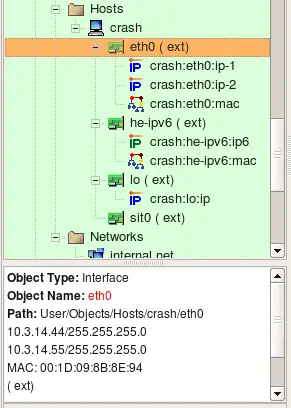
Interface objects belong to firewall or host objects. Interface objects cannot exist alone.
The dialog for the interface object that belongs to the firewall or host provides controls for the parameters described here.
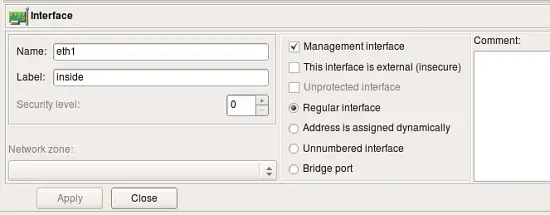
- Name: The name of the interface object in Firewall Builder must match exactly the name of the interface of the firewall machine it represents. This will be something like "eth0", "eth1", "en0", "br0", and so on.
- Label: On most OS’s this field is not used and serves the purpose of a descriptive label. Firewall Builder GUI uses a label, if it is not blank, to show interfaces in the tree. One of the suggested uses for this field is to mark interfaces to reflect the network topology (’outside’, ’inside’) or the purpose (’web frontend’ or ’backup subnet’). The label is mandatory for Cisco PIX though, where it must reflect the network topology.
- Management interface: When firewall has several network interfaces, one of them can be marked as the ’management interface’. The management interface is used for all communication between Firewall Builder and the firewall. For example, built-in policy installer uses address of the management interface to connect to the firewall via ssh when it copies generated script or configuration file to it.
- External interface (insecure): Marks an interface that connects to the Internet.
- Unprotected interface: Marks interface to which Firewall Builder should not assign any access lists or firewall rules. Unprotected interfaces are recognized by policy compilers for Cisco IOS access lists and PF. Compiler for IOS ACL just skips unprotected interfaces and does not assign any ACL to them when it choses which interface to associate given ACL with. Compiler for PF generates "set skip on
" clause for unprotected interfaces. - Regular Interface: Use this option if the interface has an IP address assigned to it manually (static IP address).
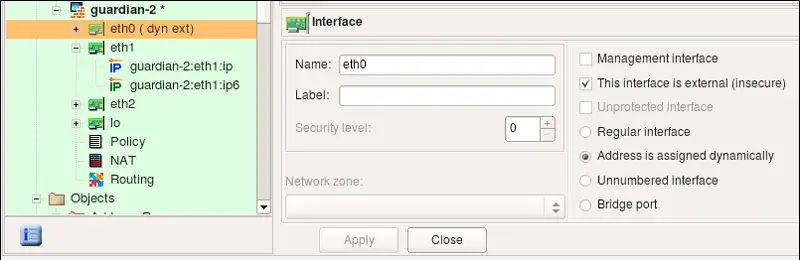
- Address is assigned dynamically: Use this option if the interface has a dynamic address (obtained by means of DHCP or PPP or another protocol). In this case an address is unknown at the moment when Firewall Builder generates the Firewall policy. Some firewalls allow for using the interface name in the policy instead of its IP address; the firewall engine then picks its address either when the policy is activated or even at run-time. Some other firewalls support special syntax for rules that are supposed to match packets headed to or from the firewall machine. Examples of these two cases are OpenBSD PF and Netfilter. PF rules can be constructed using interface names; PF automatically uses the current interface address when it loads rules into the memory. Netfilter supports special "chains" called "INPUT" and "OUPUT" that are guaranteed to inspect only packets headed for the firewall machine ("INPUT") or originated on it ("OUTPUT"). Both methods allow Firewall Builder to build correct firewall policy rules that affect the interface with a dynamic IP address, however the interface must be marked as such for the policy compiler to use proper technique depending on the target firewall platform. In cases where the rule has to use actual IP address of the interface (example: anti-spoofing rules), compiler emulates this feature by adding shell script fragment to determine the address at the time when firewall script is executed and then uses the address in rules. Such emulation is only possible on platforms where firewall configuration is in the form of the shell script, most notably this is iptables script on Linux.
- Unnumbered interface: Use this option if the interface can never have an IP address, such as the Ethernet interface used to run PPPoE communication on some ADSL connections, or tunnel endpoint interface. Although unnumbered interface does not have an address, firewall policy rules or access lists can be associated with it.
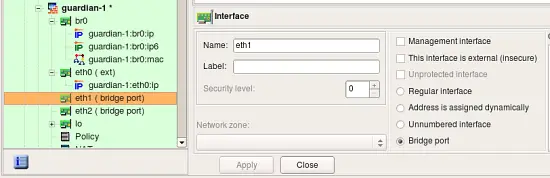
- Bridge port: This option is used for port of bridged firewall. Compilers skip bridge ports when they pick interfaces to attach policy and nat rules to. For target firewall platforms that support bridging and require special configuration parameters to match bridged packets, compilers use this attribute to generate proper configuration. For example, in case of iptables compiler uses -m physdev --physdev-in or -m physdev --physdev-out for bridge port interfaces.
- Security level: Depending on the firewall platform, the security level is either External/Internal or a numeric value between 0 and 100, with 0 being least secure and 100 being most secure levels. This field in the GUI dialog automatically shows controls appropriate to the current firewall. Not all firewall support the concept of a security zone.
- Network zone: Network zone of this interface, used only with Cisco PIX (ASA). Network zone drop-down list shows all network objects and groups of addresses and networks present in the tree. Choose one of them to tell the compiler which networks and blocks of addresses can be reached through this interface. Usually the external interface (the one which connects your firewall to the Internet) has the Network Zone set to Any. It is also recommended that you create a group of objects to represent Network Zones for all other interfaces on the firewall. The compiler uses this information to decide which interface each ACL rule should be associated with based on the addresses used in the destination of the rule.
More about Security Levels and Network Zones
Consider the network layout shown in the following screenshot.
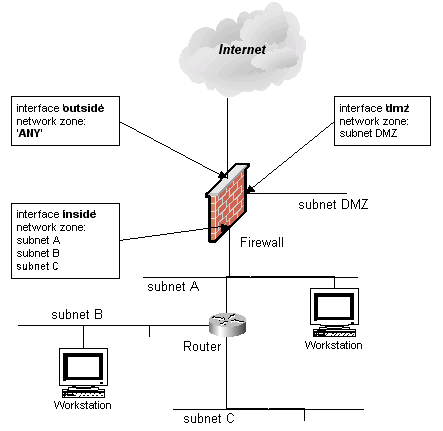
Here the firewall has three interfaces: ’outside’, ’dmz’, and ’inside’. Behind the firewall there is a router which in turn is connected to three subnets ’subnet A’, ’subnet B’, and ’subnet C’. Subnet A is shared between the router and the firewall (each device has an interface on this subnet). Let’s also suppose that we have created Network Objects for each subnet and called them ’subnet DMZ’, ’subnet A’, ’subnet B’ and ’subnet C’ (remember, spaces are allowed in object names). For this setup, network zones should be configured as follows:
| Interface | Network Zone |
|---|---|
| outside | ANY |
| dmz | subnet DMZ |
| inside | subnet A, subnet B, subnet C |
Since the network zone for the ’inside’ interface consists of multiple objects, a group must be created so that you could use this group as a Network Zone object.
The following explains the differences in the way firewall platforms interpret values in the Security Level and Network Zone parameters of the firewall interfaces.
| Firewall Platform | Security Level Values | Network Zone |
|---|---|---|
| iptables | two values: ’External’ or ’Internal’ | N/A |
| ipfilter | two values: ’External’ or ’Internal’ | N/A |
| pf | two values: ’External’ or ’Internal’ | N/A |
| Cisco PIX | numeric, 0 - 100 | a reference to a group or network object |
Note that "external" interface option may be deprecated in the future versions of the program
In PIX, access lists must always be attached to interfaces. Policy compiler for PIX uses information about network zones of interfaces to decide which interface a rule should be associated with if its "interface" column does not specify one (is left set to "All"). Instead of placing this rule in access lists attached to all interfaces, it compares addresses in "source" and "destination" of the rule with network zones of interfaces and uses only interfaces that match. This helps generate PIX configuration that is more compact.
Using Interface Object in Rules
Policy rules in Firewall Builder have special rule element or column called "Interface". You can drag and drop, or copy/paste interface object into this column of a rule to make the firewall match not only source and destination address and service, but also interface of the firewall through which packets enter or exit it. The direction is defined by the setting in the column "Direction". Consider the following example:

Rule #0 is "anti-spoofing" rule which relies on the ability to define interface and direction. It matches packets with source addresses equal to the addresses of the firewall's interfaces or internal network. This packets are coming in from outside, which is determined by comparing the interface through which they enter the firewall. Packets with addresses like these can not normally come from outside, and so if they do, they must be spoofed and should be dropped. This is what this rule does, it drops and logs these packets. Rule #1 permits connections originating from the internal network going out, but it makes sure these packets enter the firewall through its internal interface.
These two rules generate the following iptables script:
#
# Rule 0 (eth0)
#
$IPTABLES -N In_RULE_0
$IPTABLES -A FORWARD -i eth0 -s 192.0.2.1 -j In_RULE_0
$IPTABLES -A FORWARD -i eth0 -s 172.16.22.1 -j In_RULE_0
$IPTABLES -A FORWARD -i eth0 -s 192.168.2.1 -j In_RULE_0
$IPTABLES -A FORWARD -i eth0 -s 172.16.22.0/24 -j In_RULE_0
$IPTABLES -A In_RULE_0 -j LOG --log-level info --log-prefix "RULE 0 -- DENY "
$IPTABLES -A In_RULE_0 -j DROP
#
# Rule 1 (eth1)
#
$IPTABLES -A FORWARD -i eth1 -s 172.16.22.0/24 -m state --state NEW -j ACCEPT
Here all iptables command got "-i eth0" or "-i eth1" clause which makes iptables compare the interface and direction.
Here is what we get if we compile the same rules for PF:
# Tables: (1)
table <tbl.r9999.d> { 192.0.2.1 , 172.16.22.1 , 192.168.2.1 }

#
# Rule 0 (eth0)
#
block in log quick on en0 inet from <tbl.r9999.d> to any
block in log quick on en0 inet from 172.16.22.0/24 to any
#
# Rule 1 (eth1)
#
pass in quick on en1 inet from 172.16.22.0/24 to any keep state
#
For PF, compiler generated block in quick log on eth0 clause to make the rule match interface and direction.
In case of Cisco IOS access lists, defining interface in the rule makes compiler place code generated for this rule into ACL attached to the given interface. Compiler for IOS ACL always generates both inbound and outbound access lists for each interface, but if the rule specifies both interface and direction "Inbound" or "Outbound", generated configuration goes only in to corresponding access list. Here is the output produced for the rules shown above for Cisco IOS ACL:
ip access-list extended inside_in
! Rule 1 (eth1)
!
permit ip 172.16.22.0 0.0.0.255 any
exit

ip access-list extended outside_in
! Rule 0 (eth0)
!
deny ip host 192.0.2.1 any log
deny ip host 192.168.2.1 any log
deny ip 172.16.22.0 0.0.0.255 any log
exit

interface FastEthernet1
ip access-group inside_in in
exit
interface FastEthernet0
ip access-group outside_in in
exit
So far examples in this chapter demonstrated how to use interface objects to associate policy rules with interfaces to match packets crossing certain interface. Interface object can be used in "soruce" and "destination" of rules just like any other addressable object. In this case, fwbuilder replaces interface object with a set of its addresses, picking only those addresses that match address family (IPv4 or IPv6) assigned to the rule set. Here is how this looks like. We start with a firewall configuration where interface eth1 has two ip addresses, one IPv4 and another is IPv6. Note that this could be a host object as well because interface can belong either to a firewall or a host object.
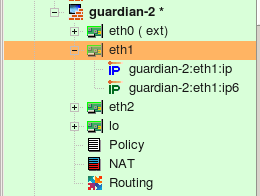
Interface eth1 has IPv4 address 172.16.22.1 and IPv6 address fe80::21d:9ff:fe8b:8e94; it is used in a simple policy rule as follows:

Policy rule set is configured as a mixed IPv4+IPv6 rule set. For the iptables, compilers generate the following code:
# ================ IPv4
# Rule 0 (global)
#
$IPTABLES -A INPUT -p tcp -m tcp -d 172.16.22.1 --dport 22 -m state --state NEW -j ACCEPT

# ================ IPv6

# Rule 1 (global)
#
$IP6TABLES -A INPUT -p tcp -m tcp -d fe80::21d:9ff:fe8b:8e94 --dport 22 -m state --state NEW -j ACCEPT
For PF we get the following:
# Rule 0 (global)
#
#
pass in quick inet proto tcp from any to 172.16.22.1 port 22 keep state
pass out quick inet proto tcp from any to 172.16.22.1 port 22 keep state

# Rule 0 (global)
#
#
pass in quick inet6 proto tcp from any to fe80::21d:9ff:fe8b:8e94 port 22 keep state
pass out quick inet6 proto tcp from any to fe80::21d:9ff:fe8b:8e94 port 22 keep state
Since interface has two addresses, one IPv4 and another IPv6, compiler generated commands in both IPv4 section and in IPv6 section of the script, but it used only the right address of the interface in each. Other than that, interface object behaves just like a set of addresses when used in the source or destination element of a rule. It can also be used in NAT rules, here is an example:

This generates the following code for iptables:
# Rule 0 (NAT)
#
$IPTABLES -t nat -A POSTROUTING -o eth0 -s 172.16.22.0/24 -j SNAT --to-source 192.0.2.1
#
# Rule 1 (NAT)
#
$IPTABLES -t nat -A PREROUTING -p tcp -m tcp -d 192.0.2.1 --dport 80 -j DNAT --to-destination 172.16.22.100
And for PF:
# Rule 0 (NAT)
#
nat on eth0 proto {tcp udp icmp} from 172.16.22.0/24 to any -> 192.0.2.1
#
# Rule 1 (NAT)
#
rdr on eth0 proto tcp from any to 192.0.2.1 port 80 -> 172.16.22.100 port 80
Using Interface Object with Dynamic Address in Rules
Examples above demonstrated what happens when an interface with one or several IP addresses is used in policy and NAT rules. Lets look at the case when interface has address assigned dynamically. This means the address is unknwown to fwbuilder policy compiler when it generates configuration script. Compiler uses features of the target firewall to work around this. Here is the configration of the interface object eth0, the radio-button "Address is assigned dynamically" is checked.
The following policy rule uses interface eth0 in destination:

Here is what we get for iptables:
getaddr eth0 i_eth0
getaddr6 eth0 i_eth0_v6

# ================ IPv4

# Rule 0 (global)
#
test -n "$i_eth0" && $IPTABLES -A INPUT -p tcp -m tcp -d $i_eth0 --dport 22 -m state --state NEW -j ACCEPT

# ================ IPv6

# Rule 0 (global)
#
test -n "$i_eth0_v6" && $IP6TABLES -A INPUT -p tcp -m tcp -d $i_eth0_v6 --dport 22 -m state --state NEW -j ACCEPT
Shell functions getaddr and getaddr6 are defined earlier in the script. Generated script determines IPv4 and IPv6 ip addresses of the interface eth0 at the time of execution and then uses the values in iptables commands. If interface does not have an address, corresponding variable gets an empty string for its value and iptables command using it is skipped.
PF allows for using interface name in rules and gets its current ip address automatically. Here is what is generated for PF:
# Rule 0 (global)
#
pass in quick inet proto tcp from any to (en0) port 22 keep state
pass out quick inet proto tcp from any to (en0) port 22 keep state

# Rule 0 (global)
#
pass in quick inet6 proto tcp from any to (en0) port 22 keep state
pass out quick inet6 proto tcp from any to (en0) port 22 keep state
We still get two separate parts for IPv4 and IPv6 because the rule set is configured as IPv4+IPv6 mix, but in both cases compiler just used interface name because its actual IP address is dynamic and was unknown at the time when configuration was generated.
Using Interface Object in Rules of Bridging iptables Firewall
In case of the "normal" iptables firewall, fwbuilder adds "-i eth0" or "-o eth0" parameter to the generated iptables command to make it match interface and direction. If radio-button "Bridge port" is turned on in the interface object, compilers use different option to make iptables match packets crossing bridge ports. Here is the interface "eth1" which is configured as a bridge port:
Consider then the following rule in the policy of the firewall this interface belongs to:

This rule matches interface "eth1" and generates the following iptables command:
$IPTABLES -A FORWARD -m physdev --physdev-in eth1 -s 172.16.22.0/24 -d 172.16.22.255 -m state --state NEW -j ACCEPT
Since interface is now a bridge port, compiler uses -m physdev --physdev-in eth1 to match it.





