
Ubuntu LAMP Server With Torrentflux In VMware
This tutorial is meant for Linux newbies who want to try and build a Ubuntu Server box as a web
server and torrent client. It is a step by step instruction on how to do this in VMWare on Windows XP to get the feel of it. I wrote this after, being a Linux newbie myself, a lot of trial-and-error and googling. Hope this helps you!
The virtual machine you create here isn't meant to work as a server at home. Apache MySQL, PHP and Torrentflux are available for Windows as well, so that would work just the same.
I was playing with the idea of getting some old pc and install it with Ubuntu LAMP server. A stand-alone web server, separate from my desktop-machine. While this box would be on all the time it could as well download some torrents. But before really buying a pc i wanted to seeÂ
how it would turn out to see if it is what i had in mind. That's why i made it in VMware and
afterwards made this tutorial.
Required downloads
If you don't have VMWare:
- VMWare Player
- VMX Builder (it's on the bottom of the page)
Ubuntu 6.06 Server get the "PC (Intel x86) server install CD" (no need to burn it to a CD, the iso is enough)
Â
Step 1: Installing VMWare Player and VMXBuilder
This step is out of scope of this how-to, if there are a lot of questions about it i might try to explain this.
VMXBuilder is a handy tool to create virtual machines that you can use with VMWare player.
See the VMX Builder page for installation notes.
Â
Step 2: Creating a Virtual machine for VMWare
Start VMXBuilder.
Choose: File - Create new virtual machine
Choose your Machine-location (I used c:\vms\UbuntuServer)
Enter a display name for the VM
For the options tab use the following Options: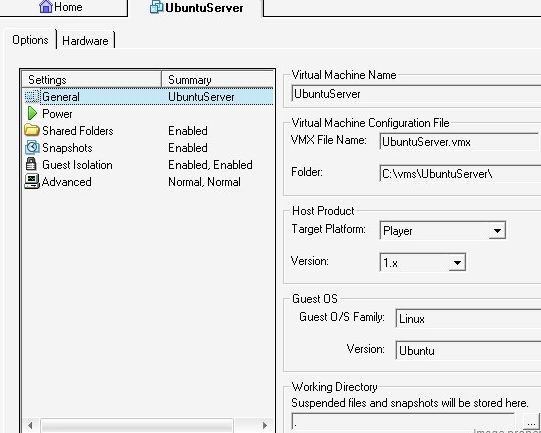
There is no need to change anything else.
For the hardware tab there's a little more to do
-
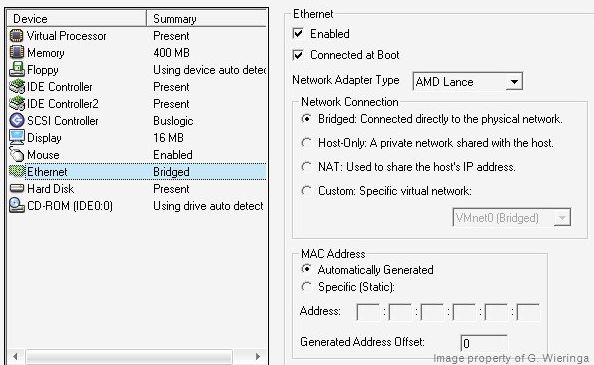
Give the machine some more memory (it's important to leave sufficient memory for your host OS). My machine has 1 GB internal memory, i gave the VM 400 MB of it.
-
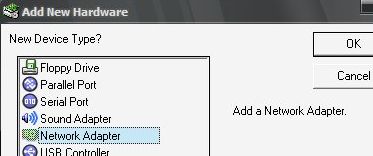
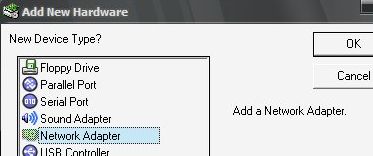
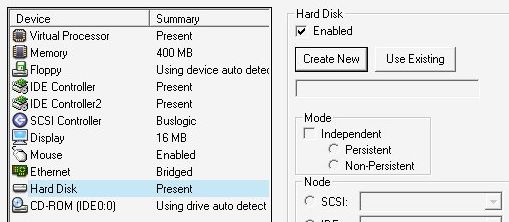
Add a network adapter via new hardware
-
In the same way add a Hard Disk and a DVD/CD-ROM drive.
-
Optionally install more (like USB, but that's up to you)
-
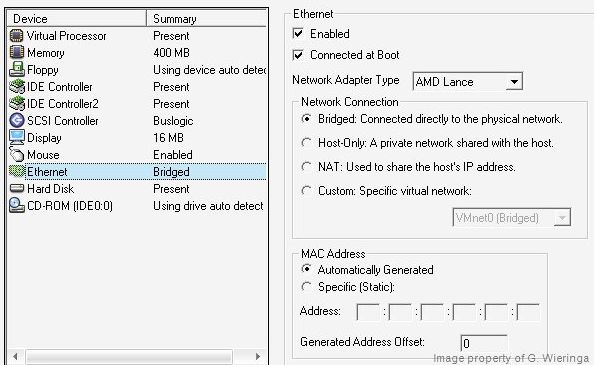
The network is standard configured the right way (it will be a machine on your network and have it's own IP-address)
-
Create a hard disk: choose 'Create new'
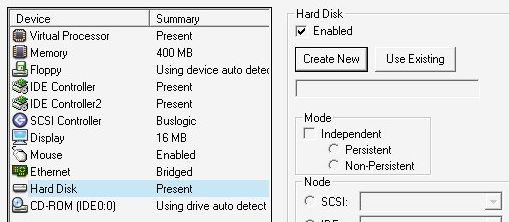
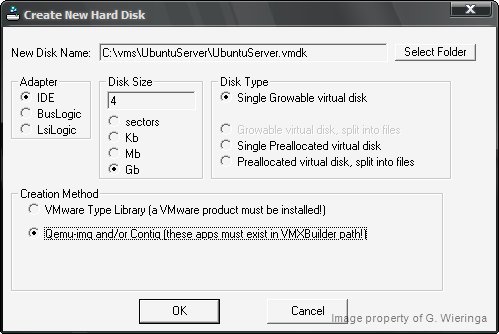
In the screen i use the following settings (I don't have VMWare and do have contig in my path)
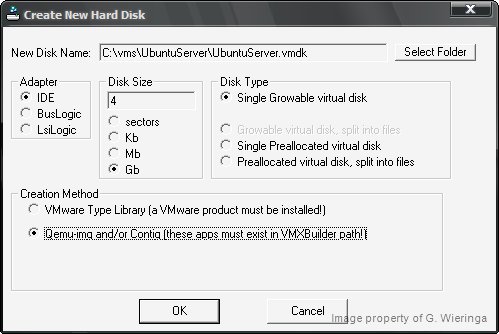
I choose a 4GB disk size, this is enough for your Ubuntu installation. On your hard disk this 'virtual hard disk' will only occupy as much space as it needs but it won't exceed 4GB. When everything went OK a message box showing your current disk information should appear
-
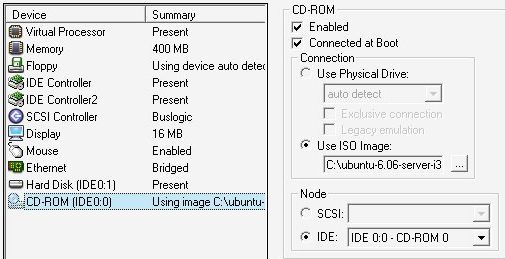
Finally set up the CD-ROM player to use your downloaded iso of ubuntu server 'ubuntu-6.06-server-i386.iso'.
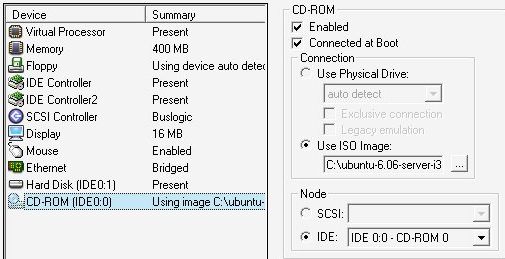
- Save your Virtual Machine.
Â
Step 3: Start your virtual machine and install Ubuntu
(If you have some sort of firewall installed on your host pc this might be the moment to temporarily disable it. I use the Sunbelt Kerio Firewall and I haven't got it to let the virtual machine use the network, any expert ideas? )
If at any time during this install it seems to have stopped, try again without using your pc at the same time or maybe swith of any screen-savers. I've had some problems with that in the past. (Reboot the machine)
Make sure you have a working internet connection.
Start VMWare Player
Open your Ubuntu Server machine (look for the vmx file in your virtual machine folder)
When the machine is booting up: left-click with your mouse in your machine.
When the Ubuntu-menu appears, choose: 'Install a LAMP Server'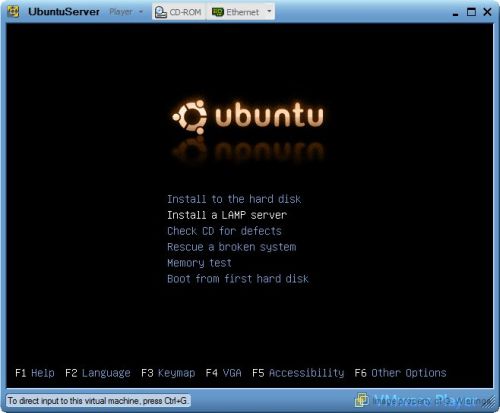
For this tutorial we choose "english" as the language and as Country: United States. Step through
some other install screens, most of them are pretty obvious. Choose a nice servername, optionally set-up a proxy server.
When it comes to partitioning your disk: no worries, this virtual machine only knows of your virtual hard disk. Everyting else is save, so choose: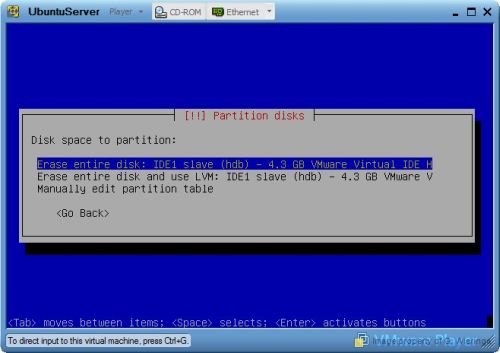
Write the changes to disk and answer the questions about your time-zone.
Walk through the username and password screens. Wait untill the installation completes, if any error screens appear: good luck :)
If everything went fine you see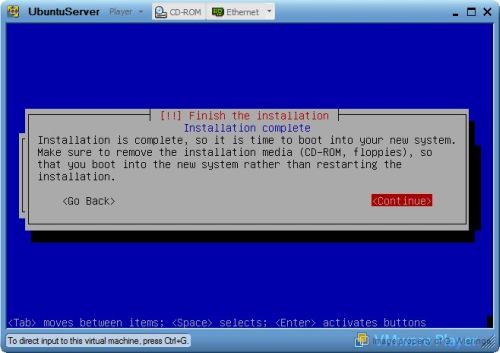
(There's no need to remove a cd since you're using an iso.)
Press continue, the machine reboots.





