
Using Sharp Fonts On A GNOME Desktop - Page 3
5 Configure GNOME Font Preferences
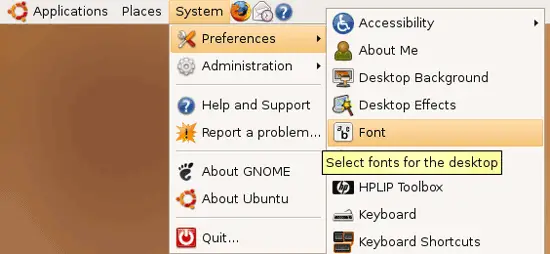
Now we have to tell GNOME which fonts it should use for applications, on the desktop, in window titles, etc. Go to System > Preferences > Font:
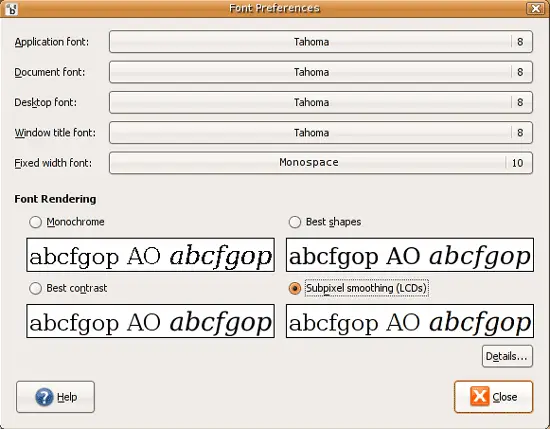
Select Tahoma (8 pt.) for Application font, Document font, Desktop font, and Window title font, and Monospace (10 pt.) for Fixed width font. Also make sure that Subpixel smoothing (LCDs) is enabled:
6 Create A .fonts.conf File In Your Home Directory
To control the behaviour of our fonts (anti-aliasing, hinting, font sizes to be smoothed, etc.), we can create the file ~/.fonts.conf. This is an XML file. After lots of experiments I found that this one works the best for me:
gedit ~/.fonts.conf
<?xml version="1.0"?>
<!DOCTYPE fontconfig SYSTEM "fonts.dtd">
<fontconfig>

<!-- Give all fonts light hinting and subpixel smoothing -->
<!--
<match target="font">
    <edit mode="assign" name="rgba">
        <const>rgb</const>
    </edit>
    <edit mode="assign" name="hinting">
        <bool>true</bool>
    </edit>
    <edit mode="assign" name="hintstyle">
        <const>hintslight</const>
    </edit>
    <edit mode="assign" name="antialias">
        <bool>true</bool>
    </edit>
</match>
-->

<!--
     <match target="font">
        <test qual="all" name="rgba"><const>unknown</const></test>
           <edit name="rgba" mode="assign"><const>rgb</const></edit>
     </match>
-->

<!--  Do not smooth Fixedsys  -->
<match target="font">
    <test name="family">
        <string>FixedsysTTF</string>
    </test>
    <edit name="antialias">
        <bool>false</bool>
    </edit>
</match>

<!--  Do not smooth Tahoma 8pt and under  -->
<match target="font">
    <test name="family">
        <string>Tahoma</string>
    </test>
    <test compare="less" name="size" qual="any">
        <double>9</double>
    </test>
    <edit name="antialias">
        <bool>false</bool>
    </edit>
</match>

<!--  Do not smooth Times New Roman or Courier New for 12pt and under  -->
<match target="font">
    <test name="family">
        <string>Times New Roman</string>
    </test>
    <test compare="less" name="size" qual="any">
        <double>13</double>
    </test>
    <edit name="antialias">
        <bool>false</bool>
    </edit>
</match>

<match target="font">
    <test name="family">
        <string>Courier</string>
        <string>Courier New</string>
        <string>Courier 10 Pitch</string>
    </test>
    <test compare="less" name="size" qual="any">
        <double>11</double>
    </test>
    <edit name="antialias">
        <bool>false</bool>
    </edit>
</match>

<!-- Do not autohint Courier New, Fixedsys, Tahoma, or Times New Roman -->
<match target="font">
    <test name="family">
        <string>Courier New</string>
        <string>Times New Roman</string>
        <string>Tahoma</string>
        <string>FixedsysTTF</string>
    </test>
    <edit mode="assign" name="hintstyle">
        <const>hintslight</const>
    </edit>
    <edit mode="assign" name="autohint">
        <bool>false</bool>
    </edit>
</match>

<match target="pattern">
            <test qual="any" name="family">
                    <string>Bitstream Vera Sans</string>
            </test>
            <edit name="family" mode="assign">
                    <string>Arial</string>
            </edit>
</match>
    <match target="pattern">
            <test qual="any" name="family">
                    <string>Helvetica</string>
            </test>
            <edit name="family" mode="assign">
                    <string>Arial</string>
            </edit>
</match>
<match target="pattern">
            <test qual="any" name="family">
                    <string>Palatino</string>
            </test>
            <edit name="family" mode="assign">
                    <string>Georgia</string>
            </edit>
</match>
</fontconfig>
|
(If you'd like to find out more about available configuration options, how to use that file, etc., please refer to these pages:
- http://fontconfig.org/fontconfig-user.html
- http://wiki.archlinux.org/index.php/XOrg_Font_Configuration
)
Each time you modify ~/.fonts.conf you must log out of GNOME and back in for the changes to take effect, so please log out now and back in.
After you've logged in again, you should now see that your fonts look exactly like on the After screenshots in chapter 2!
If you want GTK1 applications to use Tahoma, too, please create the file ~/.gtkrc.mine with the following contents:
gedit ~/.gtkrc.mine
style "user-font"
{
  fontset="-microsoft-tahoma-medium-r-normal-*-10-*-*-*-p-*-*"
}
widget_class "*" style "user-font"
|
7 Links
- HOWTO: Hoary ClearType-like fonts: http://ubuntuforums.org/showthread.php?t=20976
- .fonts.conf Sample: http://textsnippets.com/tag/gnome
- fonts.conf Documentation: http://fontconfig.org/fontconfig-user.html
- Fonts Configuration (Arch Linux Wiki): http://wiki.archlinux.org/index.php/XOrg_Font_Configuration
- GNOME: http://www.gnome.org
- Ubuntu: http://www.ubuntu.com





