
The Perfect Setup - Mandrake/Mandriva 10.2 - Page 6
Proftpd
apt-get install proftpd
/etc/init.d/proftpd start
For security reasons you can add the following lines to /etc/proftpd.conf (thanks to Reinaldo Carvalho; more information can be found here: http://proftpd.linux.co.uk/localsite/Userguide/linked/userguide.html):
DefaultRoot ~
IdentLookups off
ServerIdent on "FTP Server ready."
Be sure to comment out the following lines in /etc/proftpd.conf in order to allow ftp users to CHMOD:
# Bar use of SITE CHMOD by default |
and restart Proftpd:
/etc/init.d/proftpd restart
Webalizer
To install webalizer, run
cd /tmp/
wget --passive-ftp ftp://ftp.mrunix.net/pub/webalizer/webalizer-2.01-10-static.gz
gunzip webalizer-2.01-10-static.gz
mv webalizer-2.01-10-static /usr/bin/webalizer
chmod 755 /usr/bin/webalizer
Synchronize the System Clock
If you want to have the system clock synchronized with an NTP server do the following:
apt-get install rdate
rdate -s time.nist.gov
Create /var/spool/cron/root:
# update time with ntp server |
Then run
chmod 600 /var/spool/cron/root
/etc/init.d/crond restart
Install some Perl Modules needed by SpamAssassin (comes with ISPConfig)
Installation using the Perl Shell
Login to your command line as root and run the following command to start the Perl shell:
perl -MCPAN -e shell
If you run the Perl shell for the first time you will be asked some questions. In most cases the default answers are ok.
Please note: If you run a firewall on your system you might have to turn it off while working on the Perl shell in order for the Perl shell to be able to fetch the needed modules without a big delay. You can switch it on afterwards.
The big advantage of the Perl shell compared to the two other methods described here is that it cares about dependencies when installing new modules. I.e., if it turns out that a prerequisite Perl module is missing when you install another module the Perl shell asks you if it should install the prerequisite module for you. You should answer that question with "Yes".
Run the following commands to install the modules needed by SpamAssassin:
install HTML::Parser
install Digest::SHA1
q (to leave the Perl shell)
If a module is already installed on your system you will get a message similar to this one:
HTML::Parser is up to date.
Successful installation of a module looks like this:
/usr/bin/make install -- OK
The End
The configuration of the server is now finished, and if you wish you can now install ISPConfig on it.
A Note On SuExec
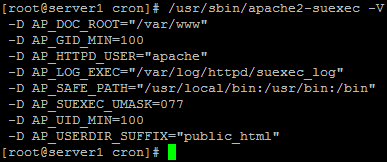
If you want to run CGI scripts under suExec, you should specify /var/www as the home directory for websites created by ISPConfig as Mandrake's suExec is compiled with /var/www as Doc_Root. Run /usr/sbin/apache2-suexec -V, and the output should look like this:
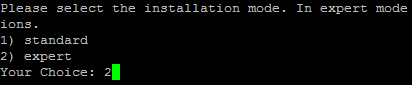
To select /var/www as the home directory for websites during the installation of ISPConfig do the following: When you are asked for the installation mode, select the expert mode.
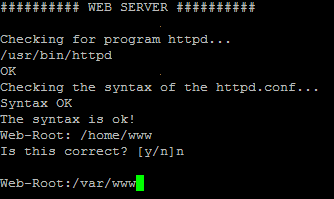
Later during the installation you are asked if the default directory /home/www should be the directory where ISPConfig will create websites in. Answer n and enter /var/www as the home directory for websites.
Links





