
The Perfect Setup - Mandrake/Mandriva 10.2 - Page 4
2 Installing And Configuring The Rest Of The System
Starting the SSH Daemon
You have to start the SSH daemon before you can login via SSH (using PuTTY or something else). To do that, you first have to login as admin on the system itself, then run su and provide the password for root:
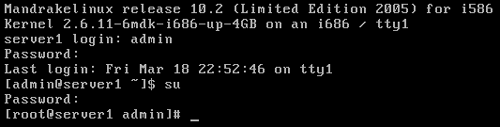
(Direct login as root is not allowed on the system itself, that's why you have to login as admin first. If you use SSH, you can directly login as root.)
Then start the SSH daemon:
/etc/init.d/sshd start
Configure Additional IP Addresses
Let's assume our network interface is eth0. Then there is a file /etc/sysconfig/network-scripts/ifcfg-eth0 which looks like this:
DEVICE=eth0 |
Now we want to create the virtual interface eth0:0 with the IP address 192.168.0.101. All we have to do is to create the file /etc/sysconfig/network-scripts/ifcfg-eth0:0 which looks like this:
DEVICE=eth0:0 |
Afterwards we have to restart the network:
/etc/init.d/network restart
Setting The Hostname
echo server1.example.com > /etc/hostname
/bin/hostname -F /etc/hostname
Install apt For Mandrake
apt is the packaging system used on Debian. Since it cares much better for package dependencies than rpm it would be nice if we could use it on our new Mandrake system. This would save us a lot of hassle. Fortunately, apt has been ported to a lot of rpm based distributions, and is also available for Mandrake 10.2 (you will love it... :-)).
rpm -ivh ftp://ftp.lip6.fr/pub/linux/distributions/Mandrakelinux/official/10.2/\
i586/media/contrib/libapt-pkg0-0.5.15cnc6-5mdk.i586.rpm
rpm -ivh ftp://ftp.lip6.fr/pub/linux/distributions/Mandrakelinux/official/10.2/\
i586/media/contrib/apt-0.5.15cnc6-5mdk.i586.rpm
Edit /etc/apt/sources.list. It should contain the following line:
rpm ftp://ftp.lip6.fr/pub/linux/distributions/Mandrakelinux/official/10.2/i586/media/ media_info/hdlist_main main |
Run
apt-get update
Install Some Software
apt-get install fetchmail wget bzip2 unzip zip nmap openssl lynx fileutils ncftp flex
Quota
apt-get install quota
Edit /etc/fstab to look like this (I added ,usrquota,grpquota to the partition with the mount point /):
# This file is edited by fstab-sync - see 'man fstab-sync' for details |
Then run:
touch /aquota.user /aquota.group
chmod 600 /aquota.*
mount -o remount /
quotacheck -avugm
quotaon -avug
DNS-Server
apt-get install bind
In the Manadrake BIND package there are a few files missing (e.g. /etc/named.conf), therefore BIND will not start when you run
/etc/init.d/named start
This is nothing to worry about because all needed files are created by ISPConfig as soon as you create your first DNS record with ISPConfig.





