
Make Browsers Cache Static Files On nginx
This tutorial explains how you can configure nginx to set the Expires HTTP header and the max-age directive of the Cache-Control HTTP header of static files (such as images, CSS and Javascript files) to a date in the future so that these files will be cached by your visitors' browsers. This saves bandwidth and makes your web site appear faster (if a user visits your site for a second time, static files will be fetched from the browser cache).
I do not issue any guarantee that this will work for you!
1 Preliminary Note
I'm assuming you have a working nginx setup, e.g. as shown in this tutorial: Installing Nginx With PHP5 (And PHP-FPM) And MySQL Support (LEMP) On Ubuntu 12.04 LTS
2 Configuring nginx
The Expires HTTP header can be set with the help of the expires directive which can be placed in inside http {}, server {}, location {}, or an if statement inside a location {} block. Usually you will use it in a location block for your static files, e.g. as follows:
location ~* \.(jpg|jpeg|png|gif|ico|css|js)$ {
|
In the above example, all .jpg, .jpeg, .png, .gif, .ico, .css, and .js files get an Expires header with a date 365 days in the future from the browser access time. Therefore, you should make sure that the location {} block really only contain static files that can be cached by browsers.
Reload nginx after your changes:
/etc/init.d/nginx reload
You can use the following time settings with the expires directive:
- off makes that the Expires and Cache-Control headers will not be modified.
- epoch sets the Expires header to 1 January, 1970 00:00:01 GMT.
- max sets the Expires header to 31 December 2037 23:59:59 GMT, and the Cache-Control max-age to 10 years.
- A time without an @ prefix means an expiry time relative to the browser access time. A negative time can be specified, which sets the Cache-Control header to no-cache. Example: expires 10d; or expires 14w3d;
- A time with an @ prefix specifies an absolute time-of-day expiry, written in either the form Hh or Hh:Mm, where H ranges from 0 to 24, and M ranges from 0 to 59. Exmaple: expires @15:34;
You can use the following time units:
- ms: milliseconds
- s: seconds
- m: minutes
- h: hours
- d: days
- w: weeks
- M: months (30 days)
- y: years (365 days)
Examples: 1h30m for one hour thirty minutes, 1y6M for one year and six months.
Also note that if you use a far future Expires header you have to change the component's filename whenever the component changes. Therefore it's a good idea to version your files. For example, if you have a file javascript.js and want to modify it, you should add a version number to the file name of the modified file (e.g. javascript-1.1.js) so that browsers have to download it. If you don't change the file name, browsers will load the (old) file from their cache.
Instead of basing the Expires header on the access time of the browser (e.g. expires 10d;), you can also base it on the modification date of a file (please note that this works only for real files that are stored on the hard drive!) by using the modified keyword which precedes the time:
expires modified 10d;
3 Testing
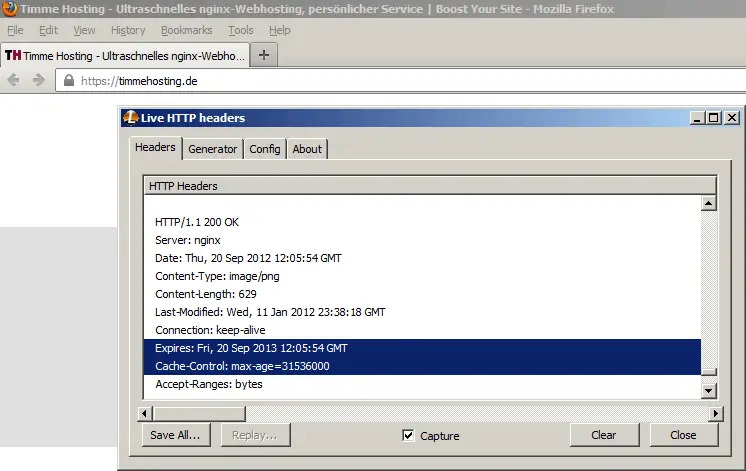
To test if your configuration works, you can install the Live HTTP Headers plugin for Firefox and access a static file through Firefox (e.g. an image). In the Live HTTP Headers output, you should now see an Expires header and a Cache-Control header with a max-age directive (max-age contains a value in seconds, for example 31536000 is one year in the future):
4 Links
- nginx HttpHeadersModule: http://wiki.nginx.org/HttpHeadersModule
- Live HTTP Headers Plugin for Firefox: https://addons.mozilla.org/en-us/firefox/addon/live-http-headers/
About The Author

Falko Timme is the owner of  Timme Hosting (ultra-fast nginx web hosting). He is the lead maintainer of HowtoForge (since 2005) and one of the core developers of ISPConfig (since 2000). He has also contributed to the O'Reilly book "Linux System Administration".





