
How To Set Up An SSL Vhost Under Apache2 On Ubuntu 9.10/Debian Lenny - Page 2
5 Creating A Certificate Signing Request (CSR)
To request a trusted certificate from a trusted CA such as Verisign, Thawte or Comodo, we must generate a certificate signing request (CSR) from our private key and send it to the CA which then creates a trusted certificate from it with which we replace our self-signed certificate.
I will create the CSR in the directory /etc/ssl/csr, so we have to create it first:
mkdir /etc/ssl/csr
Now we can create the CSR /etc/ssl/csr/www.hostmauritius.com.csr from our private key /etc/ssl/private/www.hostmauritius.com.key as follows:
openssl req -new -key /etc/ssl/private/www.hostmauritius.com.key -out /etc/ssl/csr/www.hostmauritius.com.csr
You will be asked a few questions. Please fill in your details, they will be used for creating the trusted certificate and can be seen by your visitors when they choose to view the details of your certificate in their browsers. The most important thing is the Common Name - this must be the domain or hostname of your SSL vhost (www.hostmauritius.com in this case)!
root@server1:~# openssl req -new -key /etc/ssl/private/www.hostmauritius.com.key -out /etc/ssl/csr/www.hostmauritius.com.csr
You are about to be asked to enter information that will be incorporated
into your certificate request.
What you are about to enter is what is called a Distinguished Name or a DN.
There are quite a few fields but you can leave some blank
For some fields there will be a default value,
If you enter '.', the field will be left blank.
-----
Country Name (2 letter code) [AU]: <-- DE
State or Province Name (full name) [Some-State]: <-- Lower Saxony
Locality Name (eg, city) []: <-- Lueneburg
Organization Name (eg, company) [Internet Widgits Pty Ltd]: <-- Example Ltd
Organizational Unit Name (eg, section) []: <-- IT
Common Name (eg, YOUR name) []: <-- www.hostmauritius.com
Email Address []: <-- [email protected]
Please enter the following 'extra' attributes
to be sent with your certificate request
A challenge password []: <-- ENTER
An optional company name []: <-- ENTER
root@server1:~#
Afterwards, you should have a CSR in /etc/ssl/csr/www.hostmauritius.com.csr, e.g. as follows:
cat /etc/ssl/csr/www.hostmauritius.com.csr
-----BEGIN CERTIFICATE REQUEST----- MIIB9jCCAV8CAQAwgbUxCzAJBgNVBAYTAkRFMRUwEwYDVQQIEwxMb3dlciBTYXhv bnkxEjAQBgNVBAcTCUx1ZW5lYnVyZzEtMCsGA1UEChMkSW50ZXJuZXRkaWVuc3Rs ZWlzdHVuZ2VuIEZhbGtvIFRpbW1lMQswCQYDVQQLEwJJVDEeMBwGA1UEAxMVd3d3 Lmhvc3RtYXVyaXRpdXMuY29tMR8wHQYJKoZIhvcNAQkBFhBmdEBmYWxrb3RpbW1l LmRlMIGfMA0GCSqGSIb3DQEBAQUAA4GNADCBiQKBgQC1A0hAy/N/hw637BCBRqhf ngcxrulgFQJ5ftlWv2wBuouRILQtUZAeJCNMn6d0JS+sXxP60AFEBzLsdkV/OqeF vD/vZlvUM39Qg/98yWwkvFIvz4qtJz/N0IO/KrER2+mUSfgAtFuqZWVwKLrwcVcp /bsGwkp5TqJuQs9NbuQMEQIDAQABoAAwDQYJKoZIhvcNAQEFBQADgYEADzJWSOya kJ5ccQ2TlB3SxUBXtCAZ0aomlqdjkvBu2L1yAAOT4Xv/eKoYlSHjF1vyjtN36ERf cklyFmtS64xxerGSqdW+wxjLyicK5sTplsea2F6yROaj7zxQ+By033HO/QEozU80 Ox/Kx1hc+K31wsor35pz8qxVFRegn2cgCYc= -----END CERTIFICATE REQUEST----- |
6 Getting A Trusted Certificate
To get a trusted certificate, you have to take your certificate signing request (CSR) to a certificate authority (CA) such as Verisign, Thawte, or Comodo (please note that you have to pay for a trusted certificate). Certificates issued by such a CA are trusted by all browsers which means you won't see any browser warnings anymore.
CAcert.org allows you to get free certificates, but the downside is that such certificates are trusted by only a few browsers (which means you will get browser warnings). Anyway, I will use CAcert.org here to show you how to get a certificate from a CA - it should give you the idea, the procedure is the same with the trusted CAs.
Go to CAcert.org and open an account. Afterwards, go to Domains to add your own domain(s) (without a hostname, so if you want to get a certificate for www.hostmauritius.com, you just enter hostmauritius.com without www here). The service will send an email with a link to an email address that it finds in the WHOIS data of the domain - you have to click on that link to verify that you are the owner of the domain. I've verified three domains here:
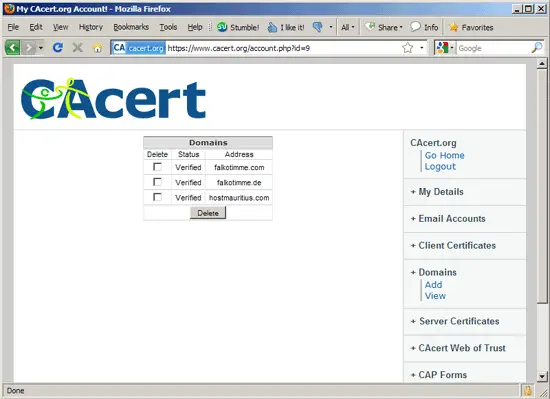
To get a certificate, go to Server Certificates > New...
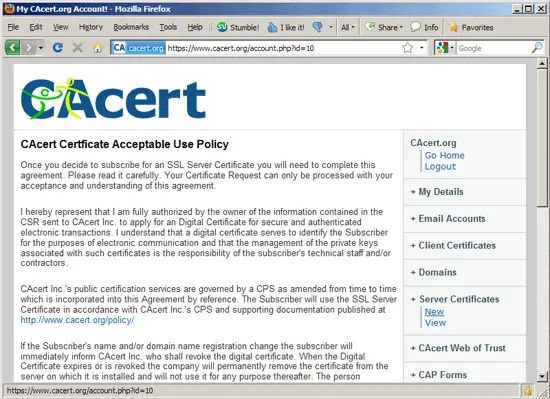
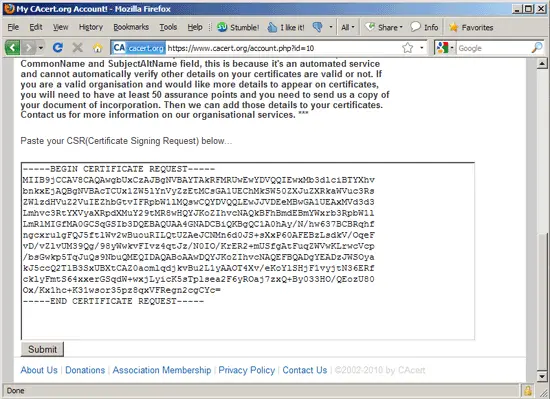
... and scroll down to the big text area - this is where you paste your CSR that you've created in chapter 5. Click on Submit afterwards:
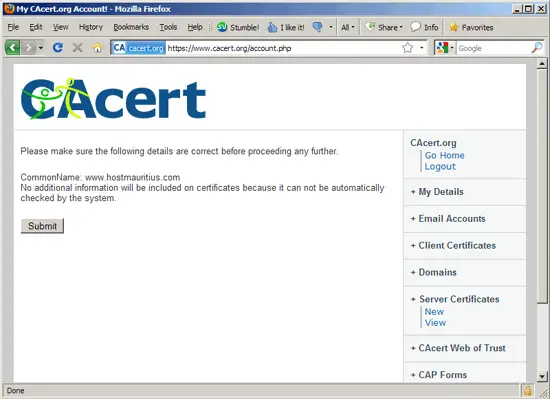
Click on Submit again on the next page:
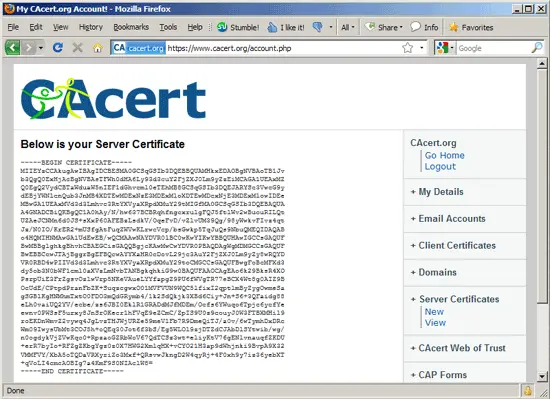
After a few moments, you will see your new certificate:
Now create a backup of your self-signed certificate...
cp /etc/ssl/certs/www.hostmauritius.com.pem /etc/ssl/certs/www.hostmauritius.com.pem_bak
... , then empty your self-signed certificate...
> /etc/ssl/certs/www.hostmauritius.com.pem
... and open the empty certificate file:
vi /etc/ssl/certs/www.hostmauritius.com.pem
Now copy&paste the certificate from the CAcert.org page into the empty file:
-----BEGIN CERTIFICATE----- MIIEYzCCAkugAwIBAgIDCBESMA0GCSqGSIb3DQEBBQUAMHkxEDAOBgNVBAoTB1Jv b3QgQ0ExHjAcBgNVBAsTFWh0dHA6Ly93d3cuY2FjZXJ0Lm9yZzEiMCAGA1UEAxMZ Q0EgQ2VydCBTaWduaW5nIEF1dGhvcml0eTEhMB8GCSqGSIb3DQEJARYSc3VwcG9y dEBjYWNlcnQub3JnMB4XDTEwMDExNzE3MDExMloXDTEwMDcxNjE3MDExMlowIDEe MBwGA1UEAxMVd3d3Lmhvc3RtYXVyaXRpdXMuY29tMIGfMA0GCSqGSIb3DQEBAQUA A4GNADCBiQKBgQC1A0hAy/N/hw637BCBRqhfngcxrulgFQJ5ftlWv2wBuouRILQt UZAeJCNMn6d0JS+sXxP60AFEBzLsdkV/OqeFvD/vZlvUM39Qg/98yWwkvFIvz4qt Jz/N0IO/KrER2+mUSfgAtFuqZWVwKLrwcVcp/bsGwkp5TqJuQs9NbuQMEQIDAQAB o4HQMIHNMAwGA1UdEwEB/wQCMAAwNAYDVR0lBC0wKwYIKwYBBQUHAwIGCCsGAQUF BwMBBglghkgBhvhCBAEGCisGAQQBgjcKAwMwCwYDVR0PBAQDAgWgMDMGCCsGAQUF BwEBBCcwJTAjBggrBgEFBQcwAYYXaHR0cDovL29jc3AuY2FjZXJ0Lm9yZy8wRQYD VR0RBD4wPIIVd3d3Lmhvc3RtYXVyaXRpdXMuY29toCMGCCsGAQUFBwgFoBcMFXd3 dy5ob3N0bWF1cml0aXVzLmNvbTANBgkqhkiG9w0BAQUFAAOCAgEAo6k29BksR4XO PsrpUiE3FrZgsvOzlwVrp5NKeVAueLYYfapgZ9PU6fWVgTR77eBCX4Wt8g0AIZ9B OcUdE/CPtpdPranFbZK+SuqzcgwxO01MVFVUN9WQC5lfixI2qptlmByZygOwmeSa gSGBlKgHNMhmTxtO0FDO3mQdGRymb4/1k2SdQkjk3XBd6Ciy+Jn+S6+3QFaidg88 eLh0vaiUQ2YV/ecbe/zs6JBI0EklR1GRADdMJfMDEm/Ocfs6YWuqo6Tpjc6ycfYe ewnv0PWSsF5urxy8JnSrOKecr1hFVqE9eZCmC/ZpIS9U0z9couyJ0W3FTBXMHil9 roEKDnWmvZ2vywq4JgLvzTHJWjURZe59meV1Fb7R9DmeQiTJ/a0v/6wTymhDxDRc Wm09IwysUbMt3COJ5h+oQEq30Jot6f3bS/Eg5WLOl9zjDTZdCJAbDlSYtwib/wg/ n0ogdykVjZVwKqo0+RpzaoGZRbWoV67QdTCSz3wt+eliyKtV76gENlvnauqfZKDU +erR7byIo+RFZgZKbgYgz0z0X7HWG2XmlqHX+vCYO21H3ap9dWhjnki9BvpA9X32 VMMFVY/XbA5oTQDaVRXyriZo3Mxf+QRsvwJkngD2W4qyRj+4F0xh9y7iz36yebXT +qVoLI4cmcAOBIg7a4KmF9S0NIAclW8= -----END CERTIFICATE----- |
Restart Apache:
/etc/init.d/apache2 restart
That's it, if your CA doesn't ask you to install a certificate chain file or intermediate certificate in Apache, you're done, and you can now access your SSL vhost (https://www.hostmauritius.com in this case) without a browser warning. (If you use a CAcert.org certificate, you will still see a browser warning as most browsers don't know this CA - read chapter 7 to learn how to make your browser trust CAcert.org certificates).
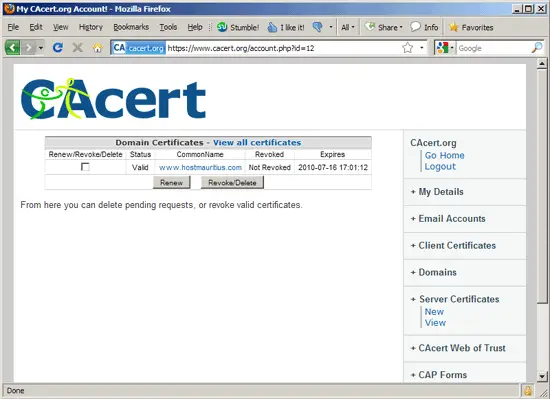
To manage your existing certificates on the CAcert.org web site, go to Server Certificates > View:
6.1 Certificate Chain Files Or Intermediate Certificates
Some CAs require that you install a certificate chain file or intermediate certificate in Apache (in addition to the certificate that you installed in chapter 6). (Please note that CAcert.org does not require this!).
These CAs usually have instructions on their web sites how to do this. Basically it works like this: you doanload this certificate chain file or intermediate certificate to your server (e.g. to the /etc/ssl/certs/ directory; I name my certificate chain file CAcert_chain.pem here, so the full path is /etc/ssl/certs/CAcert_chain.pem), then you open your SSL vhost configuration...
vi /etc/apache2/sites-available/www.hostmauritius.com-ssl
... and add/enable the SSLCertificateChainFile directive in it:
[...]
        SSLCertificateFile    /etc/ssl/certs/www.hostmauritius.com.pem
        SSLCertificateKeyFile /etc/ssl/private/www.hostmauritius.com.key

        #   Server Certificate Chain:
        #   Point SSLCertificateChainFile at a file containing the
        #   concatenation of PEM encoded CA certificates which form the
        #   certificate chain for the server certificate. Alternatively
        #   the referenced file can be the same as SSLCertificateFile
        #   when the CA certificates are directly appended to the server
        #   certificate for convinience.
        SSLCertificateChainFile /etc/ssl/certs/CAcert_chain.pem
[...]
|
Restart Apache afterwards:
/etc/init.d/apache2 restart





