
How To Install Ailurus 10.01.5 On Fedora
This document describes how to install Ailurus on Fedora 10, 11 or 12.
Ailurus is an application which aims at making Linux easier to use. It provides these features:
- Install some software which is not provided in official repository.
- Enable/disable some third-party repositories.
- Change some system settings.
- Help you study Linux skills.
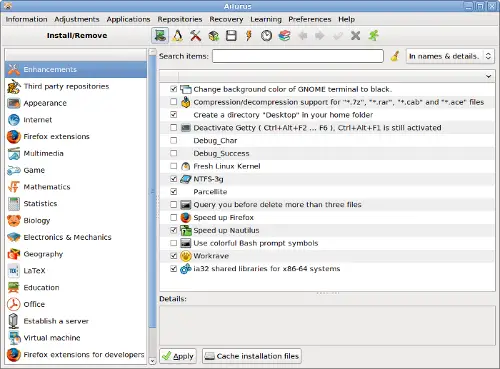
Screenshot:
1. Installation
cd /tmp
wget http://ailurus.googlecode.com/files/ailurus-10.01.5-1.noarch.rpm
su -c 'yum install wget xterm'
su -c 'rpm -U ailurus-10.01.5-1.noarch.rpm'
2. Access
In order to launch Ailurus, please click menu "Applications -> System Tools -> Ailurus".
3. Problems and solutions
*** If you encounter the error:
DBusException: cn.ailurus.CommandFailError: ('LANG=C xterm -T "Ailurus Terminal" -e bash /tmp/tmpKHy12u', 127)
Please run this command:
su -c 'yum install xterm'
The reason is that "xterm" is not installed.
*** If you encounter the error:
DBusException: org.freedesktop.DBus.Error.Spawn.ChildExited: Launch helper exited with unknown return code 1
Please restart the computer. This error happens when we upgrade old version to new version, therefore the interfaces between back-end and front-end mismatch.
*** If you encounter the error
DBusException: uid 0 is not authorized to know authorizations for uid 500 (requires org.freedesktop.policykit.read)
Please disable SELinux, then Ailurus will work.
This error appears on Fedora 9. It does not appear on Fedora 11 or 12.
*** If you cannot install ailurus-10.01.5-1.noarch.rpm, and the error message is:
rpmlib(PayloadIsXz) <= 5.2-1 is needed.
Please run these commands:
cd /tmp
wget http://ailurus.googlecode.com/files/ailurus-10.01.5.tar.gz
tar xf ailurus-10.01.5.tar.gz
cd ailurus-10.01.5
su -c 'python ./setup.py'
su -c 'yum install python pygtk2 notify-python vte rpm-python pygobject2 dbus-python iputils wget unzip xterm'
These commands will install Ailurus via source code.





