
Running Apache2 With PHP5 And PHP4 At The Same Time - Page 2
2 Setup For Ubuntu 5.10 (Breezy Badger)
This setup does not differ much from the one for Debian Sarge.
First, you must at least have a working basic Ubuntu 5.10 installation, as described on the first two pages of the "Perfect Setup" tutorial for Ubuntu 5.10 "Breezy Badger" here on HowtoForge: https://www.howtoforge.com/perfect_setup_ubuntu_5.10 and https://www.howtoforge.com/perfect_setup_ubuntu_5.10_p2
The official Ubuntu repositories contain packages for both PHP5 and PHP4 so we don't have to use third-party repositories. However, make sure /etc/apt/sources.list looks like this:
deb http://de.archive.ubuntu.com/ubuntu breezy main restricted |
Run
apt-get update
after you've changed /etc/apt/sources.list.
Now we can install Apache2 as well as the Apache2-PHP5 module and the PHP4-CGI:
apt-get install apache2 apache2-common apache2-doc apache2-mpm-prefork apache2-utils libapr0 libexpat1 ssl-cert
apt-get install libapache2-mod-php5 php4-cgi
Next, we can install all the PHP5 and PHP4 modules we need on our server, like this:
apt-get install php5-imap php5-syck php-pear php5-curl php5-dev php5-gd php5-ldap php5-mhash php5-mysql php5-odbc php5-recode php5-snmp php5-sqlite php5-xmlrpc php5-xsl php4-auth-pam php4-imagick php4-mcrypt php4-rrdtool php4-sqlite php4-curl php4-domxml php4-gd php4-imap php4-ldap php4-mcal php4-mhash php4-mysql php4-odbc php4-pear php4-xslt (1 line!)
Edit /etc/apache2/apache2.conf. Change
DirectoryIndex index.html index.cgi index.pl index.php index.xhtml |
to
DirectoryIndex index.html index.htm index.shtml index.cgi index.pl index.php index.php4 index.xhtml |
and add these two lines as well (in the section where you can find AddType and AddHandler directives):
AddHandler php-script .php4 |
This will make sure that PHP files with the extension .php4 are executed as CGI. PHP files with the extension .php will be run by the Apache2-PHP5 module.
Next, we have to enable a few Apache modules, like for example the actions module (otherwise we cannot run PHP4 as CGI):
a2enmod actions
a2enmod ssl
a2enmod rewrite
a2enmod suexec
a2enmod include
Restart Apache, and you're done!
/etc/init.d/apache2 restart
Now we can test our installation: Put two files, info.php and info.php4, with the same content:
<?php |
into /var/www (this is the default document root of Ubuntu's Apache2) and try to access them in a browser (if the server's IP address is 192.168.0.100, for example, you would type http://192.168.0.100/info.php and http://192.168.0.100/info.php4). You should see two different PHP versions, one run as Apache module (PHP5), the other one (PHP4) called as CGI:
info.php:
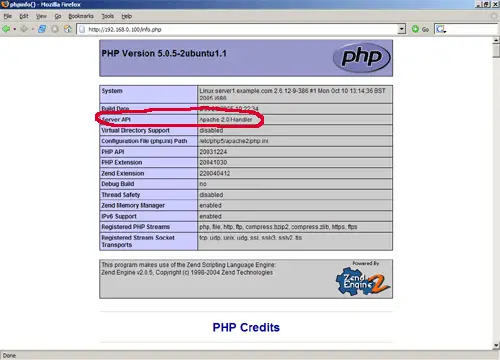
info.php4:
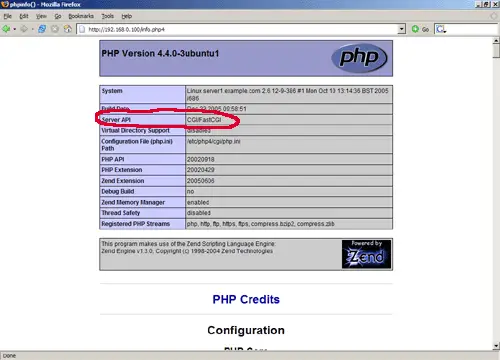
Links
- Apache Webserver: http://httpd.apache.org
- PHP: http://www.php.net
- Debian: http://www.debian.org
- Ubuntu: http://www.ubuntu.com
- Dotdeb: http://www.dotdeb.org





