
Virtual Hosting With vsftpd And MySQL On Debian Etch - Page 2

Do you like HowtoForge? Please consider supporting us by becoming a subscriber.
Submitted by falko (Contact Author) (Forums) on Sun, 2007-06-24 18:08. ::

4 Configure vsftpd

First we create a non-privileged user called vsftpd (with the homedir /home/vsftpd) belonging to the group nogroup. We will run vsftpd under this user, and the FTP directories of our virtual users will be in the /home/vsftpd directory (e.g. /home/vsftpd/user1, /home/vsftpd/user2, etc.).

useradd --home /home/vsftpd --gid nogroup -m --shell /bin/false vsftpd

Then we make a backup of the original /etc/vsftpd.conf file and create our own:

cp /etc/vsftpd.conf /etc/vsftpd.conf_orig
cat /dev/null > /etc/vsftpd.conf
vi /etc/vsftpd.conf

The file should have the following contents:

listen=YES
anonymous_enable=NO
local_enable=YES
write_enable=YES
local_umask=022
dirmessage_enable=YES
xferlog_enable=YES
connect_from_port_20=YES
nopriv_user=vsftpd
chroot_local_user=YES
secure_chroot_dir=/var/run/vsftpd
pam_service_name=vsftpd
rsa_cert_file=/etc/ssl/certs/vsftpd.pem
guest_enable=YES
guest_username=vsftpd
local_root=/home/vsftpd/$USER
user_sub_token=$USER
virtual_use_local_privs=YES
user_config_dir=/etc/vsftpd_user_conf

The configuration options are explained on http://vsftpd.beasts.org/vsftpd_conf.html. The important options for our virtual setup are chroot_local_user, guest_enable, guest_username, user_sub_token, local_root, and virtual_use_local_privs.

With the user_config_dir option you can specify a directory for per-user configuration files that override parts of the global settings. This is totally optional and up to you if you want to use this feature. However, we should create that directory now:

mkdir /etc/vsftpd_user_conf

Now we must configure PAM so that it uses the MySQL database to authenticate our virtual FTP users instead of /etc/passwd and /etc/shadow. The PAM configuration for vsftpd is in /etc/pam.d/vsftpd. We make a backup of the original file and create a new one like this:

cp /etc/pam.d/vsftpd /etc/pam.d/vsftpd_orig
cat /dev/null > /etc/pam.d/vsftpd
vi /etc/pam.d/vsftpd

auth required pam_mysql.so user=vsftpd passwd=ftpdpass host=localhost db=vsftpd table=accounts usercolumn=username passwdcolumn=pass crypt=2
account required pam_mysql.so user=vsftpd passwd=ftpdpass host=localhost db=vsftpd table=accounts usercolumn=username passwdcolumn=pass crypt=2

Please make sure that you replace the MySQL password with your own one!

Afterwards, we restart vsftpd:

/etc/init.d/vsftpd restart


5 Create The First Virtual User

To populate the database you can use the MySQL shell:

mysql -u root -p

USE vsftpd;

Now we create the virtual user testuser with the password secret (which will be stored encrypted using MySQL's PASSWORD function):

INSERT INTO accounts (username, pass) VALUES('testuser', PASSWORD('secret'));
quit;

testuser's homedir is /home/vsftpd/testuser; unfortunately vsftpd doesn't create that directory automatically if it doesn't exist. Therefore we create it manually now and make it owned by the vsftpd user and the nogroup group:

mkdir /home/vsftpd/testuser
chown vsftpd:nogroup /home/vsftpd/testuser

Now open your FTP client program on your work station (something like WS_FTP or SmartFTP if you are on a Windows system or gFTP on a Linux desktop) and try to connect. As hostname you use server1.example.com (or the IP address of the system), the username is testuser, and the password is secret.

If you are able to connect - congratulations! If not, something went wrong.


6 Database Administration

For most people it is easier if they have a graphical front-end to MySQL; therefore you can also use phpMyAdmin (in this example under http://server1.example.com/phpmyadmin/) to administrate the vsftpd database.
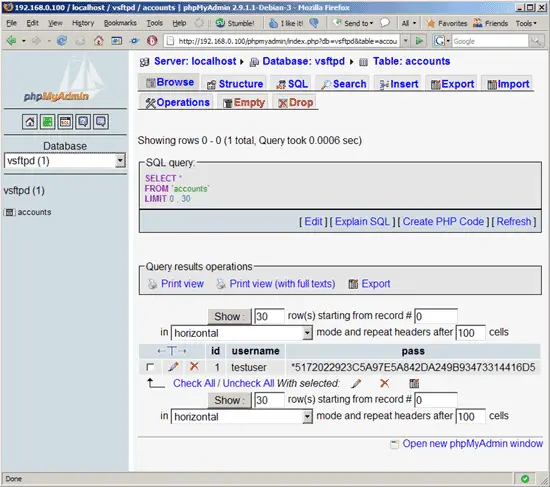
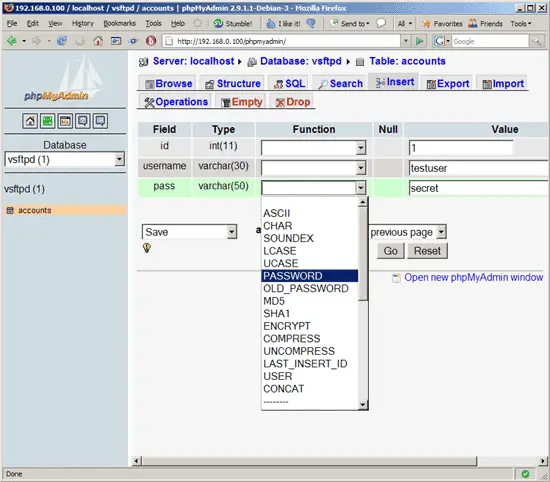
Whenever you create or modify a user, make sure that you use MySQL's PASSWORD function to encrypt that user's password. Also, when you create a new virtual user, please don't forget to create that user's homedir on the shell, as shown at the end of the previous chapter.
 

7 Links


Please do not use the comment function to ask for help! If you need help, please use our forum.
Comments will be published after administrator approval.
Submitted by Sanjeev (not registered) on Mon, 2009-03-16 00:50.

Hi:


Thanks for the tutorial. I followed through the steps to setup a ftp server with virtual user support on my ubuntu desktop machine. After completing the steps, when I start/restart the server, it gives me

" * Starting FTP server: vsftpd                                           [ OK ] "

message, but

"ps -ef | grep vsftpd | grep -v grep"

gives me no output. Also, I fail to login to the ftp server (obviously).

My guess is that vsftpd is not starting up due to some reason. Can someone please tell me which log to look into to see what might be the trouble? I have checked and rechecked my config, nothing seems to be wrong :-(.

Please help!

Submitted by Alberto (not registered) on Tue, 2009-04-21 06:10.

sorry for my bad english.

i had the same problem, but a could fix it.

in /etc/pam.d/vsftpd, the encryption maybe be wrong, I use the crypt=0 and start to work.

 again, sorry for my bad english.


Ó en español.

En el archivo /etc/pam.d/vsftpd, en vez de usar crypt=2, usa crypt=0, al parecer existe un error con la encriptacion de las contraseñas.

De igual forma, o en mi caso, tampoco utilize la funcion de "password" en la instruccion:

INSERT INTO accounts (username, pass) VALUES('testuser', PASSWORD('secret'));

quedando:

INSERT INTO accounts (username, pass) VALUES('testuser', 'secret'); 

Talvez por que se realiza una doble encriptacion: cuando se recive la contraseña y PAM la encripta y verifica con mysql, la cual  ya se encuentra encriptada... solo una idea.

espero ayude a alguien, disculpen si no lo posteo en su totalidad en ingles, pero la verdad soy un poco malo para ello.

Excelente tutorial y saludos desde Monterrey, Mexico.

Submitted by fuzionhead (not registered) on Mon, 2009-02-09 00:41.

This was a good tutorial.  I got it working with Ubuntu 8.10 server. I also used kabewm's suggestion (in comments).  No problem.   I also added a couple more fields to the table: Lastname, Firstname, comments, and email.  Just for user tracking purposes...

 The one thing that I had hoped to do but so far have been unable, is to have the user default to their home dir or a folder off of their home dir (like /home/user/www).  I tried symbolic links and that didn't work and I'm not seeing an option to follow sym links in the man page for vsftpd.conf.  If I find the solution, I will post it here.

Submitted by gniady (not registered) on Wed, 2009-03-25 15:11.

HI. I was also need do symbolic links to outside directory. I found solution on that link: http://www.ducea.com/2006/07/27/allowing-ftp-access-to-files-outside-the-home-directory-chroot/

Solution is mount external directory on home dir. sorry for my bad english :)

Submitted by kabewm (registered user) on Thu, 2007-09-27 19:09.

You may want to change the following:

 CREATE TABLE `accounts` (
`id` INT NOT NULL AUTO_INCREMENT PRIMARY KEY ,
`username` VARCHAR( 30 ) NOT NULL ,
`pass` VARCHAR( 50 ) NOT NULL ,
UNIQUE (
`username`
)
) ENGINE = MYISAM ;

To:

CREATE TABLE `accounts` (
`id` INT NOT NULL AUTO_INCREMENT PRIMARY KEY ,
`username` VARCHAR( 30 ) BINARY NOT NULL ,
`pass` VARCHAR( 50 ) NOT NULL ,
UNIQUE (
`username`
)
) ENGINE = MYISAM ;

To prevent this: 

 Connected to localhost (127.0.0.1).
220 (vsFTPd 2.0.5)
Name (localhost:nunya): testuser
331 Please specify the password.
Password:
230 Login successful.
Remote system type is UNIX.
Using binary mode to transfer files.
ftp> quit
221 Goodbye.

Connected to localhost (127.0.0.1).
220 (vsFTPd 2.0.5)
Name (localhost:bizniss): Testuser
331 Please specify the password.
Password:
500 OOPS: cannot change directory:/home/virtual/Testuser
Login failed.
ftp>

Submitted by gunavara (not registered) on Mon, 2009-04-13 17:26.
Hi, i did everything exactly how it was written but i keep getting "login failed" when i try to log in with the testuser and the password secret.. any ideas ?
Sponsored Links: Unified Communications: Thoughts, Strategies and Predictions
Join the discussion.
www.seamlessenterprise.com

IP Convergence
Integrate your wireless and wireline networks.
Learn how from the experts at Sprint.
www.seamlessenterprise.com

Wireless & Wireline Integration
Thoughts, strategies and solutions: join the discussion
www.seamlessenterprise.com

Unified Communications 2009
Join the Discussion. Now.
www.seamlessenterprise.com
