
This tutorial exists for these OS versions
- Ubuntu 11.10 (Oneiric Ocelot)
- Ubuntu 14.04 LTS (Trusty Tahr)
On this page
Running ownCloud3 On Nginx (LEMP) On Debian Squeeze/Ubuntu 11.10
Version 1.0
Author: Falko Timme  Follow me on Twitter
This tutorial shows how you can install and run ownCloud3 on a Debian Squeeze or Ubuntu 11.10 system that has nginx installed instead of Apache (LEMP = Linux + nginx (pronounced "engine x") + MySQL + PHP). ownCloud enables universal access to files through the widely implemented WebDAV standard, providing a platform to easily view and sync contacts, calendars and bookmarks across devices while supporting sharing, viewing and editing via the web interface. It offers the ease-of-use of Dropbox and box.net without vendor lock in. ownCloud users can run its file sync and share services on their own hardware. nginx is a HTTP server that uses much less resources than Apache and delivers pages a lot of faster, especially static files.
I do not issue any guarantee that this will work for you!
1 Preliminary Note
I want to install ownCloud3 in a vhost called www.example.com/example.com here with the document root /var/www/www.example.com/web.
You should have a working LEMP installation, as shown in these tutorials:
- Installing Nginx With PHP5 And MySQL Support On Debian Squeeze
- Installing Nginx With PHP5 (And PHP-FPM) And MySQL Support On Ubuntu 11.10
A note for Ubuntu users:
Because we must run all the steps from this tutorial with root privileges, we can either prepend all commands in this tutorial with the string sudo, or we become root right now by typing
sudo su
2 Configuring PHP
APC is a free and open PHP opcode cacher for caching and optimizing PHP intermediate code. It's similar to other PHP opcode cachers, such as eAccelerator and XCache. It is strongly recommended to have one of these installed to speed up your PHP page.
APC can be installed as follows:
apt-get install php-apc
We also need to install the following prerequisites for ownCloud3 to work:
apt-get install php5-sqlite php5-common mp3info curl libcurl3 libcurl4-openssl-dev php5-curl zip
Now we must configure PHP to allow big uploads - the default value is 2MB which is not much for your own cloud. I want to raise this limit to 512MB. Open your php.ini - if you use PHP-FPM, it is /etc/php5/fpm/php.ini...
vi /etc/php5/fpm/php.ini
... and if you use spawn-fcgi, it is /etc/php5/cli/php.ini:
vi /etc/php5/cli/php.ini
[...] memory_limit = 512M [...] post_max_size = 512M [...] upload_max_filesize = 512M [...] |
If you use PHP-FPM as your FastCGI daemon (like in Installing Nginx With PHP5 (And PHP-FPM) And MySQL Support On Ubuntu 11.10), restart it as follows:
/etc/init.d/php5-fpm restart
If you use lighttpd's spawn-fcgi program as your FastCGI daemon (like in Installing Nginx With PHP5 And MySQL Support On Debian Squeeze), we must kill the current spawn-fcgi process (running on port 9000) and create a new one. Run
netstat -tap
to find out the PID of the current spawn-fcgi process:
root@server1:~# netstat -tap
Active Internet connections (servers and established)
Proto Recv-Q Send-Q Local Address           Foreign Address         State       PID/Program name
tcp        0      0 *:sunrpc                *:*                     LISTEN      734/portmap
tcp        0      0 *:www                   *:*                     LISTEN      2987/nginx
tcp        0      0 *:ssh                   *:*                     LISTEN      1531/sshd
tcp        0      0 *:57174                 *:*                     LISTEN      748/rpc.statd
tcp        0      0 localhost.localdom:smtp *:*                     LISTEN      1507/exim4
tcp        0      0 localhost.localdom:9000 *:*                     LISTEN      1542/php5-cgi
tcp        0      0 localhost.localdo:mysql *:*                     LISTEN      1168/mysqld
tcp        0     52 server1.example.com:ssh 192.168.0.198:2462      ESTABLISHED 1557/0
tcp6       0      0 [::]:www                [::]:*                  LISTEN      2987/nginx
tcp6       0      0 [::]:ssh                [::]:*                  LISTEN      1531/sshd
tcp6       0      0 ip6-localhost:smtp      [::]:*                  LISTEN      1507/exim4
root@server1:~#
In the above output, the PID is 1542, so we can kill the current process as follows:
kill -9 1542
Afterwards we create a new spawn-fcgi process:
/usr/bin/spawn-fcgi -a 127.0.0.1 -p 9000 -u www-data -g www-data -f /usr/bin/php5-cgi -P /var/run/fastcgi-php.pid
3 Installing ownCloud3
The document root of my www.example.com web site is /var/www/www.example.com/web - if it doesn't exist, create it as follows:
mkdir -p /var/www/www.example.com/web
Next we download ownCloud3 as a .tar.bz2 file from http://owncloud.org/go/owncloud-download and place it in our document root:
cd /tmp
wget -O owncloud-3.0.0.tar.bz2 http://owncloud.org/go/owncloud-download
tar xvfj owncloud-3.0.0.tar.bz2
cd owncloud/
mv * /var/www/www.example.com/web/
mv .htaccess /var/www/www.example.com/web/
It is recommended to make the document root and the ownCloud3 files in it writable by the nginx daemon which is running as user www-data and group www-data:
chown -R www-data:www-data /var/www/www.example.com/web
Next we create an nginx vhost configuration for our www.example.com vhost in the /etc/nginx/sites-available/ directory as follows:
vi /etc/nginx/sites-available/www.example.com.vhost
server {
       listen 80;
       server_name www.example.com example.com;
       root /var/www/www.example.com/web;
       if ($http_host != "www.example.com") {
                 rewrite ^ http://www.example.com$request_uri permanent;
       }
       # This is to avoid a "Request Entity Too Large" error
       client_max_body_size 1000M;
       index index.php index.html index.htm;
       dav_methods PUT DELETE MKCOL COPY MOVE;
       create_full_put_path on;
       dav_access user:rw group:rw all:r;
       location = /favicon.ico {
                log_not_found off;
                access_log off;
                expires max;
       }
       location = /robots.txt {
                allow all;
                log_not_found off;
                access_log off;
       }
       # Deny all attempts to access hidden files such as .htaccess, .htpasswd, .DS_Store (Mac).
       location ~ /\. {
                deny all;
                access_log off;
                log_not_found off;
       }
       location / {
                index index.php;
                try_files $uri $uri/ @webdav;
       }
       location @webdav {
                fastcgi_split_path_info ^(.+.php)(/.+)$;
                fastcgi_param SCRIPT_FILENAME $document_root$fastcgi_script_name;
                include /etc/nginx/fastcgi_params;
                #fastcgi_param HTTPS on;
                fastcgi_pass 127.0.0.1:9000;
       }
       location ~ \.php$ {
                try_files $uri =404;
                include /etc/nginx/fastcgi_params;
                fastcgi_pass 127.0.0.1:9000;
                fastcgi_param SCRIPT_FILENAME $document_root$fastcgi_script_name;
                fastcgi_index index.php;
       }
}
|
To enable the vhost, we create a symlink to it from the /etc/nginx/sites-enabled/ directory:
cd /etc/nginx/sites-enabled/
ln -s /etc/nginx/sites-available/www.example.com.vhost www.example.com.vhost
Reload nginx for the changes to take effect:
/etc/init.d/nginx reload
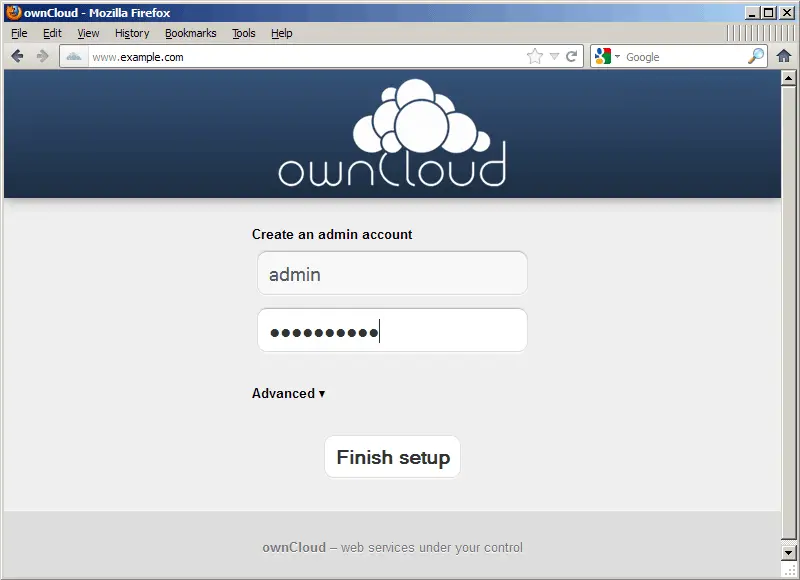
Now we can launch the web-based ownCloud3 installer by going to http://www.example.com/ - all you have to do is provide a username (e.g. admin) and password for the ownCloud admin account:
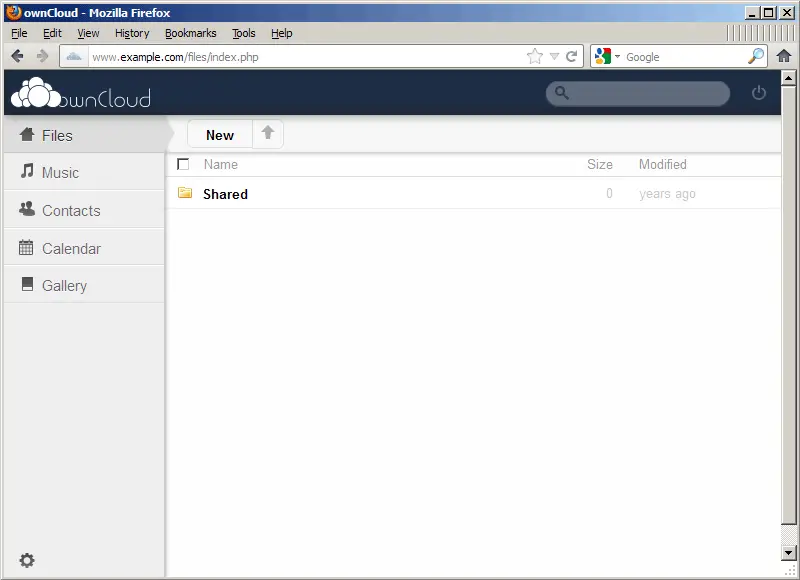
That's it already - ownCloud3 is installed, and you can start uploading files, creating contacts, etc.
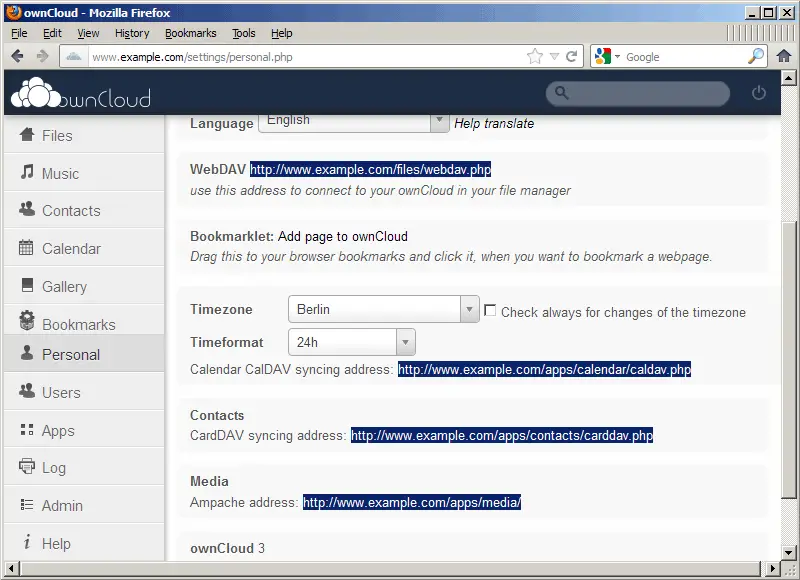
Under Personal (http://www.example.com/settings/personal.php) you can find URLs for using ownCloud with WebDAV, CalDAV, and CardDAV:
One note for WebDAV users under Windows: on Windows XP SP3 I had the following problem: when I used the WebDAV URL http://www.example.com/files/webdav.php, I couldn't log into WebDAV although my username and password were correct. By using http://www.example.com:80/files/webdav.php instead I could log in, but got an infinite folder recursion problem. I could solve both problems by using http://www.example.com/files/webdav.php/# - see http://www.thrrrust.com/~pclark/blog/2005/03/fun-with-windows-xp-and-webdav.html (including the second comment).
4 Links
- ownCloud: http://owncloud.org/
- nginx: http://nginx.org/
- nginx Wiki: http://wiki.nginx.org/
- Debian: http://www.debian.org/
- Ubuntu: http://www.ubuntu.com/
About The Author

Falko Timme is the owner of  Timme Hosting (ultra-fast nginx web hosting). He is the lead maintainer of HowtoForge (since 2005) and one of the core developers of ISPConfig (since 2000). He has also contributed to the O'Reilly book "Linux System Administration".





