
Virtual Hosting With PureFTPd And MySQL (Incl. Quota And Bandwidth Management) - Page 3
On this page
5.1 Database Administration
For most people it is easier if they have a graphical front-end to MySQL; therefore you can also use phpMyAdmin (in this example under http://server1.example.com/phpmyadmin/) to administrate the pureftpd database.
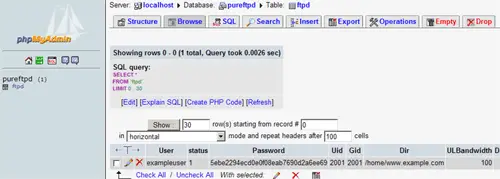
Whenever you want to create a new user, you have to create an entry in the table ftpd so I will explain the columns of this table here:
ftpd Table:
- User: The name of the virtual PureFTPd user (e.g. exampleuser).
- status: 0 or 1. 0 means the account is disabled, the user cannot login.
- Password: The password of the virtual user. Make sure you use MySQL's MD5 function to save the password encrypted as an MD5 string:
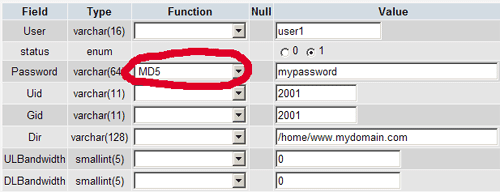
- UID: The userid of the ftp user you created at the end of step two (e.g. 2001).
- GID: The groupid of the ftp group you created at the end of step two (e.g. 2001).
- Dir: The home directory of the virtual PureFTPd user (e.g. /home/www.example.com). If it does not exist, it will be created when the new user logs in the first time via FTP. The virtual user will be jailed into this home directory, i.e., he cannot access other directories outside his home directory.
- ULBandwidth: Upload bandwidth of the virtual user in KB/sec. (kilobytes per second). 0 means unlimited.
- DLBandwidth: Download bandwidth of the virtual user in KB/sec. (kilobytes per second). 0 means unlimited.
- comment: You can enter any comment here (e.g. for your internal administration) here. Normally you leave this field empty.
- ipaccess: Enter IP addresses here that are allowed to connect to this FTP account. * means any IP address is allowed to connect.
- QuotaSize: Storage space in MB (not KB, as in ULBandwidth and DLBandwidth!) the virtual user is allowed to use on the FTP server. 0 means unlimited.
- QuotaFiles: amount of files the virtual user is allowed to save on the FTP server. 0 means unlimited.
6 Anonymous FTP
If you want to create an anonymous ftp account (an ftp account that everybody can login to without a password), you can do it like this:
First create a user ftp (with the homedir /home/ftp) and group ftp:
groupadd ftp
useradd -s /bin/false -d /home/ftp -m -c "anonymous ftp" -g ftp ftp
Then create the file /etc/pure-ftpd/conf/NoAnonymous which contains the string no:
no |
With this configuration, PureFTPd will allow anonymous logins.
Restart PureFTPd:
/etc/init.d/pure-ftpd-mysql restart
Then we create the directory /home/ftp/incoming which will allow anonymous users to upload files. We will give the /home/ftp/incoming directory permissions of 311 so that users can upload, but not see or download any files in that directory. The /home/ftp directory will have permissions of 555 which allows seeing and downloading of files:
cd /home/ftp
mkdir incoming
chown ftp:nogroup incoming/
chmod 311 incoming/
cd ../
chmod 555 ftp/
Now anonymous users can login, and they can download files from /home/ftp, but uploads are limited to /home/ftp/incoming (and once a file is uploaded into /home/ftp/incoming, it cannot be read nor downloaded from there; the server admin has to move it into /home/ftp first to make it available to others).
Links
PureFTPd: http://www.pureftpd.org/
MySQL: http://www.mysql.com/
phpMyAdmin: http://www.phpmyadmin.net/





