
The Perfect Setup - Mandriva 2007 Free Edition - Page 5
11 MySQL (5.0)
To install MySQL 5.0, we simply run:
urpmi MySQL MySQL-client libmysql15-devel
By default, networking is not enabled in Mandriva 2007's MySQL package, but networking is required by ISPConfig. We can change this by commenting out the line skip-networking in /etc/my.cnf:
vi /etc/my.cnf
[...] # Don't listen on a TCP/IP port at all. This can be a security enhancement, # if all processes that need to connect to mysqld run on the same host. # All interaction with mysqld must be made via Unix sockets or named pipes. # Note that using this option without enabling named pipes on Windows # (via the "enable-named-pipe" option) will render mysqld useless! # #skip-networking [...] |
Afterwards, we start MySQL:
/etc/init.d/mysqld start
Now check that networking is enabled. Run
netstat -tap
It should show a line like this:
[...] tcp 0 0 *:mysql *:* LISTEN 4609/mysqld [...] |
Next, run
mysqladmin -u root password yourrootsqlpassword
mysqladmin -h server1.example.com -u root password yourrootsqlpassword
to set a password for the user root (otherwise anybody can access your MySQL database!).
12 Postfix With SMTP-AUTH And TLS
Install the required packages (Postfix, cyrus-sasl, imap, etc.) like this:
urpmi cyrus-sasl libsasl2 libsasl2-devel libsasl2-plug-plain libsasl2-plug-anonymous libsasl2-plug-crammd5 libsasl2-plug-digestmd5 libsasl2-plug-gssapi libsasl2-plug-login postfix imap
Then run
postconf -e 'smtpd_sasl_local_domain ='
postconf -e 'smtpd_sasl_auth_enable = yes'
postconf -e 'smtpd_sasl_security_options = noanonymous'
postconf -e 'broken_sasl_auth_clients = yes'
postconf -e 'smtpd_recipient_restrictions = permit_sasl_authenticated,permit_mynetworks,reject_unauth_destination'
postconf -e 'inet_interfaces = all'
postconf -e 'mydomain = example.com'
postconf -e 'myhostname = server1.$mydomain'
postconf -e 'mydestination = /etc/postfix/local-host-names, localhost.example.com'
touch /etc/postfix/local-host-names
Edit /etc/sasl2/smtpd.conf. It should look like this:
vi /etc/sasl2/smtpd.conf
# SASL library configuration file for postfix # all parameters are documented into: # /usr/share/doc/cyrus-sasl-2.*/options.html # The mech_list parameters list the sasl mechanisms to use, # default being all mechs found. mech_list: plain login # To authenticate using the separate saslauthd daemon, (e.g. for # system or ldap users). Also see /etc/sysconfig/saslauthd. pwcheck_method: saslauthd saslauthd_path: /var/lib/sasl2/mux # To authenticate against users stored in sasldb. #pwcheck_method: auxprop #auxprop_plugin: sasldb #sasldb_path: /var/lib/sasl2/sasl.db |
Create the SSL certificate needed for TLS:
mkdir /etc/postfix/ssl
cd /etc/postfix/ssl/
openssl genrsa -des3 -rand /etc/hosts -out smtpd.key 1024
chmod 600 smtpd.key
openssl req -new -key smtpd.key -out smtpd.csr
openssl x509 -req -days 3650 -in smtpd.csr -signkey smtpd.key -out smtpd.crt
openssl rsa -in smtpd.key -out smtpd.key.unencrypted
mv -f smtpd.key.unencrypted smtpd.key
openssl req -new -x509 -extensions v3_ca -keyout cakey.pem -out cacert.pem -days 3650
and configure Postfix for TLS:
postconf -e 'smtpd_tls_auth_only = no'
postconf -e 'smtp_use_tls = yes'
postconf -e 'smtpd_use_tls = yes'
postconf -e 'smtp_tls_note_starttls_offer = yes'
postconf -e 'smtpd_tls_key_file = /etc/postfix/ssl/smtpd.key'
postconf -e 'smtpd_tls_cert_file = /etc/postfix/ssl/smtpd.crt'
postconf -e 'smtpd_tls_CAfile = /etc/postfix/ssl/cacert.pem'
postconf -e 'smtpd_tls_loglevel = 1'
postconf -e 'smtpd_tls_received_header = yes'
postconf -e 'smtpd_tls_session_cache_timeout = 3600s'
postconf -e 'tls_random_source = dev:/dev/urandom'
Now start Postfix, saslauthd, imap and pop3:
chkconfig imap on
chkconfig imaps on
chkconfig ipop3 on
chkconfig pop3s on
/etc/init.d/postfix restart
/etc/init.d/saslauthd restart
/etc/init.d/xinetd restart
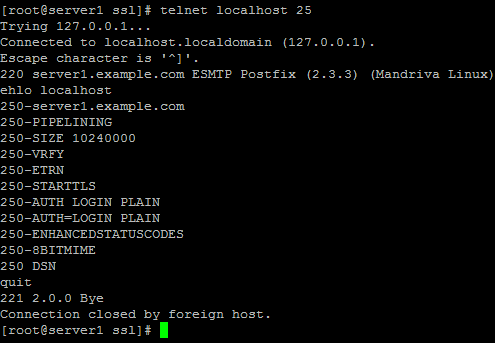
To see if SMTP-AUTH and TLS work properly now run the following command:
telnet localhost 25
After you have established the connection to your Postfix mail server type
ehlo localhost
If you see the lines
250-STARTTLS
and
250-AUTH
everything is fine.
Type
quit
to return to the system's shell.
13 Apache2 With PHP5
To install Apache2 and PHP5, run the following command (in one line):
urpmi apache2-mod_php libphp5_common5 php-bz2 php-calendar php-ctype php-curl php-devel php-dio php-dom php-eaccelerator php-enchant php-esmtp php-event php-exif php-fam php-ffmpeg php-fileinfo php-filepro php-ftp php-gd php-gettext php-gmp php-iconv php-id3 php-idn php-imap php-imlib2 php-mailparse php-mbstring php-mcache php-mcrypt php-mhash php-ming php-mysql php-mysqli php-ncurses php-newt php-odbc php-oggvorbis php-pam_auth php-pcntl php-pcre php-pear-Net_IDNA php-posix php-pspell php-readline php-recode php-session php-shmop php-simplexml php-snmp php-soap php-sockets php-sqlite php-ssh2 php-sysvmsg php-sysvsem php-sysvshm php-tclink php-tcpwrap php-tidy php-xml php-xmlrpc php-zip php5-ini curl libcurl3-devel perl-libwww-perl ImageMagick
Start Apache:
/etc/init.d/httpd restart
13.1 Disable PHP Globally
(If you do not plan to install ISPConfig on this server, please skip this section!)
In ISPConfig you will configure PHP on a per-website basis, i.e. you can specify which website can run PHP scripts and which one cannot. This can only work if PHP is disabled globally because otherwise all websites would be able to run PHP scripts, no matter what you specify in ISPConfig.
Edit /etc/httpd/modules.d/70_mod_php.conf and comment out the AddType lines:
vi /etc/httpd/modules.d/70_mod_php.conf
<IfDefine HAVE_PHP5>
    <IfModule !mod_php5.c>
        LoadModule php5_module    extramodules/mod_php5.so
    </IfModule>
</IfDefine>

<IfModule mod_mime.c>
#    AddType application/x-httpd-php .php
#    AddType application/x-httpd-php .phtml
#    AddType application/x-httpd-php-source .phps
</IfModule>

<IfModule mod_php5.c>
    <IfModule mod_dir.c>
        DirectoryIndex index.php index.phtml
    </IfModule>
</IfModule>
|
Edit /etc/httpd/conf/mime.types and comment out the following lines:
vi /etc/httpd/conf/mime.types
[...] #application/x-perl perl pl #application/x-php php php3 php4 [...] |
Edit /etc/httpd/conf/httpd.conf and add the following line to the LoadModule section:
vi /etc/httpd/conf/httpd.conf
[...] LoadModule php5_module extramodules/mod_php5.so [...] |
(Although this line is already in /etc/httpd/modules.d/70_mod_php.conf this is very important because otherwise the command
httpd -t
will report errors instead of Syntax OK when the virtual hosts created by ISPConfig contain lines like php_admin_flag safe_mode On or the like!)
Restart Apache:
/etc/init.d/httpd restart





