
The Perfect Setup - Debian Etch (Debian 4.0) - Page 7
15 Webalizer
To install webalizer, just run
apt-get install webalizer
16 Synchronize the System Clock
It is a good idea to synchronize the system clock with an NTP (network time protocol) server over the internet. Simply run
apt-get install ntp ntpdate
and your system time will always be in sync.
17 Install Some Perl Modules Needed By SpamAssassin (Comes With ISPConfig)
Run
apt-get install libhtml-parser-perl libdb-file-lock-perl libnet-dns-perl
18 ISPConfig
The configuration of the server is now finished, and if you wish you can now install ISPConfig on it. Please check out the ISPConfig installation manual: http://www.ispconfig.org/manual_installation.htm
18.1 A Note On SuExec
If you want to run CGI scripts under suExec, you should specify /var/www as the home directory for websites created by ISPConfig as Debian's suExec is compiled with /var/www as Doc_Root. Run
/usr/lib/apache2/suexec -V
and the output should look like this:
server1:/etc/postfix/ssl# /usr/lib/apache2/suexec -V
-D AP_DOC_ROOT="/var/www"
-D AP_GID_MIN=100
-D AP_HTTPD_USER="www-data"
-D AP_LOG_EXEC="/var/log/apache2/suexec.log"
-D AP_SAFE_PATH="/usr/local/bin:/usr/bin:/bin"
-D AP_UID_MIN=100
-D AP_USERDIR_SUFFIX="public_html"
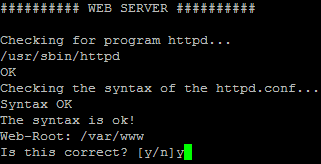
Unless you install ISPConfig in expert mode and change the default web root (which is /var/www), you will be able to run CGI scripts under suExec with ISPConfig. The following screenshot is taken from an ISPConfig installation in expert mode. If you want to use ISPConfig, then don't change the default web root:
19 Links
- Debian: http://www.debian.org
- ISPConfig: http://www.ispconfig.org





