
How To Install MySQL 4.1 And PHP4 On Debian Etch
Version 1.0
Author: Falko Timme
MySQL 4 and PHP 4 are quite old, but you might have PHP applications on your server that require PHP4 and MySQL 4. The problem is that Debian Etch comes with MySQL 5 only, and its PHP4 packages depend on MySQL 5 and don't work with MySQL 4. This guide shows how you can install MySQL 4.1 on Debian Etch along with PHP4 packages that work with MySQL 4.1.
I do not issue any guarantee that this will work for you!
1 Preliminary Note
The Debian Etch system that I'm using here has the IP address 192.168.0.100.
2 Configure apt
Fortunately http://debian.mytso.net/etch has Debian packages for MySQL 4.1 and PHP4. To use these, we must open /etc/apt/sources.list and add the following line to it:
vi /etc/apt/sources.list
[...] deb http://debian.mytso.net/etch/ / [...] |
Next we open /etc/apt/preferences and specify that apt should use the debian.mytso.net repository with priority over the default Debian repositories:
vi /etc/apt/preferences
Package: * Pin: origin debian.mytso.net Pin-Priority: 1001 |
The priority 1001 makes sure that the debian.mytso.net is the preferred repository.
Now we update our packages database:
apt-get update
3 Install MySQL 4.1
In order to install MySQL 4.1, we simply run the following command:
apt-get install mysql-server-4.1 mysql-client-4.1 mysql-common-4.1 libmysqlclient14 libmysqlclient14-dev
To configure MySQL and set up passwords, take a look at chapter 10 on https://www.howtoforge.com/perfect_setup_debian_etch_p4.
4 Install Apache2 With PHP4
To install Apache2 with PHP4 (with support for MySQL 4.1), we simply run:
apt-get install libapache2-mod-php4 php4-common php4-curl php4-domxml php4-gd php4-imap php4-mcal php4-mcrypt php4-mhash php4-mysql php4-pspell php4-recode php4-snmp php4-xslt php4
You might see the following question during the installation:
Continue installing libc-client without Maildir support? <-- Yes
Afterwards, restart Apache:
/etc/init.d/apache2 restart
5 Test PHP4
Now we can test if PHP4 and MySQL 4.1 are properly installed. Assuming that your default Apache document root is /var/www (which is true for a default Apache installation on Debian), we create the PHP file /var/www/info.php:
vi /var/www/info.php
<?php phpinfo(); ?> |
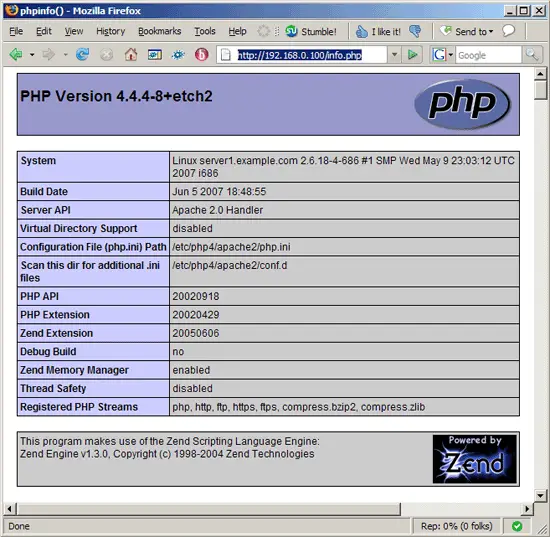
Then we call the file in a browser (http://192.168.0.100/info.php). If all goes well, you should see that you have PHP4 installed (4.4.4 in this example)...
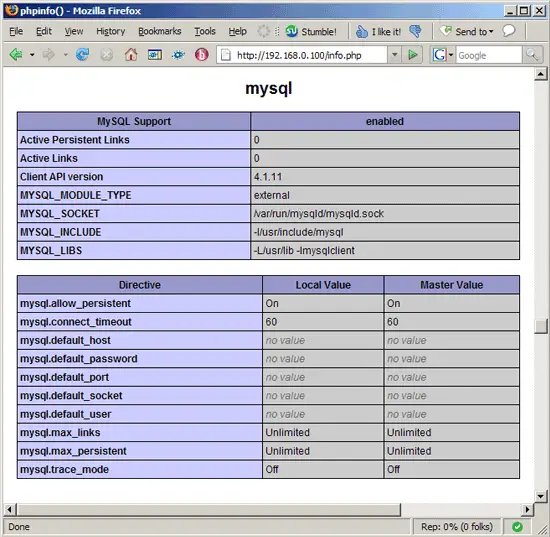
... and that MySQL support is enabled in PHP4. The Client API version is 4.1.11 which is good because we installed MySQL 4.1.11:
6 Old Passwords (MySQL)
If you're having problems logging into your web applications, open /etc/mysql/my.cnf and add old-passwords to the [mysqld] stanza, like this:
vi /etc/mysql/my.cnf
[...] [mysqld] # # * Basic Settings # old-passwords [...] |
Restart MySQL afterwards:
/etc/init.d/mysql restart
7 Links
- Debian: http://www.debian.org
- Debian Etch Repository For MySQL 4.1 And PHP4: http://debian.mytso.net/etch





