
Installing Xbox Media Center (XBMC) On Fedora 9 (i386)
Version 1.0
Author: Falko Timme
The Xbox Media Center (XBMC) is a media center application for Linux, Mac, and Windows that allows you to manage/watch/listen to/view your videos, music, and pictures. It has a nice interface, can be controlled from the desktop or a remote control or via its built-in web interface, and it can be extended by custom scripts. This guide shows how you can install XBMC on a Fedora 9 desktop (i386).
I do not issue any guarantee that this will work for you!
1 Installing XBMC
First, open a terminal (Applications > System Tools > Terminal):
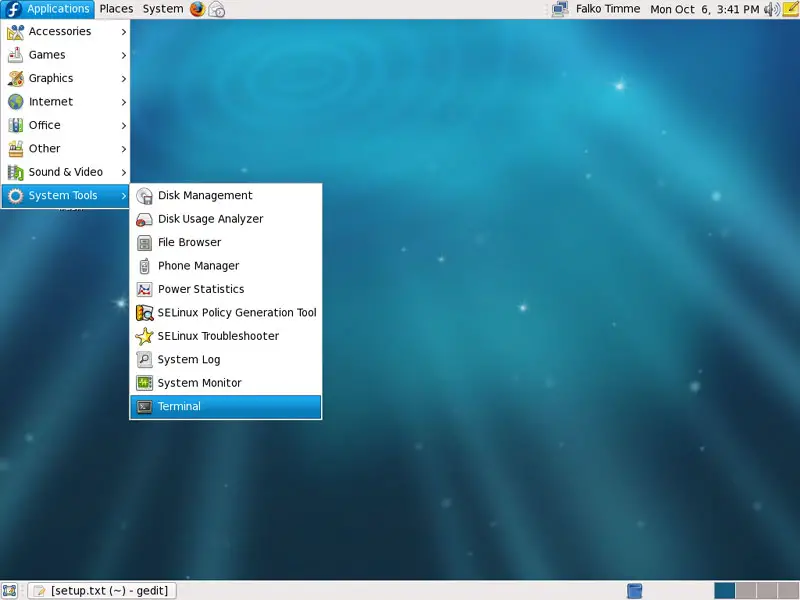
Go to your home directory and become root:
cd ~
su
There's no pre-built XBMC package for Fedora 9, so we must build it ourselves. Before we can do so, we need to install a few prerequisites:
yum groupinstall 'Development Tools'
yum groupinstall 'Development Libraries'
yum install subversion
Then we check out the XBMC sources:
svn co http://xbmc.svn.sourceforge.net/svnroot/xbmc/branches/linuxport/
Now we add the Livna repository to our system...
rpm -Uvh http://rpm.livna.org/livna-release-9.rpm
... and install some further prerequisites (the command goes in one line!):
yum install fribidi* libogg libogg-devel SDL* glew glew-devel libvorbis libvorbis-devel gperf libmad-devel tre tre-devel boost boost-devel bzip2-devel bzip2-libs curl-devel lzo lzo-devel libXinerama-devel mysql-libs mysql-devel freetype-devel jasper jasper-devel sqlite-devel faac faac-devel enca enca-devel hal hal-devel hal-libs cmake nasm libXmu-devel fontconfig-devel pcre-devel gcc-c++
ln -s /usr/lib/mysql/libmysqlclient.so.15.0.0 /usr/lib/libmysqlclient.so
Now we can start building XBMC:
cd linuxport/XBMC/
./configure
After the ./configure command has succeeded, type
make
... and be patient - this can take some time.
It is possible that make stops with an error. If you get the following error...
In file included from GUIButtonControl.cpp:26:
../xbmc/utils/CharsetConverter.h:31:39: error: fribidi/fribidi_char_sets.h: No such file or directory
... do this...
cd xbmc
ln -s lib/libfribidi/ fribidi
cd ..
... and run
make
again.
If you get the following error...
LaTeX Warning: Reference `dvdcss_8h' on page 1 undefined on input line 5.

(/usr/share/texmf/tex/latex/base/t1cmtt.fd) [1]) [2]
Chapter 2.
(./files.tex

LaTeX Warning: Reference `dvdcss_8h' on page 3 undefined on input line 3.

) [3] [4]
Chapter 3.
(./dvdcss_8h.tex [5]

! Package inputenc Error: Unicode char \u8:�ph not set up for use with LaTeX.

See the inputenc package documentation for explanation.
Type  H <return>  for immediate help.
 ...

l.49 \item[Author:]St�ph
                        ane Borel $<${\tt [email protected]}$>$
?
... cancel the build process by pressing CTRL+C and open xbmc/cores/dvdplayer/Codecs/libDVDCSS/doc/latex/dvdcss_8h.tex:
gedit xbmc/cores/dvdplayer/Codecs/libDVDCSS/doc/latex/dvdcss_8h.tex
In line 49 you should find the string \item[Author:]Stéphane Borel $<${\tt [email protected]}$>$ - replace the é in the name with a normal e so that it looks as follows:
[...]
\item[Author:]Stephane Borel $<${\tt [email protected]}$>$
[...]
Then run
make
again.
If you get the following error...
In file included from tif_ojpeg.c:35:
/usr/include/jpeglib.h:1096:55: error: jpegint.h: No such file or directory
... do this...
cp xbmc/lib/cximage-6.0/jpeg/jpegint.h /usr/include/
... and run
make
again.
After the make command has succeeded, run
make install
Afterwards, exit the root shell...
exit
... and start XBMC:
xbmc
If you don't want to start XBMC from the command line, then the next chapter is for you.





