How To Migrate Mailboxes Between IMAP Servers With imapsync
This guide explains how you can migrate mailboxes between IMAP servers with imapsync. imapsync is an IMAP synchronisation, sync, copy or migration tool. More than 32 different IMAP server software is supported with success. All flags are preserved, unread will stay unread, read will stay read, deleted will stay deleted.
1 Preliminary Note
I'm using two Debian or Ubuntu servers here (the procedure should be the same for other distributions, only the installation of imapsync will differ):
- server1.example.com (source)
- server2.example.com (target)
I want to migrate the mailbox [email protected] (username: [email protected], password: secret) on server1.example.com to the mailbox [email protected] on server2.example.com (username and password are the same as on server1.example.com).
2 Before We Start
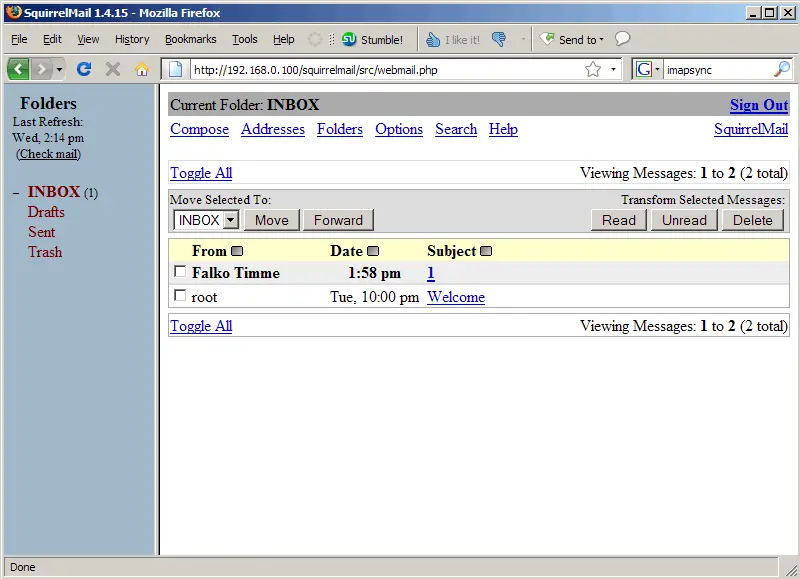
Before we start, let's take a look at both mailboxes to see what's in them (you can do this with an email client such as Outlook, Thunderbird, or a web-based email client such as SquirrelMail - I'm using SquirrelMail here).
server1.example.com:
server2.example.com:
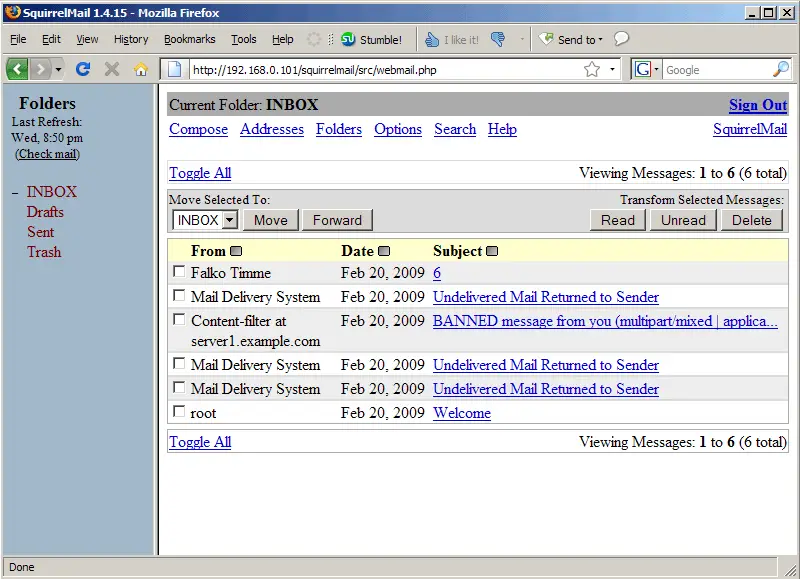
After the migration, the two messages on server1.example.com should be available on server2.example.com.
3 imapsync Installation
It doesn't matter if we install imapsync on server1.example.com or server2.example.com - we can even install it on a third, uninvolved server.
aptitude install imapsync
To learn about its usage, take a look at
man imapsync
and
imapsync --help
4 Doing The Migration
We have to tell imapsync the usernames and passwords of the mail accounts that we want to migrate. Theoretically, we can use the --password1 and --password2 switches for the passwords, but this is dangerous because the passwords would appear in the output of
ps aux
(So any user who is allowed to run that command would know the passwords.)
Therefore it's better to create two files (/etc/secret1 and /etc/secret2 in this example) that contain the passwords (in this example, it's secret for both mail accounts), do a chmod 600 on these files, and use the --passfile1 and --passfile2 switches.
echo "secret" > /etc/secret1
echo "secret" > /etc/secret2
chmod 600 /etc/secret1
chmod 600 /etc/secret2
Now we can do the migration with this simple command:
imapsync --host1 server1.example.com --user1 [email protected] --passfile1 /etc/secret2 --host2 server2.example.com --user2 [email protected] --passfile2 /etc/secret2
Here's a sample output:
root@server1:~# imapsync --host1 server1.example.com --user1 [email protected] --passfile1 /etc/secret2
 --host2 server2.example.com --user2 [email protected] --passfile2 /etc/secret2
$RCSfile: imapsync,v $ $Revision: 1.252 $ $Date: 2008/05/08 02:30:17 $
Here is a [linux] system (Linux server1.example.com 2.6.28-11-server #42-Ubuntu SMP Fri Apr 17 02:45:36 UTC 2009 x86_64)
with perl 5.10.0 and the module Mail::IMAPClient version used here is 2.2.9
Command line used :
/usr/bin/imapsync --host1 server1.example.com --user1 [email protected] --passfile1 /etc/secret2
 --host2 server2.example.com --user2 [email protected] --passfile2 /etc/secret2
Turned ON syncinternaldates, will set the internal dates on host2 same as host1.
TimeZone :[CEST]
Will try to use CRAM-MD5 authentication on host1
Will try to use CRAM-MD5 authentication on host2
From imap server [server1.example.com] port [143] user [[email protected]]
To   imap server [server2.example.com] port [143] user [[email protected]]
Banner : * OK [CAPABILITY IMAP4rev1 UIDPLUS CHILDREN NAMESPACE THREAD=ORDEREDSUBJECT THREAD=REFERENCES SORT QUOTA
 IDLE ACL ACL2=UNION STARTTLS] Courier-IMAP ready. Copyright 1998-2008 Double Precision, Inc.  See COPYING for distribution information.
Host server1.example.com says it has NO CAPABILITY for AUTHENTICATE CRAM-MD5
Error login : [server1.example.com] with user [[email protected]] auth [CRAM-MD5]: 3 NO Login failed.

Trying LOGIN Auth mechanism on [server1.example.com] with user [[email protected]]
Success login on [server1.example.com] with user [[email protected]] auth [CRAM-MD5]
Banner : * OK [CAPABILITY IMAP4rev1 UIDPLUS CHILDREN NAMESPACE THREAD=ORDEREDSUBJECT THREAD=REFERENCES SORT QUOTA
 IDLE ACL ACL2=UNION STARTTLS] Courier-IMAP ready. Copyright 1998-2008 Double Precision, Inc.  See COPYING for distribution information.
Host server2.example.com says it has NO CAPABILITY for AUTHENTICATE CRAM-MD5
Error login : [server2.example.com] with user [[email protected]] auth [CRAM-MD5]: 3 NO Login failed.

Trying LOGIN Auth mechanism on [server2.example.com] with user [[email protected]]
Success login on [server2.example.com] with user [[email protected]] auth [CRAM-MD5]
From capability : QUOTA STARTTLS NAMESPACE IDLE THREAD=ORDEREDSUBJECT ACL SORT UIDPLUS CHILDREN ACL2=UNION IMAP4REV1 THREAD=REFERENCES
To   capability : QUOTA STARTTLS NAMESPACE IDLE THREAD=ORDEREDSUBJECT ACL SORT UIDPLUS CHILDREN ACL2=UNION IMAP4REV1 THREAD=REFERENCES
From state Authenticated
To   state Authenticated
From separator and prefix : [.][INBOX.]
To   separator and prefix : [.][INBOX.]
++++ Calculating sizes ++++
From Folder [INBOX]                             Size:      2412 Messages:     2
From Folder [INBOX.Drafts]                      Size:         0 Messages:     0
From Folder [INBOX.Sent]                        Size:         0 Messages:     0
From Folder [INBOX.Trash]                       Size:         0 Messages:     0
Total size: 2412
Total messages: 2
Time : 11 s
++++ Calculating sizes ++++
To   Folder [INBOX]                             Size:     16844 Messages:     6
To   Folder [INBOX.Drafts]                      Size:         0 Messages:     0
To   Folder [INBOX.Sent]                        Size:         0 Messages:     0
To   Folder [INBOX.Trash]                       Size:         0 Messages:     0
Total size: 16844
Total messages: 6
Time : 0 s
++++ Listing folders ++++
From folders list : [INBOX] [INBOX.Drafts] [INBOX.Sent] [INBOX.Trash]
To   folders list : [INBOX] [INBOX.Drafts] [INBOX.Sent] [INBOX.Trash]
++++ Looping on each folder ++++
From Folder [INBOX]
To   Folder [INBOX]
++++ From [INBOX] Parse 1 ++++
++++ To   [INBOX] Parse 1 ++++
++++ Verifying [INBOX] -> [INBOX] ++++
+ NO msg #1 [FID6mR7SVC7csdmRce+7PQ:924] in INBOX
+ Copying msg #1:924 to folder INBOX
flags from : [\Seen]["26-May-2009 22:00:59 +0200"]
Copied msg id [1] to folder INBOX msg id [7]
+ NO msg #2 [4lu3SCjZGH2mRuiP1dY7Mw:1488] in INBOX
+ Copying msg #2:1488 to folder INBOX
flags from : [()]["27-May-2009 14:12:59 +0200"]
Copied msg id [2] to folder INBOX msg id [8]
Time : 0 s
From Folder [INBOX.Drafts]
To   Folder [INBOX.Drafts]
++++ From [INBOX.Drafts] Parse 1 ++++
++++ To   [INBOX.Drafts] Parse 1 ++++
++++ Verifying [INBOX.Drafts] -> [INBOX.Drafts] ++++
Time : 0 s
From Folder [INBOX.Sent]
To   Folder [INBOX.Sent]
++++ From [INBOX.Sent] Parse 1 ++++
++++ To   [INBOX.Sent] Parse 1 ++++
++++ Verifying [INBOX.Sent] -> [INBOX.Sent] ++++
Time : 0 s
From Folder [INBOX.Trash]
To   Folder [INBOX.Trash]
++++ From [INBOX.Trash] Parse 1 ++++
++++ To   [INBOX.Trash] Parse 1 ++++
++++ Verifying [INBOX.Trash] -> [INBOX.Trash] ++++
Time : 1 s
++++ Statistics ++++
Time                   : 12 sec
Messages transferred   : 2
Messages skipped       : 0
Total bytes transferred: 2412
Total bytes skipped    : 0
Total bytes error      : 0
Detected 0 errors
Please, rate imapsync at http://freshmeat.net/projects/imapsync/
?Happy with this free, open source and gratis GPL software?
Feel free to thank the author by giving him a book:
http://www.amazon.com/gp/registry/wishlist/1C9UNDIH3P7R7/
(or its paypal account [email protected])
root@server1:~#
Afterwards we can delete the two password files:
rm -f /etc/secret1
rm -f /etc/secret2
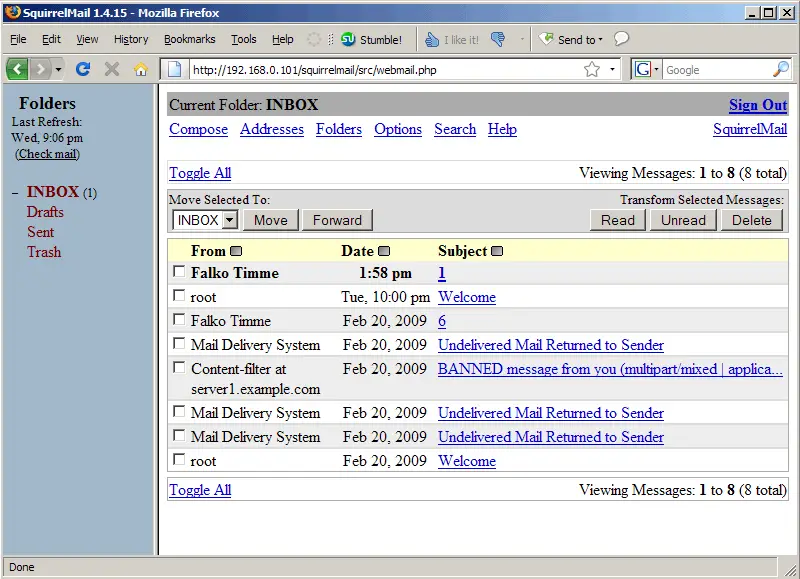
On the target server (server2.example.com), log out of your IMAP account and log back in (a simple refresh might not be enough), and you should see the messages from server1.example.com:
server2.example.com: