
How To Install Tomcat6 With SUN-Java And Apache2 Integration On Ubuntu 10.04 [Lucid Lynx] With Virtual Hosts
Author: Jaac
Last edited: 25-01-2011
Apache Tomcat (or Jakarta Tomcat or simply Tomcat) is an open source servlet container developed by the Apache Software Foundation (ASF). Tomcat implements the Java Servlet and the JavaServer Pages (JSP) specifications from Sun Microsystems, and provides a "pure Java" HTTP web server environment for Java code to run.
Tomcat should not be confused with the Apache web server, which is a C implementation of an HTTP web server; these two web servers are not bundled together. Apache Tomcat includes tools for configuration and management, but can also be configured by editing XML configuration files.
1 Preliminary Note
This tutorial is based on Ubuntu 10.04 Server (Lucid Lynx), so you should set up a basic Ubuntu 10.04 server installation with Apache or a LAMP Server before you continue with this tutorial (e.g. as shown in this tutorial: Installing Apache2 With PHP5 And MySQL Support On Ubuntu 10.04 (LAMP)). The system should have a static IP address. I use 192.168.1.100 as my IP address in this tutorial and server1.example.com as the hostname.
Make sure that you are logged in as root (type in
sudo su
to become root), because we must run all the steps from this tutorial as root user.
2 Installing Java Development Kit (JDK)
For easily adding a repository now and in the future you must install python-software-properties first:
apt-get install python-software-properties
Then run:
add-apt-repository "deb http://archive.canonical.com/ubuntu lucid partner"
Now update the Aptitude cache:
apt-get update
We will now install sun-java6-jdk which is available in the new repository, and openjdk-6-jdk:
apt-get install sun-java6-jdk openjdk-6-jdk
Accept the license agreement! with Ok and then Yes!
Let's make sure Ubuntu and our future Tomcat check the sun-java6-jdk package first:
update-alternatives --config java
Choose the number that matches with /usr/lib/jvm/java-6-sun/jre/bin/java
Now check the Java version by typing:
java -version
It should look a lot like this (depends on java version in repo!)
root@ubuntu:~# java -version
java version "1.6.0_22"
Java(TM) SE Runtime Environment (build 1.6.0_22-b04)
Java HotSpot(TM) 64-Bit Server VM (build 17.1-b03, mixed mode)
3 Installing Tomcat6
We can install Tomcat 6 via Aptitude like this:
apt-get install tomcat6 tomcat6-admin tomcat6-common tomcat6-docs tomcat6-examples tomcat6-user
3.1 Declaring users and roles
Usernames, passwords and roles (groups) can be defined centrally in a Servlet container.
In Tomcat 6.0 this is done in the /etc/tomcat6/tomcat-users.xml file:
vi /etc/tomcat6/tomcat-users.xml
and add the following:
<role rolename="manager"/>
<role rolename="admin"/>
<user username="YOUR_USERNAME" password="YOUR_PASSWORD" roles="manager,admin"/>
Make sure you replace YOUR_USERNAME and YOUR_PASSWORD with your credentials, then save and exit the file.
3.2 Restart Tomcat6 and have a first test
/etc/init.d/tomcat6 restart
Then use your browser to visit http://192.168.1.100:8080/ and verify that you get the default Tomcat page.

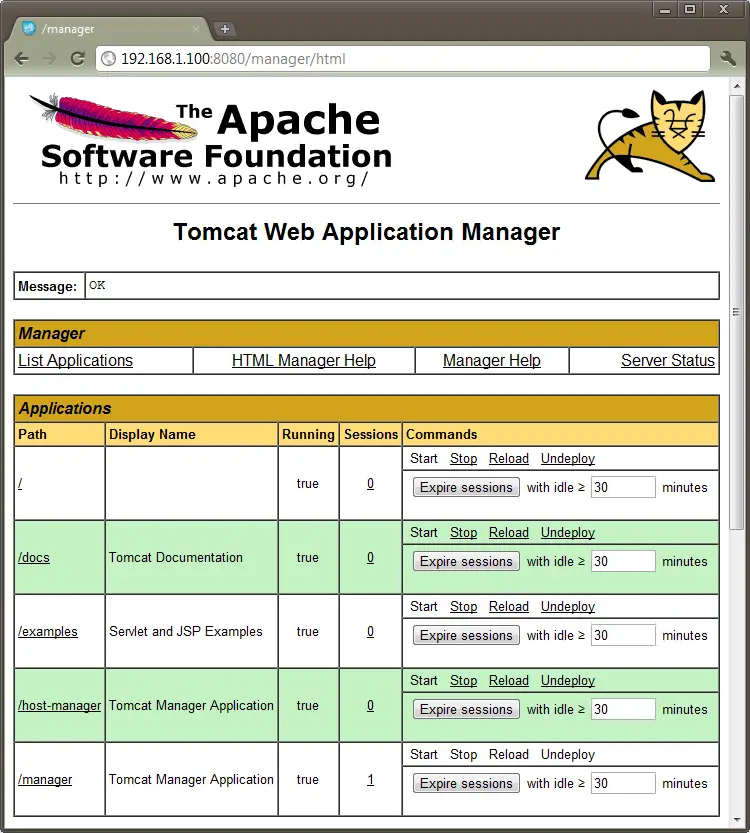
You should also be able to visit http://192.168.1.100:8080/manager/html with the credentials you have set above:
4 Integrate Tomcat6 on Apache2
First we install the Apache2 connector for the Tomcat Java servlet engine like this:
apt-get install libapache2-mod-jk
4.1 Configure the connector module
Now we can start configuring the connector module, first we create a new file which will hold our properties:
vi /etc/apache2/workers.properties
Add the following to the file:
workers.tomcat_home=/var/lib/tomcat6
workers.java_home=/usr/lib/jvm/java-6-sun
ps=/
worker.list=default
worker.default.port=8009
worker.default.host=localhost
worker.default.type=ajp13
worker.default.lbfactor=1
Save and exit the file.
4.2 Configure Apache2 to use the connector properties
Create a configuration file for Apache2 which will load when Apache starts:
vi /etc/apache2/conf.d/mod_jk.conf
Add the following to the file:
<IfModule mod_jk.c>
  JkWorkersFile /etc/apache2/workers.properties
  JkShmFile /var/log/apache2/mod_jk.shm
  JkLogFile /var/log/apache2/mod_jk.log
  JkLogLevel info
  JkLogStampFormat "[%a %b %d %H:%M:%S %Y] "
  JkRequestLogFormat "%w %V %T"
</IfModule>
Save and exit the file.





