
Creating Virtual RedHat/CentOS/Scientific Linux/Fedora Appliances For KVM With BoxGrinder (Fedora 17) - Page 2
On this page
It is also possible to make BoxGrinder create an appliance and transfer it to a remote KVM host (my remote KVM host has the IP address 192.168.0.100 in this example). To make this work, we have to configure the local and the remote system in such a way that a password-less SSH login is possible from the local system to the remote system. To do this, we create a private/public key pair on the local system...
ssh-keygen
[root@localhost appliances]# ssh-keygen
Generating public/private rsa key pair.
Enter file in which to save the key (/root/.ssh/id_rsa): <-- ENTER
Enter passphrase (empty for no passphrase): <-- ENTER
Enter same passphrase again: <-- ENTER
Your identification has been saved in /root/.ssh/id_rsa.
Your public key has been saved in /root/.ssh/id_rsa.pub.
The key fingerprint is:
2b:b7:a0:b5:d8:a6:26:46:c9:fe:2f:fa:ef:87:d0:30 [email protected]
The key's randomart image is:
+--[ RSA 2048]----+
| |
| |
| |
| E |
| . . + S |
| + . . . |
| o .+.o |
| + o=o=.. |
| ..**B*.. |
+-----------------+
[root@localhost appliances]#
... and copy the public key to the remote KVM host:
ssh-copy-id -i $HOME/.ssh/id_rsa.pub [email protected]
Afterwards we can use BoxGrinder as follows to create an appliance and copy it to the remote KVM host:
boxgrinder-build centos.appl --os-config format:qcow2 -d libvirt --delivery-config connection_uri:qemu+ssh://[email protected]/system,image_delivery_uri:sftp://[email protected]/var/lib/libvirt/images
Now we are using a lot of command options that do not make the BoxGrinder command easy to remember. We therefore put them in the BoxGrinder configuration file /root/.boxgrinder/config:
mkdir /root/.boxgrinder
vi /root/.boxgrinder/config
plugins:
   fedora:
     format: qcow2
   centos:
     format: qcow2
   libvirt:
     connection_uri: qemu+ssh://[email protected]/system
     image_delivery_uri: sftp://[email protected]/var/lib/libvirt/images
     bus: virtio
     overwrite: true
     domain_type: kvm
|
This file makes that Fedora and CentOS appliances are created with the format qcow2 (RedHat and Scientific Linux appliances would still use raw format), and that the appliances are automatically copied to the remote KVM host.
By default, BoxGrinder creates virtual hard drives as IDE drives. The option bus: virtio makes the appliance use the virtio driver which is faster. The default hypervisor is Qemu; by using domain_type: kvm we use KVM which is faster.
Now, by using the /root/.boxgrinder/config file, we can shorten the BoxGrinder command to...
boxgrinder-build /usr/local/appliances/centos.appl -d libvirt
... or...
boxgrinder-build centos.appl -d libvirt
... if you are still in the /usr/local/appliances directory.
4 Things To Check After Appliance Creation
BoxGrinder uses some strange default settings, therefore you should check a few things in the Virtual Machine Manager before you start an appliance for the first time.
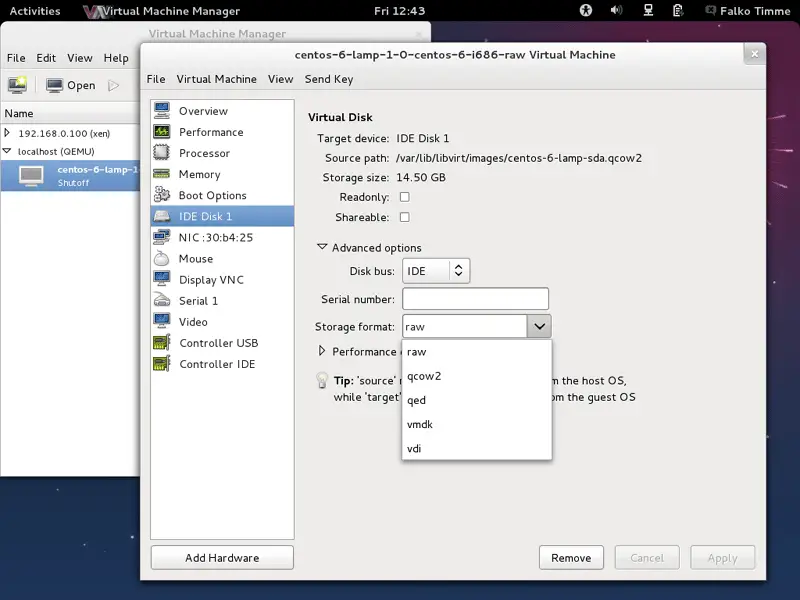
First, qcow2 images use the wrong storage format. Select qcow2 instead of raw and apply the change:
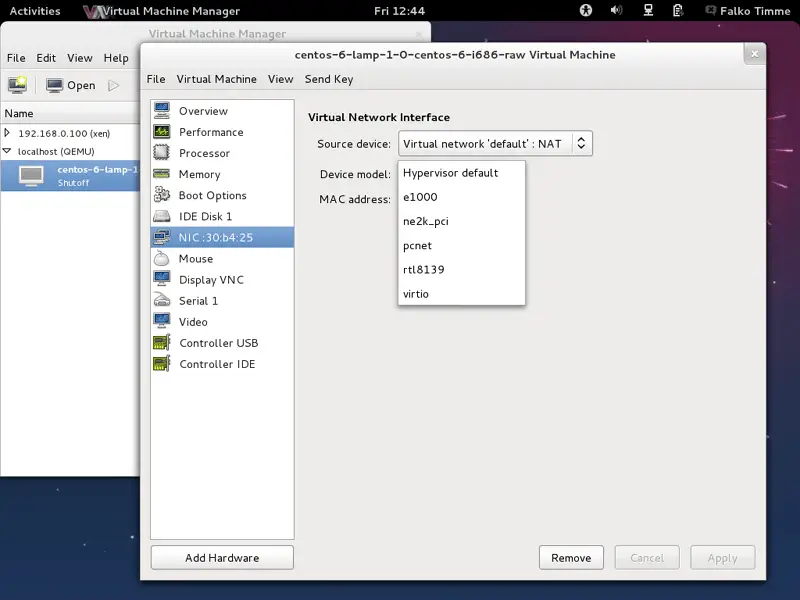
Next, select virtio as the Device model for the virtual network interface:
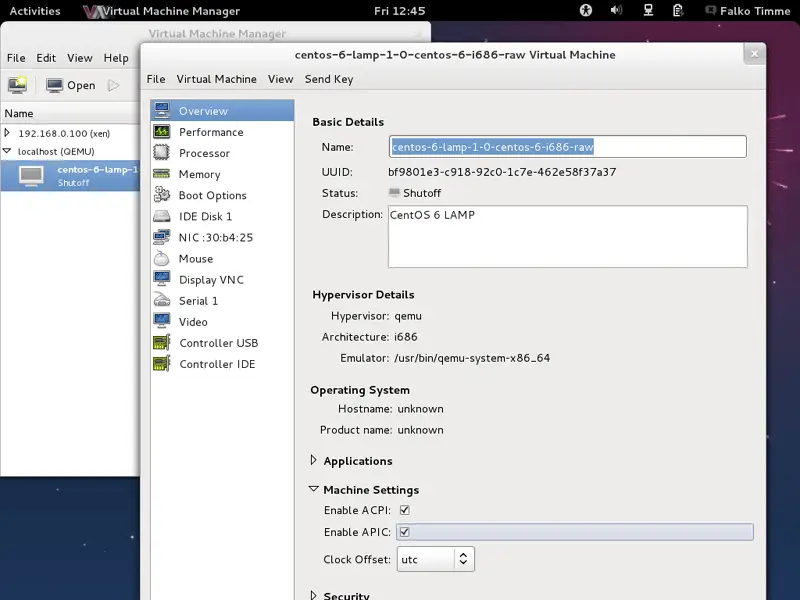
And finally, enable ACPI and APIC:
BoxGrinder creates appliances with the U.S. keyboard layout by default. If you use a different keyboard, please open /etc/sysconfig/keyboard in the appliance and adjust it to your needs.
Also, appliances use the EDT timezone (Eastern Daylight Time = New York). To change this, copy the correct time zone file from /usr/share/zoneinfo to /etc/localtime. For example, to use Berlin time, do this inside the appliance:
cp -f /usr/share/zoneinfo/Europe/Berlin /etc/localtime
5 Links
- BoxGrinder: http://boxgrinder.org/
- BoxGrinder Tutorials: http://boxgrinder.org/tutorials/
- BoxGrinder Appliance Definition: http://boxgrinder.org/tutorials/appliance-definition/
- Fedora: http://fedoraproject.org/
- KVM: http://www.linux-kvm.org/





