Cloning Linux Systems With CloneZilla Server Edition (CloneZilla SE)
Version 1.0
Author: Falko Timme
This tutorial shows how you can clone Linux systems with CloneZilla SE. This is useful for copying one Linux installation to multiple computers without losing much time, e.g. in a classroom, or also for creating an image-based backup of a system. I will install CloneZilla SE on a Debian Etch server in this tutorial. The systems that you want to clone can use whatever Linux distribution you prefer.
I do not issue any guarantee that this will work for you!
1 Preliminary Note
The Debian server on which I want to install CloneZilla SE is in the local network 192.168.0.0 (netmask 255.255.255.0) and has the IP address 192.168.0.100.
To clone a system, the target systems should use the same or at least similar hardware, otherwise cloning might not work!
2 Installing CloneZilla SE
First we import the GPG key of the DRBL (Diskless Remote Boot in Linux, needed to boot the client systems from the network (PXE) later on) and CloneZilla repository:
wget -q http://drbl.sourceforge.net/GPG-KEY-DRBL -O- | apt-key add -
Then we open /etc/apt/sources.list...
vi /etc/apt/sources.list
... and add the DRBL/CloneZilla Debian repository to it:
[...] deb http://drbl.sourceforge.net/drbl-core drbl stable [...] |
Run
apt-get update
afterwards.
Now we can install DRBL and CloneZilla like this:
apt-get install drbl
Then we run
/opt/drbl/sbin/drbl4imp
to configure DRBL and CloneZilla with default values (should work in most environments):
*****************************************************.
This script is for those impatient, it will setup the DRBL server by the default value which might not fit your environment. Are you impatient ?
[Y/n] <-- ENTER
*****************************************************.
Ok, Laziness is a virtue! Let us setup DRBL server with the default values!!!
Press "Enter" to continue... <-- ENTER
[...]
Starting the NAT services for DRBL clients... done!
ip_forward is already on.
The GDM or KDM config file is NOT found! Skip setting the DM! Maybe you will not be able to make this DRBL server as thin client server!
Clean all the previous saved config file if they exist...done!
Turn on the boot prompt for PXE client...done!
Turn off the thin client option in PXE boot menu...done!
Modifying /tftpboot/nbi_img/pxelinux.cfg/default to let DRBL client use graphical PXE boot menu... done!
Full DRBL mode. Remove clientdir opt for label drbl in pxelinux config...
Setting drbl_mode="full_drbl_mode" in /etc/drbl/drbl_deploy.conf and /etc/drbl/drblpush.conf... done!
Full clonezilla mode. Remove clientdir opt for label clonezilla in pxelinux config...
Setting clonezilla_mode="full_clonezilla_mode" in /etc/drbl/drbl_deploy.conf and /etc/drbl/drblpush.conf... done!
You have to use "/opt/drbl/sbin/dcs" -> clonezilla-start to start clonezilla serivce, so that there will be a clonezilla menu when client boots
*****************************************************.
Adding normal users to group "audio cdrom plugdev floppy video"........ done!
*****************************************************.
Updating the YP/NIS for group...
Note! If you add new or remove accounts in the DRBL server in the future, remember to run the following command again, so that some group (EX:plugdev) will be updated:
tune-debian-dev-group-perm -g "audio cdrom plugdev floppy video" -e
*****************************************************.
Enjoy DRBL!!!
http://drbl.nchc.org.tw; http://drbl.name
NCHC Free Software Labs, Taiwan. http://free.nchc.org.tw
*****************************************************.
If you like, you can reboot the DRBL server now to make sure everything is ready...(This is not necessary, just an option.).
*****************************************************.
DRBL server is ready! Now set the client machines to boot from PXE or Etherboot (refer to http://drbl.sourceforge.net for more details).
NOTE! If Etherboot is used in client machine, version 5.4.0 or newer is required!
PS. The config file is saved as /etc/drbl/drblpush.conf. Therefore if you want to run drblpush with the same config again, you may run it as: /opt/drbl/sbin/drblpush -c /etc/drbl/drblpush.conf
server1:~#
That's it for the installation.
3 Creating An Image Of A Linux System
To create an image, we first start CloneZilla on the Debian system and tell it to store an image (the server will then wait until a client connects to store the image), and then we boot the client system of which we want to create the image from the network - it should then boot into a CloneZilla Linux system that connects to the server and creates the image.
Run
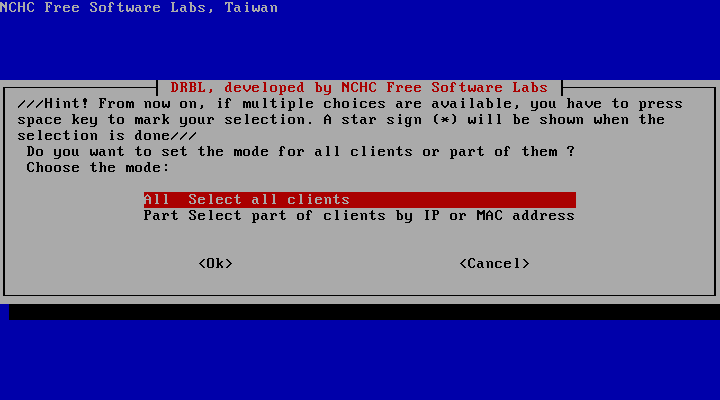
/opt/drbl/sbin/dcs
on the Debian server and select All Select all clients:
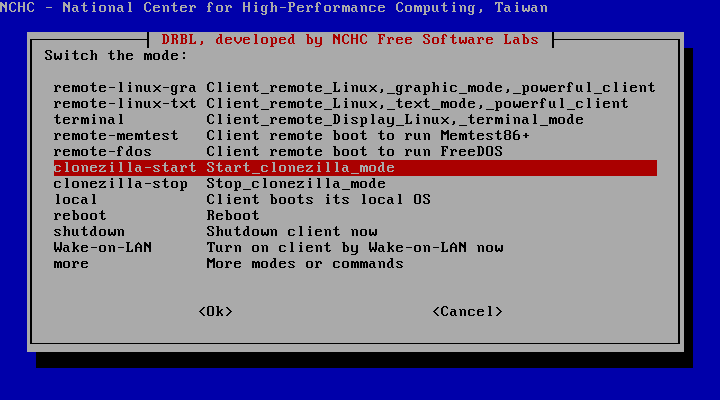
Next pick clonezilla-start Start_clonezilla_mode:
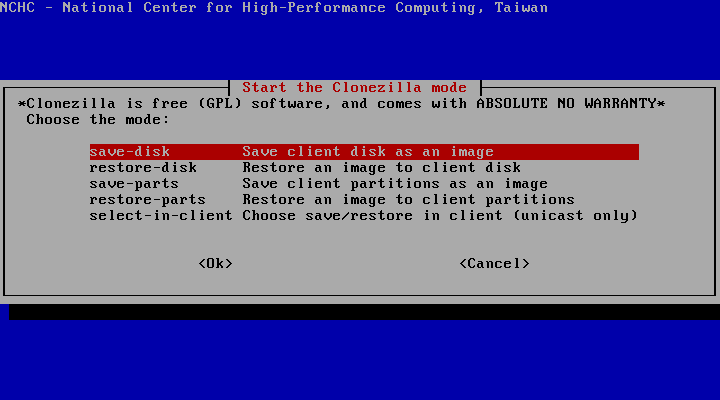
Choose save-disk Save client disk as an image:
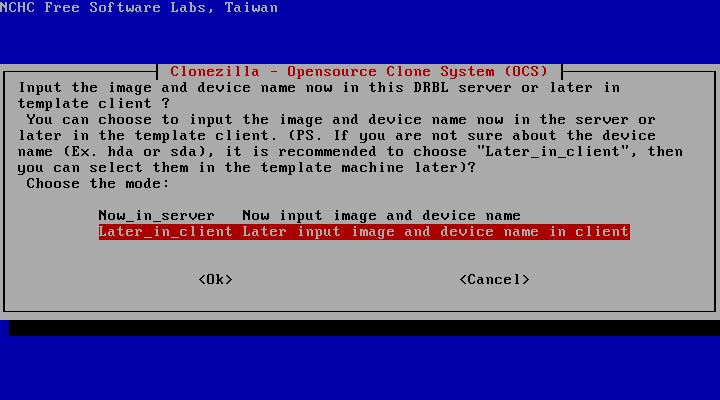
Select Later_in_client Later input image and device name in client (you will then be prompted for an image name later on the client, instead of having to provide an image name now):
On the next two screens you can simply press ENTER to select the default values: