
Integrating APC (Alternative PHP Cache) Into PHP5 (Debian Etch & Apache2)
Version 1.0
Author: Falko Timme
This guide explains how to integrate APC (Alternative PHP Cache) into PHP5 on a Debian Etch system (with Apache2). APC is a free and open PHP opcode cacher for caching and optimizing PHP intermediate code. It's similar to other PHP opcode cachers, such as eAccelerator and XCache.
I do not issue any guarantee that this will work for you!
1 Preliminary Note
I have tested this on a Debian Etch server with the IP address 192.168.0.100 where Apache2 and PHP5 are already installed and working. I'll use Apache's default document root /var/www in this tutorial for demonstration purposes. Of course, you can use any other vhost as well, but you might have to adjust the path to the info.php file that I'm using in this tutorial.
2 Checking PHP5's Current State
First, before we install APC, let's find out about our PHP5 installation. To do this, we create the file info.php in our document root /var/www:
vi /var/www/info.php
<?php phpinfo(); ?> |
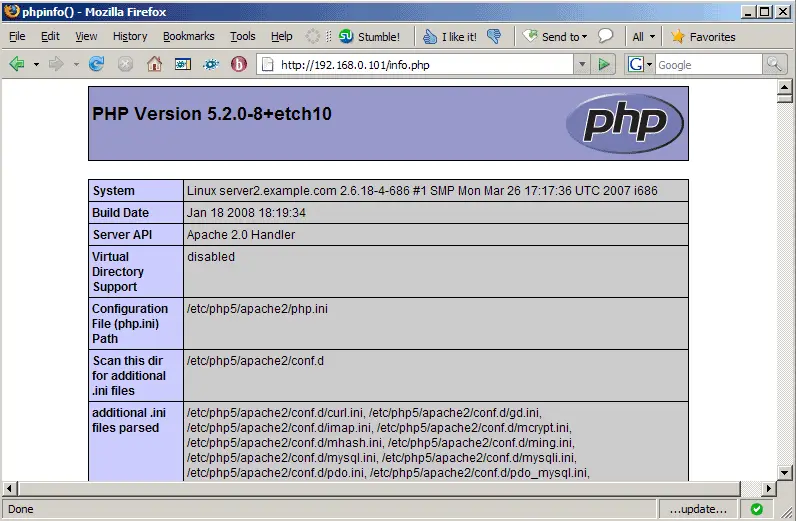
Afterwards, we call that file in a browser: http://192.168.0.100/info.php
As you see, we have PHP 5.2.0 installed...
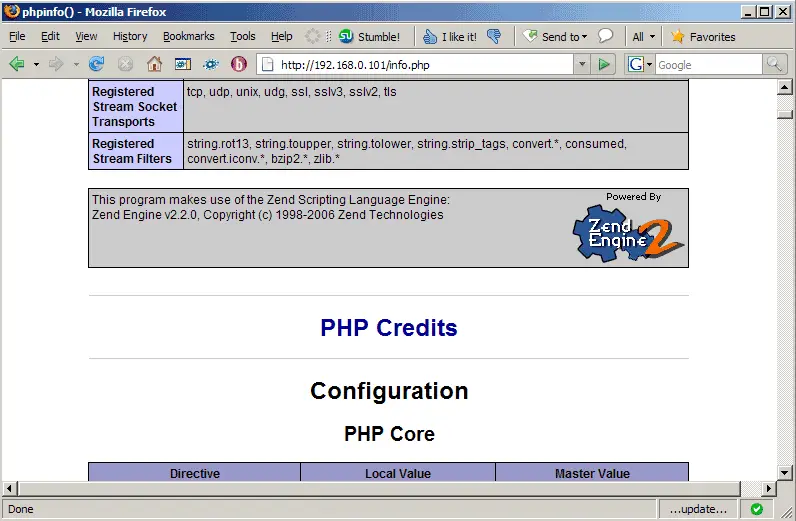
... but APC isn't mentioned anywhere on the page:
3 Installing APC
APC is a PHP extension that can be installed using PECL. PECL comes with the php-pear package, so we install that now:
apt-get install php-pear
Furthermore we must install some APC dependencies so that PECL can build APC:
apt-get install php5-dev apache2-prefork-dev build-essential
Now that all dependencies are installed, we can install APC as follows:
pecl install apc
server2:~# pecl install apc
downloading APC-3.0.17.tgz ...
Starting to download APC-3.0.17.tgz (116,058 bytes)
.........................done: 116,058 bytes
47 source files, building
running: phpize
Configuring for:
PHP Api Version: 20041225
Zend Module Api No: 20060613
Zend Extension Api No: 220060519
Use apxs to set compile flags (if using APC with Apache)? [yes] : <-- ENTER
[...]
----------------------------------------------------------------------
Libraries have been installed in:
/var/tmp/pear-build-root/APC-3.0.17/modules
If you ever happen to want to link against installed libraries
in a given directory, LIBDIR, you must either use libtool, and
specify the full pathname of the library, or use the `-LLIBDIR'
flag during linking and do at least one of the following:
- add LIBDIR to the `LD_LIBRARY_PATH' environment variable
during execution
- add LIBDIR to the `LD_RUN_PATH' environment variable
during linking
- use the `-Wl,--rpath -Wl,LIBDIR' linker flag
- have your system administrator add LIBDIR to `/etc/ld.so.conf'
See any operating system documentation about shared libraries for
more information, such as the ld(1) and ld.so(8) manual pages.
----------------------------------------------------------------------
Build complete.
(It is safe to ignore warnings about tempnam and tmpnam).
running: make INSTALL_ROOT="/var/tmp/pear-build-root/install-APC-3.0.17" install
Installing shared extensions: /var/tmp/pear-build-root/install-APC-3.0.17/usr/lib/php5/20060613+lfs/
running: find "/var/tmp/pear-build-root/install-APC-3.0.17" -ls
998152 4 drwxr-xr-x 3 root root 4096 Mar 28 15:23 /var/tmp/pear-build-root/install-APC-3.0.17
998214 4 drwxr-xr-x 3 root root 4096 Mar 28 15:23 /var/tmp/pear-build-root/install-APC-3.0.17/usr
998215 4 drwxr-xr-x 3 root root 4096 Mar 28 15:23 /var/tmp/pear-build-root/install-APC-3.0.17/usr/lib
998216 4 drwxr-xr-x 3 root root 4096 Mar 28 15:23 /var/tmp/pear-build-root/install-APC-3.0.17/usr/lib/php5
998217 4 drwxr-xr-x 2 root root 4096 Mar 28 15:23 /var/tmp/pear-build-root/install-APC-3.0.17/usr/lib/php5/20060613+lfs
998213 416 -rwxr-xr-x 1 root root 418822 Mar 28 15:23 /var/tmp/pear-build-root/install-APC-3.0.17/usr/lib/php5/20060613+lfs/apc.so
Build process completed successfully
Installing '/var/tmp/pear-build-root/install-APC-3.0.17//usr/lib/php5/20060613+lfs/apc.so'
install ok: channel://pecl.php.net/APC-3.0.17
You should add "extension=apc.so" to php.ini
server2:~#
Now that APC is installed, we create the configuration file /etc/php5/conf.d/apc.ini. We must at least add the line extension=apc.so in there; all other configuration options are optional. You can find a list of all available configuration options on http://de2.php.net/manual/en/ref.apc.php.
vi /etc/php5/conf.d/apc.ini
extension=apc.so apc.enabled=1 apc.shm_size=30 |
That's it. Restart Apache, and you're done:
/etc/init.d/apache2 restart
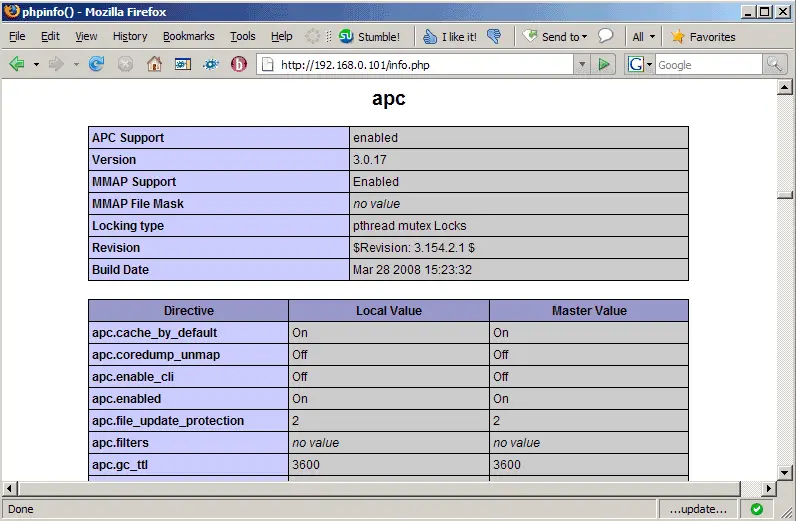
Afterwards, open info.php again in a browser: http://192.168.0.100/info.php
You should now see APC mentioned on the page which means it has successfully been integrated and is working as expected:
4 Links
- APC: http://pecl.php.net/package/APC
- PHP: http://www.php.net
- Apache: http://httpd.apache.org
- Debian: http://www.debian.org





