
Zimbra Collaboration Suite Open Source Edition On CentOS - Page 3
On this page
5 Installation Of Zimbra Collaboration Suite
You will need to download ZCS from the Zimbra website.
cd /tmp wget http://files.zimbra.com/downloads/5.0.2_GA/zcs-5.0.2_GA_1975.RHEL5.20080130221917.tgz
Next untar, change into the directory of the installer and run the installer.
tar xvzf zcs-5.0.2_GA_1975.RHEL5.20080130221917.tgz
cd zcs-5.0.2_GA_1975.RHEL5.20080130221917
./install.sh
The output should look something like:
Checking for existing installation...
zimbra-ldap...NOT FOUND
zimbra-logger...NOT FOUND
zimbra-mta...NOT FOUND
zimbra-snmp...NOT FOUND
zimbra-store...NOT FOUND
zimbra-apache...NOT FOUND
zimbra-spell...NOT FOUND
zimbra-proxy...NOT FOUND
zimbra-archiving...NOT FOUND
zimbra-cluster...NOT FOUND
zimbra-core...NOT FOUND
Read through the license agreement and hit enter.
The output should be similar to:
Checking for prerequisites...
NPTL...FOUND
sudo...FOUND sudo-1.6.7p12-10
libidn...FOUND libidn-0.6.5-1.1
fetchmail...FOUND fetchmail-6.3.6-1.1
gmp...FOUND gmp-4.1.4-10
compat-libstdc++-296...FOUND compat-libstdc++-296-2.96-138
compat-libstdc++-33...FOUND compat-libstdc++-33-3.2.3-61
libtool-ltdl...FOUND libtool-ltdl-1.5.22-6.1
/usr/lib/libstdc++.so.6...FOUND
Prerequisite check complete.
Checking for standard system perl...
perl-5.8.8...FOUND start system perl-5.8.8
Checking for installable packages
Found zimbra-core
Found zimbra-ldap
Found zimbra-logger
Found zimbra-mta
Found zimbra-snmp
Found zimbra-store
Found zimbra-apache
Found zimbra-spell
Found zimbra-proxy
Next you need to select the packages to install. The defaults are listed in teh brackets so you can just press enter for every question.
Install zimbra-ldap [Y]
Install zimbra-logger [Y]
Install zimbra-mta [Y]
Install zimbra-snmp [Y]
Install zimbra-store [Y]
Install zimbra-apache [Y]
Install zimbra-spell [Y]
Install zimbra-proxy [N]
You will see a warning like this:
You appear to be installing packages on a platform different
than the platform for which they were built
This platform is CentOS5
Packages found: zimbra-core-5.0.2_GA_1975.RHEL5-20080130221917.i386.rpm
This may or may not work
Install anyway? [N] Y
The system will be modified. Continue? [N] Y
The installation takes a little bit so if you are running low on coffee or need a potty break now is the time to take it. :)
Once the install is finished you are presented with the Main Menu. It looks like this:
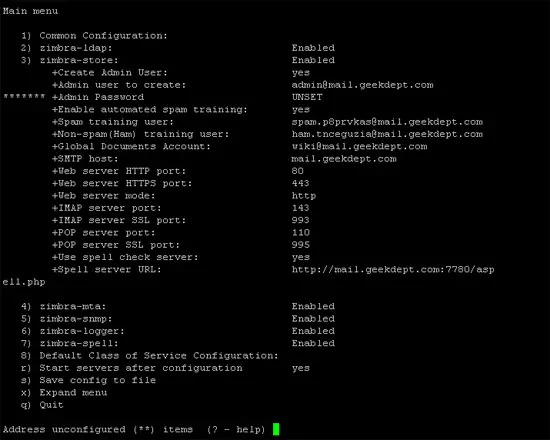
Notice the asterisks next to the Admin Password. You need to set the Admin Password before you complete the install. To do this enter 3 at the prompt and hit enter. The menu changes to:
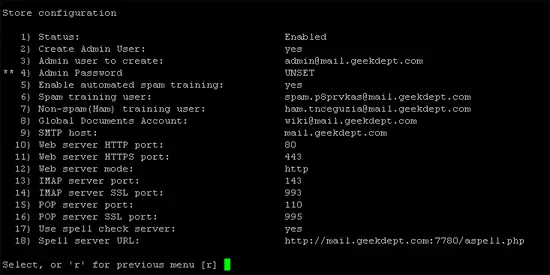
Now you choose 4. You will be prompted to change the password. After you change the password hit r which will take you back to the previous menu. Enter a at the prompt to save the configuration.
The installation will complete and you will be all set to access the administrative web interface.





