
Flash Player 8.5 Linux (Ubuntu Dapper Drake)
Do you like HowtoForge? Please consider supporting us by becoming a subscriber.
|
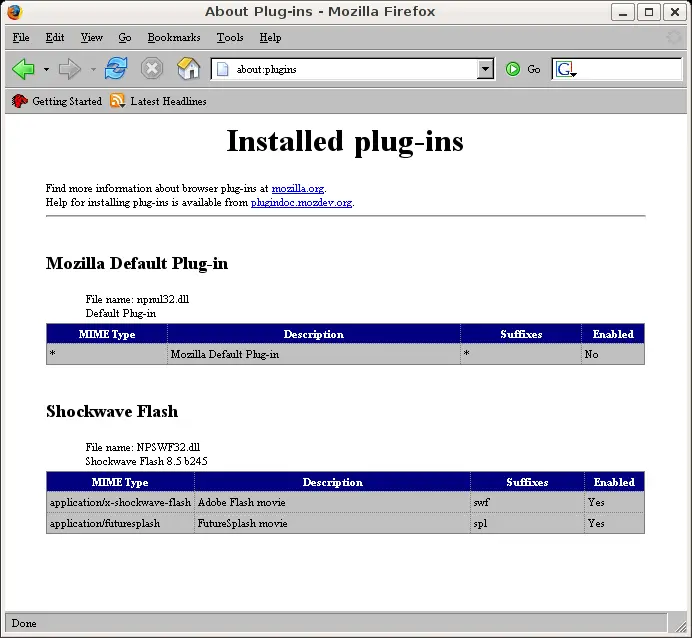
It was tested on Dapper Drake beta 2 (on x86 - 32 bit machine) 1.install wine sudo apt-get install wine 2. install msttcorefonts (optional) sudo apt-get install msttcorefonts 3. Download firefox version for windows (yes you heard it well - Thank you macromedia) wget run the setup wine Firefox\ Setup\ 1.5.0.3.exe 4.Download the macromedia flash 8.5 setup wget http://fpdownload.macromedia.com/get/flashplayer/current/fp8-5_beta/install_flash_player_8-5_beta.exe Start the setup with wine wine install_flash_player_8-5_beta.exe point the plugins directory to c:\Program Files\Mozilla Firefox\plugins 5.start firefox with wine .wine/drive_c/Program\ Files/Mozilla\ Firefox/firefox.exe write about:plugins in the Url bar
|
Sponsored Links:
Unified Communications: Thoughts, Strategies and Predictions
Join the discussion.
www.seamlessenterprise.com
IP Convergence
Integrate your wireless and wireline networks.
Learn how from the experts at Sprint.
www.seamlessenterprise.com
Wireless & Wireline Integration
Thoughts, strategies and solutions: join the discussion
www.seamlessenterprise.com
Unified Communications 2009
Join the Discussion. Now.
www.seamlessenterprise.com
Join the discussion.
www.seamlessenterprise.com
IP Convergence
Integrate your wireless and wireline networks.
Learn how from the experts at Sprint.
www.seamlessenterprise.com
Wireless & Wireline Integration
Thoughts, strategies and solutions: join the discussion
www.seamlessenterprise.com
Unified Communications 2009
Join the Discussion. Now.
www.seamlessenterprise.com


Recent comments
18 hours 38 min ago
20 hours 7 min ago
23 hours 41 min ago
1 day 2 hours ago
1 day 5 hours ago
1 day 6 hours ago
1 day 6 hours ago
1 day 7 hours ago
1 day 8 hours ago
1 day 9 hours ago
