
How To Set Up suPHP On A Debian Sarge Based ISPConfig Server

Version 1.3
Author: <hans> [at] bb-hosting [dot] org>
With this howto I explain how to set up suPHP on a Debian based ISPConfig server with php4. Mainly, it is based on Falko's howto https://www.howtoforge.com/apache2_suphp_php4_php5. Within the forums on Howtoforge, lots of information about "setting up suphp" can be found.
However, this information is spread all over the forums, so it is not very clear how to set up suphp on an ISPConfig server. It was the reason for me to write this howto. When you've setup suPHP on your ISPConfig server, you are able to run the PHP scripts under the admin user of the website instead of www-data.
Important: I have tested this howto on a Debian Sarge server with ISPConfig 2.2.11 and 4.3.10-19 for Apache2, but I do not issue any guarantee that this will work for you!
First make a copy of your /etc/apache2/vhosts/Vhosts_ispconfig.conf. For example copy it to /etc/apache2/vhosts/Vhosts_ispconfig-backup.conf.
On a default ISPConfig server php4 is running as a module. Disable it with the command:
a2dismod php4
Now remove all the phpadmin entries within the original Vhosts_ispconfig.conf file. Restart Apache:
/etc/init.d/apache2 restart
As we removed all the phpadmin entries, you should not have any errors, when Apache2 restarts.
Install suPHP as a DSO, therefore we must install apxs (on Debian Sarge it's apxs2):
apt-get install apache2-prefork-dev
Install PHP4-CGI:
apt-get install php4-cgi
cd /tmp
Install suPHP, version 0.6.2 is the latest stable version at this time:
wget http://www.suphp.org/download/suphp-0.6.2.tar.gz
tar xvfz suphp-0.6.2.tar.gz
cd suphp-0.6.2
vi src/apache2/mod_suphp.c
Replace the lines 324/325 with these two lines below (if you use a different version of suPHP, the linenumbers can be different):
AP_INIT_ITERATE("suPHP_AddHandler", suphp_handle_cmd_add_handler, NULL, RSRC_CONF | ACCESS_CONF, "Tells mod_suphp to handle these MIME-types"),
AP_INIT_ITERATE("suPHP_RemoveHandler", suphp_handle_cmd_remove_handler, NULL, RSRC_CONF | ACCESS_CONF, "Tells mod_suphp not to handle these MIME-types"),
Then we compile and install suPHP:
./configure --prefix=/usr --sysconfdir=/etc --with-apache-user=www-data --with-setid-mode=paranoid --with-apxs=/usr/bin/apxs2
make
make install
Copy the suphp.conf file:
cp /tmp/suphp-0.6.2/doc/suphp.conf-example /etc/suphp.conf
Change the content of /etc/suphp.conf, by using the command:
vi /etc/suphp.conf
It should look like this:
[global]
;Path to logfile
logfile=/var/log/suphp.log

;Loglevel
loglevel=info

;User Apache is running as
webserver_user=www-data

;Path all scripts have to be in
docroot=/

;Path to chroot() to before executing script
;chroot=/mychroot

; Security options
allow_file_group_writeable=true
allow_file_others_writeable=false
allow_directory_group_writeable=true
allow_directory_others_writeable=false

;Check wheter script is within DOCUMENT_ROOT
check_vhost_docroot=true

;Send minor error messages to browser
errors_to_browser=false

;PATH environment variable
env_path=/bin:/usr/bin

;Umask to set, specify in octal notation
umask=0077

; Minimum UID
min_uid=100

; Minimum GID
min_gid=100

[handlers]
;Handler for php-scripts
x-httpd-php=php:/usr/bin/php4-cgi

;Handler for CGI-scripts
x-suphp-cgi=execute:!self
Add the following line to /etc/apache2/httpd.conf, using the command:
vi /etc/apache2/httpd.conf
LoadModule suphp_module /usr/lib/apache2/modules/mod_suphp.so
Restart Apache, using the command:
/etc/init.d/apache2 restart
Edit /home/admispconfig/ispconfig/lib/config.inc.php find the line:
$go_info["server"]["apache2_php"] = 'both';
and change to:
$go_info["server"]["apache2_php"] = 'suphp';
Now, within ISPConfig make a small modification to one of your webs, so that ISPConfig writes a new vhost file. For example enable cgi-scrips for one of your websites or so.
Within your /etc/apache2/vhosts/Vhosts_ispconfig.conf, you will see that ISPConfig has re-written the file, because the lines below are added for every single web:
suPHP_Engine on
suPHP_UserGroup username groupname
AddHandler x-httpd-php .php .php3 .php4 .php5
suPHP_AddHandler x-httpd-php
</VirtualHost>
Important: do not make any manual changes within your /etc/apache2/vhosts/Vhosts_ispconfig.conf file!
When you establish a connection via FTP, you'll see that you can set any permission within your web:
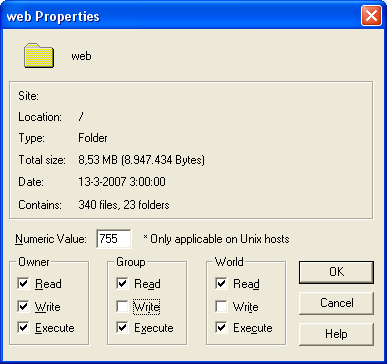
You're also able to run the php scripts under the admin user of the website instead of the system user www-data. This gives the admin user of the website more comfort. suPHP is also very useful when you run a CMS within your web like Joomla. With suPHP enabled Joomla will have enough permissions to function properly, while the admin user of the website has full control! Last but not least, using suPHP is more safe and a more professional solution than using chmod 777 for your website!
If you don't want to use php4-cgi+suPHP for a particular website on your ISPConfig server, there is a solution. Login to your server as root and enable the php4 module for Apache2:
a2enmod php4
Restart Apache2 with:
/etc/init.d/apache2 force-reload
Within ISPConfig, disable php and add the following within the Apache directives field for your site:
<Directory /var/www/webX/web>
AddType application/x-httpd-php .php .php3 .php4
php_admin_flag safe_mode Off
</Directory>
Now your ISPConfig with Debian Sarge, uses PHP4-mod and PHP4-CGI+suPHP. In the most situations you'll only need PHP4-CGI+suPHP. However, if you cannot use the suphp mechanism for some reasons, you can still use php4 as a module for that particular website.





