
Speed Up Your System With Preload On Fedora 8
Version 1.0
Author: Oliver Meyer <o [dot] meyer [at] projektfarm [dot] de>
This document describes how to install preload on Fedora 8. Preload is an adaptive readahead daemon - it will monitor which programs you use at the most. Parts of these programs will be cached to speed up their load time.
This howto is a practical guide without any warranty - it doesn't cover the theoretical backgrounds. There are many ways to set up such a system - this is the way I chose.
1 Installation
Install the following package with yum or your preferred yum-frontend.
- preload
2 Service Settings
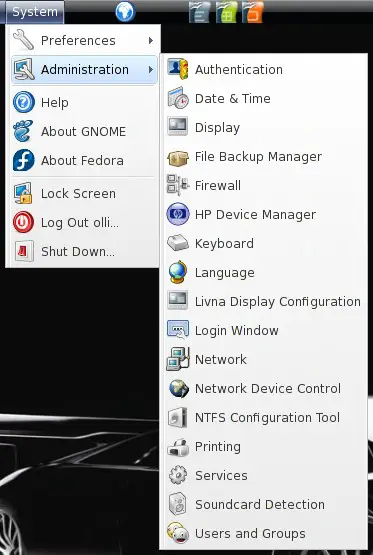
After the installation preload is not running and also deactivated in all runlevels. So open the service settings ...
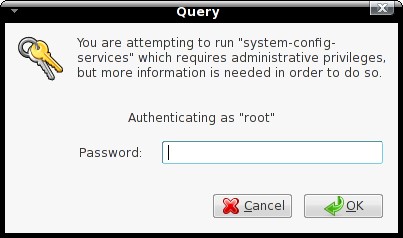
... and enter the root password.
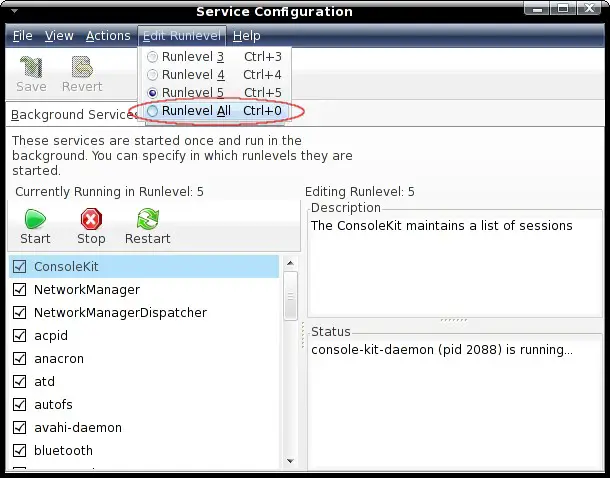
Click on "Edit Runlevel" and choose "Runlevel All".
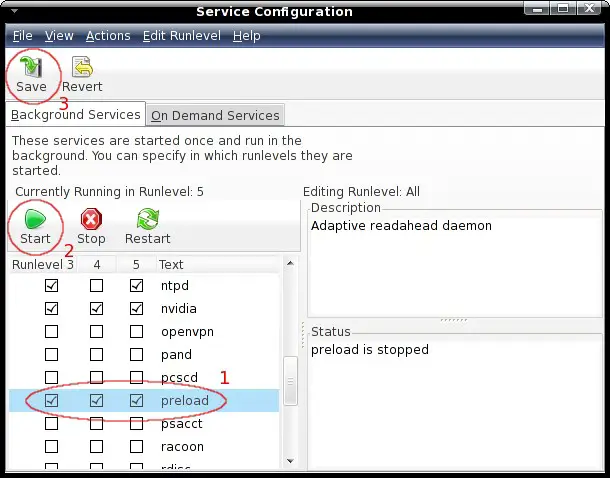
Activate "preload" in all runlevels, start it and save the settings.
3 Configuration (Optional)
Usually there's no need to adjust the configuration - but maybe you have a special reason. Before you should make a backup of the file.
cp /etc/preload.conf /etc/preload.conf.orig
vi /etc/preload.conf
The configuration parameters are well described within the configuration file. If you need more detailed information you should take a look at the documentation - chapter 5.2.
4 Performance
It's difficult to say how your system performance will be affected. For sure it'll take some time till preload learned enough to reduce the load time of your applications noticeable. You should take a look at the documentation - starting with chapter 6.
5 Links
Fedora: http://fedoraproject.org/
Preload: http://preload.sourceforge.net/





