
Setting Up A High-Availability Load Balancer (With Failover and Session Support) With HAProxy/Heartbeat On Debian Lenny - Page 2
5 Setting Up Heartbeat
We've just configured HAProxy to listen on the virtual IP address 192.168.0.99, but someone has to tell lb1 and lb2 that they should listen on that IP address. This is done by heartbeat which we install like this:
lb1/lb2:
aptitude install heartbeat
To allow HAProxy to bind to the shared IP address, we add the following line to /etc/sysctl.conf:
vi /etc/sysctl.conf
[...] net.ipv4.ip_nonlocal_bind=1 |
... and run:
sysctl -p
Now we have to create three configuration files for heartbeat, /etc/ha.d/authkeys, /etc/ha.d/ha.cf, and /etc/ha.d/haresources. /etc/ha.d/authkeys and /etc/ha.d/haresources must be identical on lb1 and lb2, and /etc/ha.d/ha.cf differs by just one line!
lb1/lb2:
vi /etc/ha.d/authkeys
auth 3 3 md5 somerandomstring |
somerandomstring is a password which the two heartbeat daemons on lb1 and lb2 use to authenticate against each other. Use your own string here. You have the choice between three authentication mechanisms. I use md5 as it is the most secure one.
/etc/ha.d/authkeys should be readable by root only, therefore we do this:
lb1/lb2:
chmod 600 /etc/ha.d/authkeys
lb1:
vi /etc/ha.d/ha.cf
# # keepalive: how many seconds between heartbeats # keepalive 2 # # deadtime: seconds-to-declare-host-dead # deadtime 10 # # What UDP port to use for udp or ppp-udp communication? # udpport 694 bcast eth0 mcast eth0 225.0.0.1 694 1 0 ucast eth0 192.168.0.101 # What interfaces to heartbeat over? udp eth0 # # Facility to use for syslog()/logger (alternative to log/debugfile) # logfacility local0 # # Tell what machines are in the cluster # node nodename ... -- must match uname -n node lb1.example.com node lb2.example.com |
Important: As nodenames we must use the output of
uname -n
on lb1 and lb2.
The udpport, bcast, mcast, and ucast options specify how the two heartbeat nodes communicate with each other to find out if the other node is still alive. You can leave the udpport, bcast, and mcast lines as shown above, but in the ucast line it's important that you specify the IP address of the other heartbeat node; in this case it's 192.168.0.101 (lb2.example.com).
On lb2 the file looks pretty much the same, except that the ucast line holds the IP address of lb1:
lb2:
vi /etc/ha.d/ha.cf
# # keepalive: how many seconds between heartbeats # keepalive 2 # # deadtime: seconds-to-declare-host-dead # deadtime 10 # # What UDP port to use for udp or ppp-udp communication? # udpport 694 bcast eth0 mcast eth0 225.0.0.1 694 1 0 ucast eth0 192.168.0.100 # What interfaces to heartbeat over? udp eth0 # # Facility to use for syslog()/logger (alternative to log/debugfile) # logfacility local0 # # Tell what machines are in the cluster # node nodename ... -- must match uname -n node lb1.example.com node lb2.example.com |
lb1/lb2:
vi /etc/ha.d/haresources
lb1.example.com 192.168.0.99 |
The first word is the output of
uname -n
on lb1, no matter if you create the file on lb1 or lb2! It is followed by our virtual IP address (192.168.0.99 in our example).
Finally we start heartbeat on both load balancers:
lb1/lb2:
/etc/init.d/heartbeat start
Then run:
lb1:
ip addr sh eth0
... and you should find that lb1 is now listening on the shared IP address, too:
lb1:/etc/ha.d# ip addr sh eth0
2: eth0: <BROADCAST,MULTICAST,UP,LOWER_UP> mtu 1500 qdisc pfifo_fast state UNKNOWN qlen 1000
link/ether 00:0c:29:63:f7:5c brd ff:ff:ff:ff:ff:ff
inet 192.168.0.100/24 brd 192.168.0.255 scope global eth0
inet 192.168.0.99/24 brd 192.168.0.255 scope global secondary eth0:0
inet6 fe80::20c:29ff:fe63:f75c/64 scope link
valid_lft forever preferred_lft forever
lb1:/etc/ha.d#
You can check this again by running:
ifconfig
lb1:/etc/ha.d# ifconfig
eth0 Link encap:Ethernet HWaddr 00:0c:29:63:f7:5c
inet addr:192.168.0.100 Bcast:192.168.0.255 Mask:255.255.255.0
inet6 addr: fe80::20c:29ff:fe63:f75c/64 Scope:Link
UP BROADCAST RUNNING MULTICAST MTU:1500 Metric:1
RX packets:15838 errors:0 dropped:0 overruns:0 frame:0
TX packets:8761 errors:0 dropped:0 overruns:0 carrier:0
collisions:0 txqueuelen:1000
RX bytes:21111826 (20.1 MiB) TX bytes:844920 (825.1 KiB)
Interrupt:18 Base address:0x1400
eth0:0 Link encap:Ethernet HWaddr 00:0c:29:63:f7:5c
inet addr:192.168.0.99 Bcast:192.168.0.255 Mask:255.255.255.0
UP BROADCAST RUNNING MULTICAST MTU:1500 Metric:1
Interrupt:18 Base address:0x1400
lo Link encap:Local Loopback
inet addr:127.0.0.1 Mask:255.0.0.0
inet6 addr: ::1/128 Scope:Host
UP LOOPBACK RUNNING MTU:16436 Metric:1
RX packets:8 errors:0 dropped:0 overruns:0 frame:0
TX packets:8 errors:0 dropped:0 overruns:0 carrier:0
collisions:0 txqueuelen:0
RX bytes:560 (560.0 B) TX bytes:560 (560.0 B)
lb1:/etc/ha.d#
As lb2 is the passive load balancer, it should not be listening on the virtual IP address as long as lb1 is up. We can check that with:
lb2:
ip addr sh eth0
The output should look like this:
lb2:~# ip addr sh eth0
2: eth0: <BROADCAST,MULTICAST,UP,LOWER_UP> mtu 1500 qdisc pfifo_fast state UNKNOWN qlen 1000
link/ether 00:0c:29:be:7b:3b brd ff:ff:ff:ff:ff:ff
inet 192.168.0.101/24 brd 192.168.0.255 scope global eth0
inet6 fe80::20c:29ff:febe:7b3b/64 scope link
valid_lft forever preferred_lft forever
lb2:~#
The output of
ifconfig
shouldn't display the virtual IP address either:
lb2:~# ifconfig
eth0 Link encap:Ethernet HWaddr 00:0c:29:be:7b:3b
inet addr:192.168.0.101 Bcast:192.168.0.255 Mask:255.255.255.0
inet6 addr: fe80::20c:29ff:febe:7b3b/64 Scope:Link
UP BROADCAST RUNNING MULTICAST MTU:1500 Metric:1
RX packets:15689 errors:0 dropped:0 overruns:0 frame:0
TX packets:9010 errors:0 dropped:0 overruns:0 carrier:0
collisions:0 txqueuelen:1000
RX bytes:21151306 (20.1 MiB) TX bytes:879697 (859.0 KiB)
Interrupt:18 Base address:0x1400
lo Link encap:Local Loopback
inet addr:127.0.0.1 Mask:255.0.0.0
inet6 addr: ::1/128 Scope:Host
UP LOOPBACK RUNNING MTU:16436 Metric:1
RX packets:8 errors:0 dropped:0 overruns:0 frame:0
TX packets:8 errors:0 dropped:0 overruns:0 carrier:0
collisions:0 txqueuelen:0
RX bytes:560 (560.0 B) TX bytes:560 (560.0 B)
lb2:~#
6 Starting HAProxy
Now we can start HAProxy:
lb1/lb2:
/etc/init.d/haproxy start
7 Testing
Our high-availability load balancer is now up and running.
You can now make HTTP requests to the virtual IP address 192.168.0.99 (or to any domain/hostname that is pointing to the virtual IP address), and you should get content from the backend web servers.
You can test its high-availability/failover capabilities by switching off one backend web server - the load balancer should then redirect all requests to the remaining backend web server. Afterwards, switch off the active load balancer (lb1) - lb2 should take over immediately. You can check that by running:
lb2:
ip addr sh eth0
You should now see the virtual IP address in the output on lb2:
lb2:~# ip addr sh eth0
2: eth0: <BROADCAST,MULTICAST,UP,LOWER_UP> mtu 1500 qdisc pfifo_fast state UNKNOWN qlen 1000
link/ether 00:0c:29:be:7b:3b brd ff:ff:ff:ff:ff:ff
inet 192.168.0.101/24 brd 192.168.0.255 scope global eth0
inet 192.168.0.99/24 brd 192.168.0.255 scope global secondary eth0:0
inet6 fe80::20c:29ff:febe:7b3b/64 scope link
valid_lft forever preferred_lft forever
lb2:~#
The same goes for the output of
ifconfig
When lb1 comes up again, it will take over the master role again.
8 HAProxy Statistics
You might have noticed that we have used the options stats enable and stats auth someuser:somepassword in the HAProxy configuration in chapter 4. This allow us to access (password-protected) HAProxy statistics under the URL http://192.168.0.99/haproxy?stats. This is how it looks:
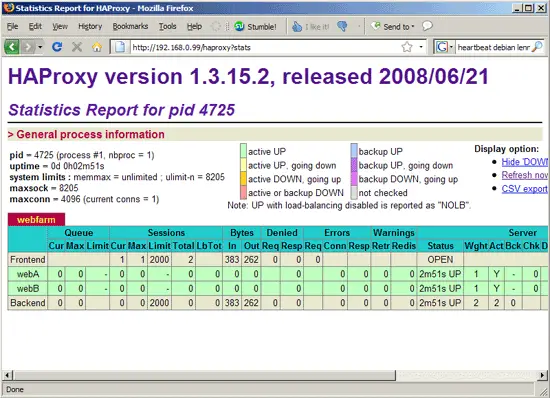
If you don't need the statistics, just comment out or remove the stats lines from the HAProxy configuration.
9 Links
- HAProxy: http://haproxy.1wt.eu
- Heartbeat: http://www.linux-ha.org/Heartbeat
- Debian: http://www.debian.org





