
Secure your SSH deployment with WiKID two-factor authentication
SSH offers a highly secure channel for remote administration of servers. However, if you face an audit for regulatory or business requirements, such as Visa/Mastercard PCI, you need to be aware of some potential authentication related short-comings that may cause headaches in an audit. For example:
- There is no way to control which users have public key authorization
- There is no way to enforce passphrase complexity (or even be sure that one is being used)
- There is no way to expire a public key
In this document we are going to demonstrate how to combine two-factor authentication from WiKID with an SSH gateway server with hosted private keys to create a highly secure, auditable and easy to use remote access solution. The WiKID Strong Authentication System is a commercial/open source two-factor authentication solution. First, we will configure a domain on the WiKID server, then add the servers as network clients to the WiKID server, and finally configure the gateway box and the targets servers - in our case, Fedora Core 6 servers.
Adding a domain to the WiKID server
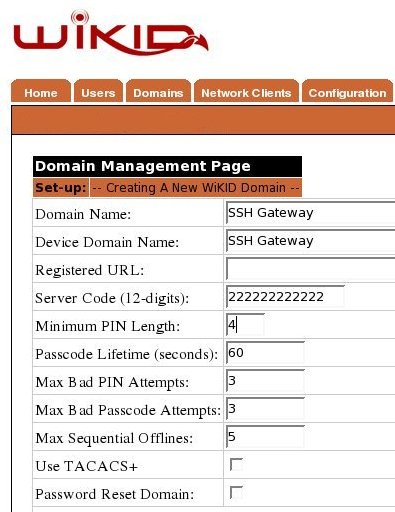
Create a network client
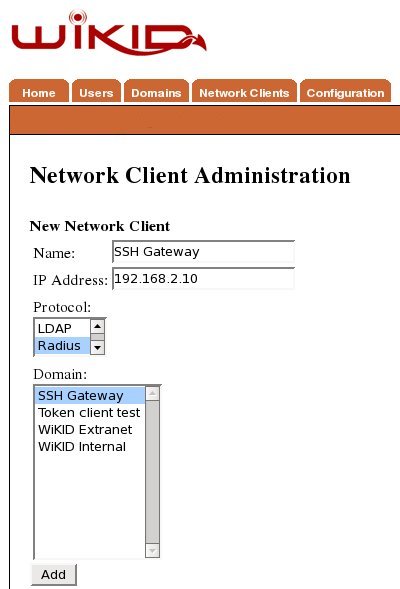
After saving the domain information, click on the Network Client tab and Create New Network Client. Enter a name for this client and the IP Address of the SSH gateway on the internal network. Select Radius as the protocol and the domain you created above as the domain.
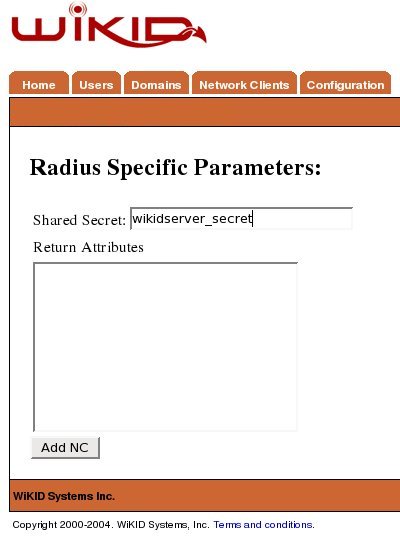
Click Add to get the next page and enter the shared secret for Radius.
You will need to repeat this process for each server on your network.
Configure the SSH Gateway
Now we will configure the central SSH gateway. This linux box is the gateway/proxy to all the production servers in the farm. It should be locked down tight with no extraneous software or services running on it. It should have an external interface for in-bound connections and an internal interface for internal connections. First, we will configure the gateway box to use WiKID for strong authentication of SSH users. Edit your /etc/pam.d/sshd file thusly:
#%PAM-1.0
auth       sufficient   /lib/security/pam_radius_auth.so
auth       include      system-auth
account    required     pam_nologin.so
account    include      system-auth
password   include      system-auth
session    include      system-auth
session    required     pam_loginuid.so
Add your WiKID server to the /etc/raddb/server file, using the internal IP Address of the WiKID server and the shared secret you entered in the Network Client creation page:
# server[:port] shared_secret      timeout (s)
127.0.0.1       secret             1
xxx.xxx.xxx.xx  wikidserver_secret 3
Let's add some security to SSH configuration here too. Open your /etc/ssh/sshd_config (not the nearby ssh_config file). Add these configuration options:
#Protocol 2,1
#Check that only protocol 2 is allowed:
Protocol 2
#Disallow root login:
PermitRootLogin no
#Disallow accounts without passwords:
PermitEmptyPasswords no
If you want to change the port you can. It won't stop an attacker, but it might cut down on log events caused by script kiddies. This gateway box is now set to use WiKID one-time passwords for SSH authentication. All users have to be registered with the WiKID server and no one can login as root. Before we leave this box, we'll do something that is a little bit different - we will have the users create their RSA private key on the gateway. Once each users is signed into the box with WiKID, have them create their keys:
ssh-keygen -t rsa
In my opinion, passphrases for these keys are redundant. They are here only to create a single sign on functionality into the server farm. Obviously, you must be careful to be sure that users do not have access to other keys.
Configure the target servers
Obviously, we configure these servers to only accept incoming SSH requests from the gateway. We do this by restricting access on port 22 to our internal addresses. Edit /etc/sysconfig/iptables and add or edit the line for SSH on port 22:
-A RH-Firewall-1-INPUT -m state --state NEW -m tcp -p tcp -s 192.168.1.0/24 --dport 22 -j ACCEPT
Chances are that you can use the standard set up for sshd_config, which allows for public key authentication. So, we're done!
Conclusion
Remote SSH is now extremely secure. No user can get access to the server farm without first getting a one-time passcode from the WiKID server. The two-factors of authentication are possession of the WiKID token (and it's cryptographic key) and knowledge of the PIN. Because the PIN is validated on the WiKID server, it is very easy to disable a user. Everything is logged and any auditor should be very pleased.
Additionally, you could require a WiKID one-time passcode for root access on internal machines. Just create create a new domain for su and edit /etc/pam.d/su appropriately. This will also allow you to break the servers into different groups for management. Just create For example, if you have a set of servers for HR to which only certain admins have root access, they can be configured for a specific WiKID domain - allowing fine grained access control and strong authentication. Get more information on two-factor authentication from WiKID website.





