
On this page
Using Ruby On Rails With Apache2 On Debian Etch
Version 1.0
Author: Falko Timme
This article shows how you can install Ruby on Rails (RoR) and integrate it in Apache2 on a Debian Etch system (including a short section at the end showing how to use RoR in a web site created with ISPConfig). Ruby on Rails is a web application framework which is rapidly gaining popularity among web programmers. It aims to increase the speed and ease with which database-driven web sites can be created and offers skeleton code frameworks (scaffolding) from the outset. Applications using the RoR framework are developed using the Model-View-Controller design pattern.
This document comes without warranty of any kind! I want to say that this is not the only way of setting up such a system. There are many ways of achieving this goal but this is the way I take. I do not issue any guarantee that this will work for you!
1 Preliminary Note
I will use the hostname testapplication.example.com in this tutorial for the virtual host running Ruby on Rails.
2 Installing Ruby And Rails
In order to install Ruby and Ruby on Rails, we simply run
apt-get install ruby libzlib-ruby rdoc irb rubygems rails eruby
3 Installing Apache2 And mod-fcgid
Ruby on Rails can be integrated in Apache2 using mod-fcgid. Therefore we install the following packages:
apt-get install apache2 libapache2-mod-fcgid libfcgi-ruby1.8
Afterwards, we enable a few Apache modules:
a2enmod ssl
a2enmod rewrite
a2enmod suexec
a2enmod include
and reload Apache:
/etc/init.d/apache2 force-reload
4 Installing MySQL And The Ruby MySQL Bindings
Most probably you or your users will like to create database-driven Ruby on Rails applications, therefore we install the MySQL server and the Ruby MySQL bindings now:
apt-get install libmysql-ruby mysql-server
You should set a root password for MySQL now:
mysqladmin -u root password yourrootsqlpassword
If MySQL is listening not only on 127.0.0.1, but on other addresses as well (e.g. server1.example.com), you should set a root password for these addresses as well:
mysqladmin -h server1.example.com -u root password yourrootsqlpassword
5 Creating Our Ruby On Rails Environment
We can now create a directory in which we want to develop our future RoR applications. I'd like to develop them in /var/rails, so I create that directory now:
mkdir /var/rails
Apache2 should have read/write access to that directory, so we make the Apache user (www-data on Debian) and Apache group (again www-data) the owner and group of that directory:
chown -R www-data:www-data /var/rails</p> <p>Now we can create our first RoR application which we will call <span class="system">testapplication</span>. We will create <span class="system">testapplication</span> under the user <span class="system">www-data</span> so that Apache has read/write access to it:</p> <p class="command">cd /var/rails<br> su -m www-data</p> <p>Now that we're logged in as <span class="system">www-data</span>, we run</p> <p class="command">rails testapplication</p> <p>This will create a directory called <span class="system">testapplication</span> within <span class="system">/var/rails</span> that contains all directories and files we need to develop our RoR application.</p> <p>Next, we type in</p> <p class="command">exit</p> <p>to become the root user again.</p> <img src="data:image/gif;base64,R0lGODlhAQABAIAAAAAAAP///yH5BAEAAAAALAAAAAABAAEAAAIBRAA7" class="mce-pagebreak" data-mce-resize="false" data-mce-placeholder />
6 Modifying Our Application's .htaccess File
The web folder of testapplication is /var/rails/testapplication/public. It contains an .htaccess file that we must modify so that Apache2 can run RoR applications using mod-fcgid.
vi /var/rails/testapplication/public/.htaccess
Comment out the AddHandler fastcgi-script .fcgi and AddHandler cgi-script .cgi lines and add the line AddHandler fcgid-script .fcgi. Also comment out the line RewriteRule ^(.*)$ dispatch.cgi [QSA,L] and add the line RewriteRule ^(.*)$ dispatch.fcgi [QSA,L] (note that it's now dispatch.fcgi instead of dispatch.cgi). Afterwards, the file should look like this:
# General Apache options
#AddHandler fastcgi-script .fcgi
#AddHandler cgi-script .cgi
AddHandler fcgid-script .fcgi
Options +FollowSymLinks +ExecCGI

# If you don't want Rails to look in certain directories,
# use the following rewrite rules so that Apache won't rewrite certain requests
#
# Example:
#   RewriteCond %{REQUEST_URI} ^/notrails.*
#   RewriteRule .* - [L]

# Redirect all requests not available on the filesystem to Rails
# By default the cgi dispatcher is used which is very slow
#
# For better performance replace the dispatcher with the fastcgi one
#
# Example:
#   RewriteRule ^(.*)$ dispatch.fcgi [QSA,L]
RewriteEngine On

# If your Rails application is accessed via an Alias directive,
# then you MUST also set the RewriteBase in this htaccess file.
#
# Example:
#   Alias /myrailsapp /path/to/myrailsapp/public
#   RewriteBase /myrailsapp

RewriteRule ^$ index.html [QSA]
RewriteRule ^([^.]+)$ $1.html [QSA]
RewriteCond %{REQUEST_FILENAME} !-f
#RewriteRule ^(.*)$ dispatch.cgi [QSA,L]
RewriteRule ^(.*)$ dispatch.fcgi [QSA,L]

# In case Rails experiences terminal errors
# Instead of displaying this message you can supply a file here which will be rendered instead
#
# Example:
#   ErrorDocument 500 /500.html

ErrorDocument 500 "<h2>Application error</h2>Rails application failed to start properly"
|
7 Creating A Virtual Host For Our RoR Application
(If you use ISPConfig, please go to chapter 8!)
Now it's time to create an Apache vhost for our application. I will use the hostname testapplication.example.com so that our application can be reached under http://testapplication.example.com (assuming that testapplication.example.com points to the correct IP address).
The easiest way to create such a vhost is to replace the existing default vhost in /etc/apache2/sites-available/default (assuming that this default vhost isn't needed!):
cp /etc/apache2/sites-available/default /etc/apache2/sites-available/default_old
cat /dev/null > /etc/apache2/sites-available/default
vi /etc/apache2/sites-available/default
<Virtualhost *:80>
   ServerName testapplication.example.com
   DocumentRoot /var/rails/testapplication/public/

   <Directory /var/rails/testapplication/public>
      Options ExecCGI FollowSymLinks
      AllowOverride all
      Order allow,deny
      Allow from all
   </Directory>
</Virtualhost>
|
Of course, instead of replacing the default vhost, you can simply add your testapplication.example.com vhost at the end of /etc/apache2/sites-available/default so that you keep the default vhost.
Now we restart Apache:
/etc/init.d/apache2 restart
Next we open http://testapplication.example.com in a browser. We should see the default RoR page:
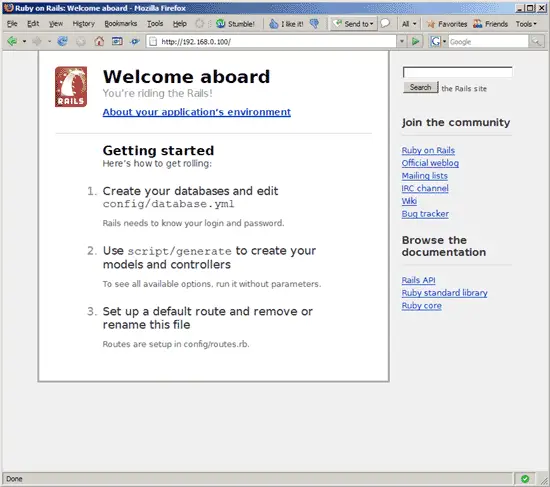
That's it! Now we can start to develop our RoR application in the /var/rails/testapplication directory.
8 RoR And ISPConfig
(If you don't use ISPConfig, skip this chapter!)
In this chapter I assume that you have created a web site called testapplication.example.com with the document root /var/www/web1/web in ISPConfig, and that your RoR testapplication is still in /var/rails/testapplication.
To make our RoR testapplication available in the testapplication.example.com vhost which we have created in ISPConfig, we do the following:
First, we put the following lines into the Apache Directives field of the testapplication.example.com web site in ISPConfig:
<Directory /var/www/web1/web> Options +ExecCGI +FollowSymLinks AllowOverride all </Directory> |
Then we rename /var/rails/testapplication/public to /var/rails/testapplication/web, copy the contents of /var/rails/testapplication to /var/www/web1, and make the Apache user the owner of /var/www/web1/web:
cd /var/rails/testapplication
mv public web
cp -pfr * /var/www/web1
chown www-data:web1 /var/www/web1/web
That's it. The RoR application should now work in the testapplication.example.com vhost which we have created in ISPConfig.
9 Links
- Ruby on Rails: http://www.rubyonrails.org
- Ruby: http://www.ruby-lang.org
- Debian: http://www.debian.org
- ISPConfig: http://www.ispconfig.org





