
RoundCube Webmail On Your ISPConfig Server Within 10 Easy Steps

Version 2.1
Author: <hans> [at] bb-hosting [dot] org>
There are a nice RoundCube packages available for ISPConfig at http://www.ispconfig.org/downloads.htm
The RoundCube package of your choice can be installed with the ISPConfig update Manager. However, if you prefer to setup RoundCube on your ISPConfig server in the webspace of your choice running on port 80, you can use this “How to” as an alternative.In this how to I will use as an example:
- domainname webmail.myhostingcompany.tld
- MySQL databasename: web_db1
- MySQL username: web1_u1
- MySQL user password: mysqlpassword
- RoundCube version 0.1.1
When you are finished with this “How to”, you have a nice webmail client at URL http://webmail.myhostingcompany.tld.
Step 2 is not really necessary but can be very practical if you want to upload/download your website using FTP. This is very useful if you want to customize the RoundCube website on your local desktop.
Here we go:
Step 1 - Create a website:
In ISPConfig, create a website via “New site” in the main menu.
On the tab called “Basis” use webmail for the hostname and myhostingcompany.tld for the domain name. Enable MySQL and PHP scripts for this website but disable PHP Safe Mode. RoundCube makes use of .htaccess files. To allow these files within your website, add the following lines within the Apache directive field of your website:
<Directory "/var/www/web1/web">
Options FollowSymLinks
AllowOverride All
</Directory>
Step 2 – Create an Administator user for the website:
In ISPConfig, create a Administrator user, so you can upload the website later via FTP:
In the main menu select “ISP Manager”, select your new website called webmail.myhostingcompany.tld in the structure tree and press the tab “User and Email”.
Press “new” and define a new user and its email address. Give this user administrator rights and press “Save”.
Step 3 - Create a MySQL database for the website:
Click on the tab called “Options” and create a new database for the website.
ISPConfig will show you:
Database name: web1_db1 (example)
Database user: web1_u1 (example)
Then you define a password for the Database user and press “Save”.
Step 4 – Download/extract the packages and remove some files:
- Login to your server as root.
The most stable release at this moment is version 0.1.1.
Change to the web where you want to download RoundCube by giving the command:
cd /var/www/web1/web/
wget http://downloads.sourceforge.net/roundcubemail/roundcubemail-0.1.1.tar.gz
Extract RoundCube with the command:
tar xzf roundcubemail-0.1.1.tar.gz
Remove the tar.gz files:
rm *.tar.gz
Step 5 - Move the files to the web directory and delete the empty directory:
cd roundcubemail-0.1.1
mv * ../
cd ../
rmdir roundcubemail-0.1.1
Step 6 – making the temp and logs directory read/writeable for Apache:
Whitin your web /var/www/web1/web folder, you give your web server process read/write privileges to all folders in the temp and logs directory by giving these commands:
chown -R www-data:www-data temp
chown -R www-data:www-data logs
(This is how it workes on Debian Linux, other distros might differ).
It is also possible to chmod the temp and logs directories to 777 but this is not secure.
cd /var/www/web1/
chown -R -v -f webadmin:web1 web/(Remember that "web1" and the username "webadmin" are according my example, use your own webnumber and username instead !)
Step 7 – Configure RoundCube (manually):
With this method, you have more options available!
Navigate to the config folder with the command:
cd config
In here you will find two files, db.inc.php.dist and main.inc.php.dist.
Rename main.inc.php.dist and db.inc.php.dist by removing .dist.
You now have two files db.inc.php and main.inc.php.
Modifications to make in file db.inc.php:
Open db.inc.php in a text editor.
We give RoundCube a way to access our newly created database by changing the line:
$rcmail_config[’db_dsnw’]=’mysql:// roundcube:pass@localhost/roundcubemail’;
into:
$rcmail_config[’db_dsnw’]=’mysql:// web1_u1:mysqlpassword@localhost/web1_db1’;
Make sure that you have the follwowing line as well:
$rcmail_config['db_backend'] = 'mdb2';
Modifications to make in file main.inc.php:
Open your main.inc.php file with a text editor:
Changes to be made in main.inc.php:
Change the line:
$rcmail_config[’default_host’] = '’;
into
$rcmail_config[’default_host’] = ‘localhost’;
or into:
$rcmail_config[’default_host’] = ‘’;
if you prefer to choose a server name at login.
You can keep all the configuration settings as default, but make sure you have the following lines:
$rcmail_config['default_port'] = 143;
$rcmail_config['virtuser_file'] = '/etc/postfix/virtusertable';
$rcmail_config['smtp_server'] = '';
$rcmail_config['smtp_port'] = 25;
$rcmail_config['create_default_folders'] = TRUE;
$rcmail_config['prefer_html'] = TRUE;
$rcmail_config['htmleditor'] = FALSE;
$rcmail_config['preview_pane'] = TRUE;
$rcmail_config['enable_spellcheck'] = TRUE;
The next line needs extra attention for security reasons:
$rcmail_config['des_key'] = '';
Replace '' with a string of exactly 24 chars!
When a user logs in with the email address for the first time, within RoundCubes the identities section, the e-mail address will be displayed like: [email protected]. As we want the email address to be displayed like [email protected] do the following:
Change the line 709 within /program/include/main.inc file from:
709 $line = trim($line);
to:
709 $line = trim(str_replace("www.", "", $line));
Make sure that you have the following line within your php.ini file:
; Magic quotes for incoming GET/POST/Cookie data.
magic_quotes_gpc = Off
If it was necesarry to change the line from
magic_quotes_gpc = On
into
magic_quotes_gpc = Off
then restart Apache2 afterwards with the command:
/etc/init.d/apache2 restart
Step 8 – Configure RoundCube (alternative way using the installer script):
RoundCube comes with a nice installer script. This alternative method is a very easy way to configure RoundCube.Within your browser, visit your new RoundCube website at http://webmail.yourhostingcompany.tld/installer/index.php.
Read the basic requirements and press the button "START INSTALLATION".
On the screen "Check Environment" the system requirements are verified.
If one ore more system requirements are displayed within the color red, the configuration needs to be changed to garanty that RoundCube will function properly.
On a default ISPConfig server, everyhing should be ok, probably you only need to turn off magic_quotes_gpc within your php.ini file.
If the system requirements for are fine, press the button "NEXT".
On the "Create config" screen you can define the required system configuration.
Define the configuration settings, like we did before under Step 7 of this how to.
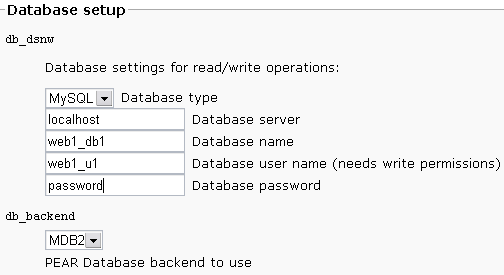
Define the database settings according our MySQL database as we have defined within ISPConfig: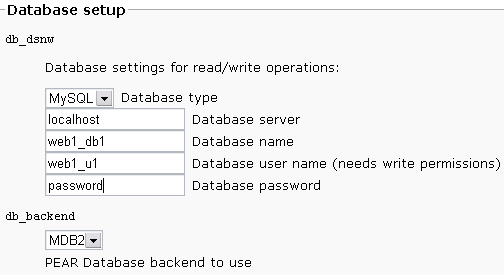
Finally press the button "CREATE CONFIG".
Two configurations are displayed.
Copy the first configuration within the file main.inc.php and the second configuration within the file db.inc.php. Save these files within the config/ directory of your RoundCube installation.
Press the button "Continue"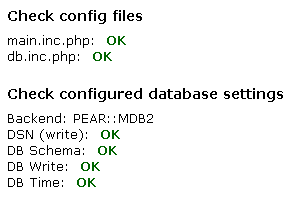
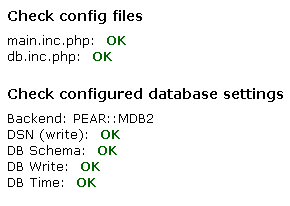
The results are displayed.
Now we test the SMTP and IMAP configuration.
After completing the installation and the final tests please remove the whole installer folder from the document root of your RoundCube installation.
Finally, change the line 709 within /program/include/main.inc file as described within step 7 within this howto.
Step 9 – access your new webmail client:
Now you can point to your new webmail client with your favourite browser. The address according my how to is: http://webmail.myhostingcompany.tld
You can login with any valid username/password or email address/password combination, as defined within ISPConfig.
After your first login you should make some settings before you start using RoundCube. Here, the first thing you have to do is define your identity. You can define more than one identity for an email address but you need at least one. When you create an identity, change also @localhost within @yourdomain.tld if necessary.
STEP 10 – Customizing RoundCube:
If you like to customize RoundCube webmail, I refer to the how to of Paul Stamatiou at URL: http://paulstamatiou.com/2005/10/29/how-to-setup-roundcube-webmail-on-your-server/
Before you start to customize RoundCube, I recommend to download it first using your administrator account as mentioned in STEP 2. Customizing RoundCube webmail on your local desktop is more comfortable.
Information:
More information about RoundCube: http://www.roundcube.net/
Specials thanks to:
Pauls Stamatiou, who wrote and published a nice how to for setting up RoundCube http://paulstamatiou.com/2005/10/29/how-to-setup-roundcube-webmail-on-your-server/
The Howtoforge members for their useful input!




