
Watching Your Power Consumption With Powertop On Fedora 7
Version 1.0
Author: Falko Timme
Powertop is a command-line tool released by Intel that shows you the power consumption of the applications running on your system. It works best on notebooks with Intel mobile processors and can help you find out the programs that put a strain on your notebook battery. It requires kernel 2.6.21 or newer with tickless idle enabled (CONFIG_NO_HZ) (which is currently available for 32-bit kernels only). Fedora 7 comes with a 2.6.21 kernel by default, so we can use Powertop on it.
This document comes without warranty of any kind! I do not issue any guarantee that this will work for you!
1 Preliminary Note
I have tested this on a Fedora 7 system (kernel 2.6.21, 32-bit).
As I mentioned above, only kernel 2.6.21 and newer are supported, and 64-bit kernels are currently not working with Powertop.
Powertop works best with these options enabled in the kernel:
CONFIG_NO_HZ
CONFIG_HIGH_RES_TIMERS
CONFIG_HPET_TIMER
CONFIG_CPU_FREQ_GOV_ONDEMAND
CONFIG_USB_SUSPEND
CONFIG_SND_AC97_POWER_SAVE
CONFIG_TIMER_STATS
And the following options should be disabled:
CONFIG_IRQBALANCE
CONFIG_ACPI_DEBUG
However, the default Fedora 7 kernel is working fine, so no kernel compilation is needed.
2 Installing Powertop
There are currently no Powertop packages in the official Fedora 7 repositories, so we must install it manually which isn't difficult at all. First we download the latest Powertop version to a directory on the system (e.g. /tmp) and unpack it:
cd /tmp
wget http://www.linuxpowertop.org/download/powertop-1.8.tar.gz
tar xvfz powertop-1.8.tar.gz
This creates a new directory, powertop-1.8 (or whatever Powertop version you are installing), to which we change now and run the installation:
cd powertop-1.8
make
make install
That's it. If you see no errors, Powertop is now installed and ready to be used.
3 Using Powertop
Powertop usage is similar to the top command. Simply run
powertop
and it will show you the power consumption over the time. To leave Powertop, simply press q.
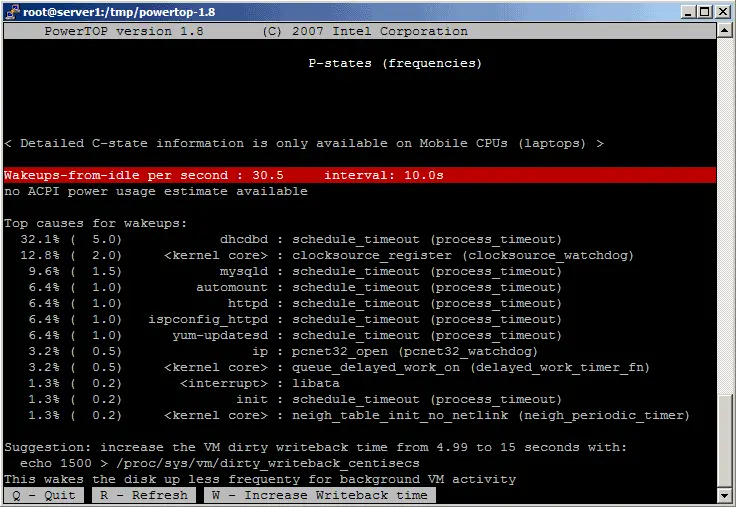
This is how Powertop looks:
4 Links
- Powertop: http://www.linuxpowertop.org
- Fedora: http://fedoraproject.org





