
How To Harden PHP5 With Suhosin On Fedora 7 - Page 2
On this page
4 Installing Suhosin
Suhosin can be downloaded from here: http://www.hardened-php.net/suhosin/download.html
To install the Suhosin patch, we need to recompile PHP5 from the sources, but we will use the Fedora 7 PHP5 .src.rpm package for this (using the rpmbuild command), so that we get new PHP5 .rpm packages (with Suhosin) that we can install. That way, we don't have to worry about the right PHP5 configuration options because rpmbuild will take care of this.
But first we grab a copy of the Hardened-PHP Project's release signaturekey and import it into our GNU Privacy Guard keychain:
wget http://www.hardened-php.net/hardened-php-signature-key.asc
gpg --import < hardened-php-signature-key.asc
Then we download a PHP5 .src.rpm package (that suits our currently installed PHP version, 5.2.2 in this example) from a Fedora 7 mirror to /usr/src and install it:
cd /usr/src
wget http://ftp-stud.fht-esslingen.de/pub/Mirrors/fedora/linux/releases/7/Fedora/source/SRPMS/php-5.2.2-3.src.rpm
rpm -ivh php-5.2.2-3.src.rpm
If you get warnings like this one:
warning: group kojibuilder does not exist - using root
you can ignore it.
Next we download the Suhosin patch that suits our PHP version to /usr/src/redhat/SOURCES (you can find all available patches on the Suhosin downloads page):
cd /usr/src/redhat/SOURCES
wget http://www.hardened-php.net/suhosin/_media/suhosin-patch-5.2.2-0.9.6.2.patch.gz
We should check now that the MD5 sum of the downloaded patch is identical to the one published on the Suhosin downloads page:
md5sum suhosin-patch-5.2.2-0.9.6.2.patch.gz
If the MD5 sum is ok, we can check the digital signature like this:
wget http://www.hardened-php.net/suhosin/_media/suhosin-patch-5.2.2-0.9.6.2.patch.gz.sig
gpg suhosin-patch-5.2.2-0.9.6.2.patch.gz.sig
If you see this line in the output:
gpg: Good signature from "Hardened-PHP Signature Key"
everything is ok with the downloaded patch, and we can proceed.
Now we unpack the Suhosin patch, rename it so that it fits into Fedora's naming scheme, and modify the file /usr/src/redhat/SPECS/php.spec so that the rpmbuild command knows it has to include the Suhosin patch when it rebuilds PHP5:
gunzip suhosin-patch-5.2.2-0.9.6.2.patch.gz
mv suhosin-patch-5.2.2-0.9.6.2.patch php-5.2.2-suhosin.patch
cd /usr/src/redhat/SPECS/
vi php.spec
Add Patch0: php-5.2.2-suhosin.patch to the stanza where all patches are listed, and %patch0 -p1 -b .suhosin to the %setup -q stanza:
[...] Source3: macros.php Patch0: php-5.2.2-suhosin.patch Patch1: php-5.1.4-gnusrc.patch [...] %setup -q %patch0 -p1 -b .suhosin %patch1 -p1 -b .gnusrc [...] |
Now we rebuild PHP5:
rpmbuild -ba php.spec
Depending on what PHP5 modules you have installed, rpmbuild will most likely complain about missing packages that it needs to build new packages for the various PHP5 modules:
[root@server1 SPECS]# rpmbuild -ba php.spec
cat: /usr/include/httpd/.mmn: No such file or directory
error: Failed build dependencies:
        aspell-devel >= 0.50.0 is needed by php-5.2.2-3.i386
        httpd-devel >= 2.0.46-1 is needed by php-5.2.2-3.i386
        pcre-devel >= 4.5 is needed by php-5.2.2-3.i386
        uw-imap-devel is needed by php-5.2.2-3.i386
        mysql-devel >= 4.1.0 is needed by php-5.2.2-3.i386
        postgresql-devel is needed by php-5.2.2-3.i386
        unixODBC-devel is needed by php-5.2.2-3.i386
        net-snmp-devel is needed by php-5.2.2-3.i386
        libxslt-devel >= 1.0.18-1 is needed by php-5.2.2-3.i386
[root@server1 SPECS]#
If you see an error like this, install the missing packages, e.g. like this:
yum install aspell-devel httpd-devel pcre-devel uw-imap-devel mysql-devel postgresql-devel unixODBC-devel net-snmp-devel libxslt-devel
Afterwards, run rpmbuild again:
rpmbuild -ba php.spec
This should now compile PHP5 and all installed PHP5 modules again and create new .rpm packages in the /usr/src/redhat/RPMS/i386 directory. This can take some time, so please be patient.
Afterwards, we can install the new PHP5 packages like this:
cd /usr/src/redhat/RPMS/i386
rpm -Uvh --force php-*
That's it for the Suhosin patch.
Now we are going to build the Suhosin PHP extension. First we download its sources to the /usr/src directory (the sources of the Suhosin extension are available on the Suhosin downloads page):
cd /usr/src
wget http://www.hardened-php.net/suhosin/_media/suhosin-0.9.20.tgz
Next we check the MD5 sum and the signature again:
md5sum suhosin-0.9.20.tgz
wget http://www.hardened-php.net/suhosin/_media/suhosin-0.9.20.tgz.sig
gpg suhosin-0.9.20.tgz.sig
Then we unpack the sources and build the extension like this:
tar xvfz suhosin-0.9.20.tgz
cd suhosin-0.9.20
phpize
./configure
make
make install
To enable the Suhosin extension, we create the file /etc/php.d/suhosin.ini and put the line extension=suhosin.so into it:
vi /etc/php.d/suhosin.ini
extension=suhosin.so |
All that is left to do now is restart Apache2:
/etc/init.d/httpd restart
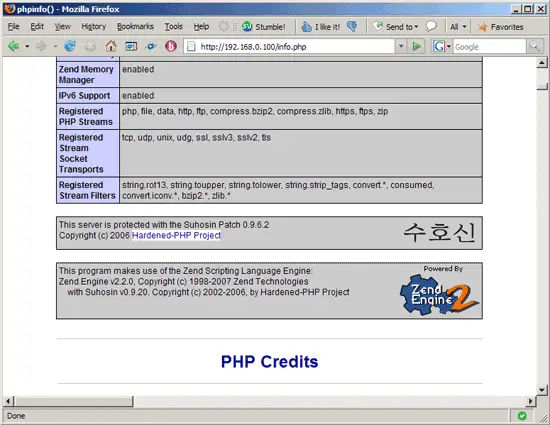
Now let's call our info.php page again in a browser (e.g. http://192.168.0.100/info.php). If everything went ok, you should now see Suhosin mentioned in two places on the page:
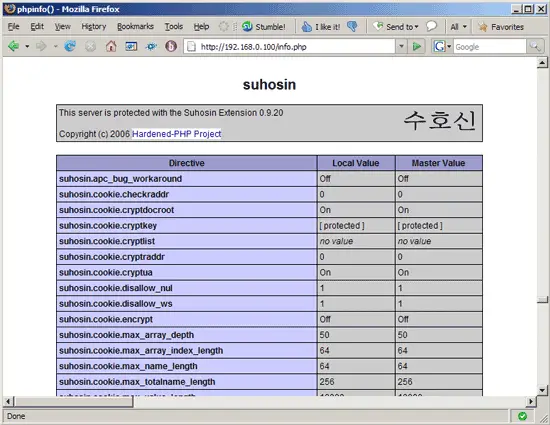
That's it. If you like you can configure Suhosin (see http://www.hardened-php.net/suhosin/configuration.html), although Suhosin will work out of the box with its default configuration, so be sure that you know what you're doing.
5 Links
- Suhosin: http://www.hardened-php.net/suhosin/index.html
- PHP: http://www.php.net
- Fedora: http://fedoraproject.org





