
The Perfect Server - Gentoo 2007.0 - Page 4
7 Install some software
Optionally we can install a couple of things to make our time at the commandline more comfortable. It makes no real functional difference to the "perfect setup". Install vim in this fashion even if you pushed it onto the chroot system earlier, as this will install it properly.
emerge --ask --verbose gentoolkit vim
Now you can change the default editor, if you don't want it to be nano.
vi /etc/rc.conf
Change the EDITOR property to your desired value. This will take effect from the next time you log in, or your can just type now,
source /etc/rc.conf
We already have most of the development files we need, and any others we will need will be brought in as we install their main software. As this is Gentoo there is no division commonly seen on other distributions between a package and the package-dev version.
emerge --ask --verbose expect fetchmail ncftp netkit-telnetd unzip zip
8 Create an administrator user
While not strictly necessary to make the system work, this will standardise things with the perfect setup for other distributions. We'll create a user called administrator and allow that user to use sudo.
groupadd -g 1000 administrator
useradd --create-home --gid administrator --groups wheel --shell /bin/bash administrator
passwd administrator
Enter the password, then install sudo.
emerge --ask --verbose sudo
Set up sudo so anyone in wheel can use it.
visudo
Uncomment this line:
# %wheel ALL=(ALL) ALL
It should look like this,
[...]
# Uncomment to allow people in group wheel to run all commands
%wheel        ALL=(ALL)       ALL
[...]
Save and exit.
Then, if you wish, you can remove root's password:
passwd --delete root
9 Quota
9.1 Kernel configuration
We need quota support in the kernel, and the quota file format version 2.
The standard Gentoo kernel does not have quota support. If you've followed this HowTo to do the base install you will have set this up already and you can skip to the next section. Otherwise you need to do it now. These instructions are for the genkernel users. The rest of you probably already know what to do.
genkernel --no-clean --no-mrproper --menuconfig all
Go into File Systems, select Quota support and select, to be built into the kernel, not as a module, Quota format v2 support.
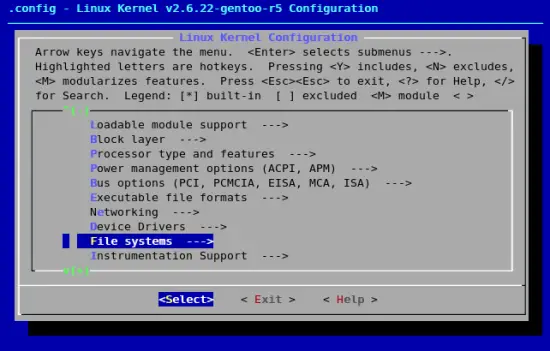
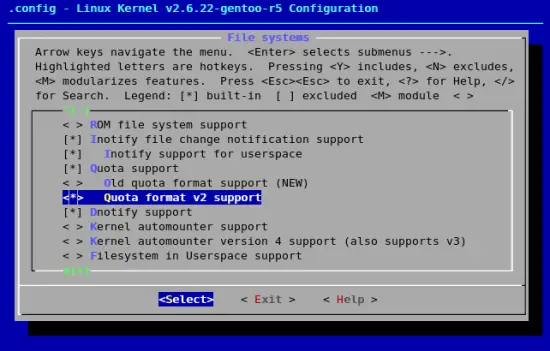
Exit until you're out, saving your kernel configuration, then the build resumes.
Reboot.
9.2 Userspace configuration
emerge --ask --verbose quota
Edit /etc/conf.d/quota and add m to the QUOTACHECK_OPTS. Mine looks like this:
# /etc/conf.d/quota: config file for /etc/init.d/quota
# Note: if your console is hooked up to a serial terminal,
# you prob want to drop the '-v' from the OPTS vars below.

# Run quotacheck ?
RUN_QUOTACHECK="yes"

# Options for quotacheck
QUOTACHECK_OPTS="-avugm"

# Options for quotaon
QUOTAON_OPTS="-avug"

# Options for quotaoff
QUOTAOFF_OPTS="-avug"
Edit /etc/fstab. Mine looks like this (I added ,usrquota,grpquota to the partition with the mount point /):
# /etc/fstab: static file system information.
#
# noatime turns off atimes for increased performance (atimes normally aren't
# needed; notail increases performance of ReiserFS (at the expense of storage
# efficiency).  It's safe to drop the noatime options if you want and to
# switch between notail / tail freely.
#
# The root filesystem should have a pass number of either 0 or 1.
# All other filesystems should have a pass number of 0 or greater than 1.
#
# See the manpage fstab(5) for more information.
#
# <fs>                  <mountpoint>    <type>          <opts>          <dump pass="">
# NOTE: If your BOOT partition is ReiserFS, add the notail option to opts.
/dev/hda1               /boot           ext2            noauto,noatime  1 2
/dev/hda3               /               ext3            noatime,usrquota,grpquota               0 1
/dev/hda2               none            swap            sw              0 0
/dev/cdrom              /mnt/cdrom      audo            noauto,ro       0 0
#/dev/fd0               /mnt/floppy     auto            noauto          0 0
# glibc 2.2 and above expects tmpfs to be mounted at /dev/shm for
# POSIX shared memory (shm_open, shm_unlink).
# (tmpfs is a dynamically expandable/shrinkable ramdisk, and will
#  use almost no memory if not populated with files)
shm                     /dev/shm        tmpfs           nodev,nosuid,noexec    0 0
Start the quota system.
mount -o remount /
/etc/init.d/quota start
rc-update add quota boot
10 DNS Server
Run,
echo "net-dns/bind resolvconf" >> /etc/portage/package.use
emerge --ask --verbose bind
For security reasons we want to run BIND chrooted, so we have to do the following steps.
emerge --config bind
echo alias rndc=\'rndc -k /chroot/dns/etc/bind/rndc.key\' >> ~/.bash_profile
source ~/.bash_profile
rm --recursive --force /etc/bind
ln --symbolic /chroot/dns/etc/bind /etc/bind
There's no need to configure the logging daemon to include BIND's logs; it's already set up for us.
So we start it up.
/etc/init.d/named start
rc-update add named default
11 MySQL
Gentoo's default USE flags will cause MySQL to be installed with the UTF-8 character set selected as default for everything. If you're going to install ISPConfig you need to enter the following line or the ISPConfig web interface will not function:
echo "dev-db/mysql latin1" >> /etc/portage/package.use
Individual databases can still use other encodings, such as UTF-8.
Run,
emerge --ask --verbose mysql
That'll take a while; then when that's done,
emerge --config dev-db/mysql
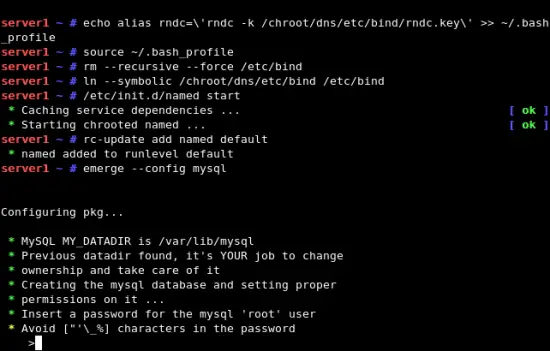
Enter the root password you want to set for the database, and let it finish.
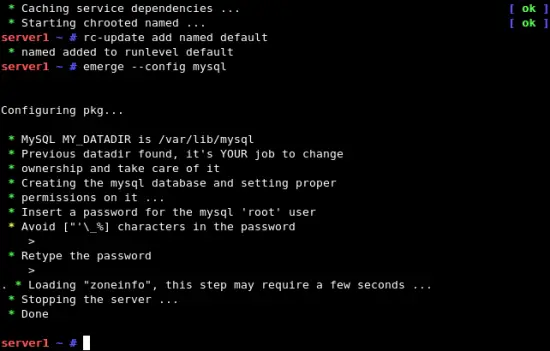
If you want MySQL to listen on all interfaces, not just localhost, edit /etc/mysql/my.cnf and comment out the line bind-address = 127.0.0.1:
Start MySQL
/etc/init.d/mysql start
rc-update add mysql default





