The Perfect Server - Ubuntu 11.04 [ISPConfig 3] - Page 5
This tutorial exists for these OS versions
- Ubuntu 20.04 (Focal Fossa)
- Ubuntu 18.04 (Bionic Beaver)
- Ubuntu 17.10 (Artful Aardvark)
- Ubuntu 17.04 (Zesty Zapus)
- Ubuntu 16.10 (Yakkety Yak)
- Ubuntu 16.04 (Xenial Xerus)
On this page
19 Install fail2ban
This is optional but recommended, because the ISPConfig monitor tries to show the fail2ban log:
apt-get install fail2ban
To make fail2ban monitor PureFTPd, SASL, and Courier, create the file /etc/fail2ban/jail.local:
vi /etc/fail2ban/jail.local
[pureftpd] enabled = true port = ftp filter = pureftpd logpath = /var/log/syslog maxretry = 3 [sasl] enabled = true port = smtp filter = sasl logpath = /var/log/mail.log maxretry = 5 [courierpop3] enabled = true port = pop3 filter = courierpop3 logpath = /var/log/mail.log maxretry = 5 [courierpop3s] enabled = true port = pop3s filter = courierpop3s logpath = /var/log/mail.log maxretry = 5 [courierimap] enabled = true port = imap2 filter = courierimap logpath = /var/log/mail.log maxretry = 5 [courierimaps] enabled = true port = imaps filter = courierimaps logpath = /var/log/mail.log maxretry = 5 |
Then create the following five filter files:
vi /etc/fail2ban/filter.d/pureftpd.conf
[Definition] failregex = .*pure-ftpd: \(.*@<HOST>\) \[WARNING\] Authentication failed for user.* ignoreregex = |
vi /etc/fail2ban/filter.d/courierpop3.conf
# Fail2Ban configuration file
#
# $Revision: 100 $
#

[Definition]

# Option:  failregex
# Notes.:  regex to match the password failures messages in the logfile. The
#          host must be matched by a group named "host". The tag "<HOST>" can
#          be used for standard IP/hostname matching and is only an alias for
#          (?:::f{4,6}:)?(?P<host>\S+)
# Values:  TEXT
#
failregex = pop3d: LOGIN FAILED.*ip=\[.*:<HOST>\]

# Option:  ignoreregex
# Notes.:  regex to ignore. If this regex matches, the line is ignored.
# Values:  TEXT
#
ignoreregex =
|
vi /etc/fail2ban/filter.d/courierpop3s.conf
# Fail2Ban configuration file
#
# $Revision: 100 $
#

[Definition]

# Option:  failregex
# Notes.:  regex to match the password failures messages in the logfile. The
#          host must be matched by a group named "host". The tag "<HOST>" can
#          be used for standard IP/hostname matching and is only an alias for
#          (?:::f{4,6}:)?(?P<host>\S+)
# Values:  TEXT
#
failregex = pop3d-ssl: LOGIN FAILED.*ip=\[.*:<HOST>\]

# Option:  ignoreregex
# Notes.:  regex to ignore. If this regex matches, the line is ignored.
# Values:  TEXT
#
ignoreregex =
|
vi /etc/fail2ban/filter.d/courierimap.conf
# Fail2Ban configuration file
#
# $Revision: 100 $
#

[Definition]

# Option:  failregex
# Notes.:  regex to match the password failures messages in the logfile. The
#          host must be matched by a group named "host". The tag "<HOST>" can
#          be used for standard IP/hostname matching and is only an alias for
#          (?:::f{4,6}:)?(?P<host>\S+)
# Values:  TEXT
#
failregex = imapd: LOGIN FAILED.*ip=\[.*:<HOST>\]

# Option:  ignoreregex
# Notes.:  regex to ignore. If this regex matches, the line is ignored.
# Values:  TEXT
#
ignoreregex =
|
vi /etc/fail2ban/filter.d/courierimaps.conf
# Fail2Ban configuration file
#
# $Revision: 100 $
#

[Definition]

# Option:  failregex
# Notes.:  regex to match the password failures messages in the logfile. The
#          host must be matched by a group named "host". The tag "<HOST>" can
#          be used for standard IP/hostname matching and is only an alias for
#          (?:::f{4,6}:)?(?P<host>\S+)
# Values:  TEXT
#
failregex = imapd-ssl: LOGIN FAILED.*ip=\[.*:<HOST>\]

# Option:  ignoreregex
# Notes.:  regex to ignore. If this regex matches, the line is ignored.
# Values:  TEXT
#
ignoreregex =
|
Restart fail2ban afterwards:
/etc/init.d/fail2ban restart
20 Install SquirrelMail
To install the SquirrelMail webmail client, run
apt-get install squirrelmail
Then create the following symlink...
ln -s /usr/share/squirrelmail/ /var/www/webmail
... and configure SquirrelMail:
squirrelmail-configure
We must tell SquirrelMail that we are using Courier-IMAP/-POP3:
SquirrelMail Configuration : Read: config.php (1.4.0)
---------------------------------------------------------
Main Menu --
1. Organization Preferences
2. Server Settings
3. Folder Defaults
4. General Options
5. Themes
6. Address Books
7. Message of the Day (MOTD)
8. Plugins
9. Database
10. Languages
D. Set pre-defined settings for specific IMAP servers
C Turn color on
S Save data
Q Quit
Command >> <-- D
SquirrelMail Configuration : Read: config.php
---------------------------------------------------------
While we have been building SquirrelMail, we have discovered some
preferences that work better with some servers that don't work so
well with others. If you select your IMAP server, this option will
set some pre-defined settings for that server.
Please note that you will still need to go through and make sure
everything is correct. This does not change everything. There are
only a few settings that this will change.
Please select your IMAP server:
bincimap = Binc IMAP server
courier = Courier IMAP server
cyrus = Cyrus IMAP server
dovecot = Dovecot Secure IMAP server
exchange = Microsoft Exchange IMAP server
hmailserver = hMailServer
macosx = Mac OS X Mailserver
mercury32 = Mercury/32
uw = University of Washington's IMAP server
gmail = IMAP access to Google mail (Gmail) accounts
quit = Do not change anything
Command >> <-- courier
SquirrelMail Configuration : Read: config.php
---------------------------------------------------------
While we have been building SquirrelMail, we have discovered some
preferences that work better with some servers that don't work so
well with others. If you select your IMAP server, this option will
set some pre-defined settings for that server.
Please note that you will still need to go through and make sure
everything is correct. This does not change everything. There are
only a few settings that this will change.
Please select your IMAP server:
bincimap = Binc IMAP server
courier = Courier IMAP server
cyrus = Cyrus IMAP server
dovecot = Dovecot Secure IMAP server
exchange = Microsoft Exchange IMAP server
hmailserver = hMailServer
macosx = Mac OS X Mailserver
mercury32 = Mercury/32
uw = University of Washington's IMAP server
quit = Do not change anything
Command >> courier
imap_server_type = courier
default_folder_prefix = INBOX.
trash_folder = Trash
sent_folder = Sent
draft_folder = Drafts
show_prefix_option = false
default_sub_of_inbox = false
show_contain_subfolders_option = false
optional_delimiter = .
delete_folder = true
Press any key to continue... <-- ENTER
SquirrelMail Configuration : Read: config.php (1.4.0)
---------------------------------------------------------
Main Menu --
1. Organization Preferences
2. Server Settings
3. Folder Defaults
4. General Options
5. Themes
6. Address Books
7. Message of the Day (MOTD)
8. Plugins
9. Database
10. Languages
D. Set pre-defined settings for specific IMAP servers
C Turn color on
S Save data
Q Quit
Command >> <-- S
SquirrelMail Configuration : Read: config.php (1.4.0)
---------------------------------------------------------
Main Menu --
1. Organization Preferences
2. Server Settings
3. Folder Defaults
4. General Options
5. Themes
6. Address Books
7. Message of the Day (MOTD)
8. Plugins
9. Database
10. Languages
D. Set pre-defined settings for specific IMAP servers
C Turn color on
S Save data
Q Quit
Command >> S
Data saved in config.php
Press enter to continue... <-- ENTER
SquirrelMail Configuration : Read: config.php (1.4.0)
---------------------------------------------------------
Main Menu --
1. Organization Preferences
2. Server Settings
3. Folder Defaults
4. General Options
5. Themes
6. Address Books
7. Message of the Day (MOTD)
8. Plugins
9. Database
10. Languages
D. Set pre-defined settings for specific IMAP servers
C Turn color on
S Save data
Q Quit
Command >> <-- Q
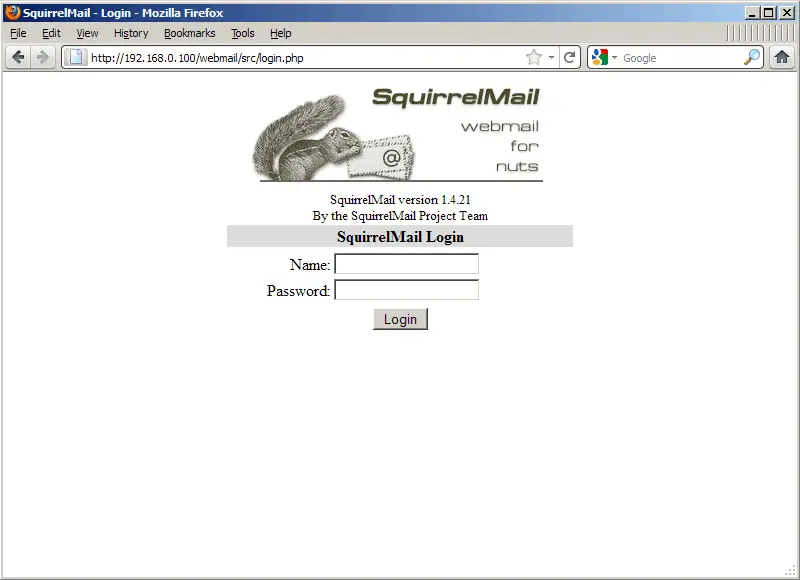
Afterwards you can access SquirrelMail under http://server1.example.com/webmail or http://192.168.0.100/webmail: