
Network Diagnostic Tool (NDT) On Ubuntu 7.10 Server - Page 2
Download NDT, the web100 patch, userland and new kernel sources
Issue the following commands to obtain everything that you will need for a successful build.
cd /usr/src
wget http://e2epi.internet2.edu/ndt/download/ndt-3.4.4.tar.gz
wget http://www.web100.org/download/kernel/2.5.18/web100-2.5.18-200711151130.tar.gz
wget http://www.web100.org/download/userland/version1.6/web100_userland-1.6.tar.gz
wget http://www.kernel.org/pub/linux/kernel/v2.6/linux-2.6.23.tar.bz2
Patch and compile the kernel with the web100 patch
There is an excellent guide here in regards to compiling the kernel. I have a quick walkthrough below though that should suffice.
The first step is to extract your new kernel. Issue the following command:
tar xjf linux-2.6.23.tar.bz2
Now we are going to create a symliynk for the newly extracted kernel.
ln -s linux-2.6.23 linux
Move into the kernel directory with this command.
cd /usr/src/linux
Now it is time to extract the patch. This method is probably not as clean as it could be, since you will be extracting it and re-compressing it into the BZ2 format. It was the only way I could get the patching process to run cleanly. Issue the following commands to extract and re-compress the patch file.
tar -xvzf /usr/src/web100-2.5.18-200711151130.tar.gz
bzip2 web100/web100-2.6.23-2.5.18-200711151130.patch
Before you jump right in and run a patch, it is always a good idea to perform a dry run to make sure that everything appears okay. The following command should return a successful output.
bzip2 -dc /usr/src/linux/web100/web100-2.6.23-2.5.18-200711151130.patch.bz2 | patch -p1 --dry-run
The output should be similar to what is shown below:
patching file Makefile
patching file Documentation/web100/locking.txt
patching file Documentation/web100/proc_interface.txt
patching file Documentation/web100/sysctl.txt
patching file fs/proc/Makefile
patching file fs/proc/root.c
patching file fs/proc/web100.c
patching file include/linux/netlink.h
patching file include/linux/proc_fs.h
patching file include/linux/sysctl.h
patching file include/linux/tcp.h
patching file include/net/tcp.h
patching file include/net/web100.h
patching file include/net/web100_stats.h
patching file net/ipv4/Kconfig
patching file net/ipv4/Makefile
patching file net/ipv4/sysctl_net_ipv4.c
patching file net/ipv4/tcp.c
patching file net/ipv4/tcp_cong.c
patching file net/ipv4/tcp_input.c
patching file net/ipv4/tcp_ipv4.c
patching file net/ipv4/tcp_minisocks.c
patching file net/ipv4/tcp_output.c
patching file net/ipv4/tcp_timer.c
patching file net/ipv4/web100_stats.c
patching file net/ipv6/tcp_ipv6.c
If there are no errors, then it is safe to proceed. Patch the kernel with the following command:
bzip2 -dc /usr/src/linux/web100/web100-2.6.23-2.5.18-200711151130.patch.bz2 | patch -p1
Now copy your existing configuration with this command:
cp /boot/config-`uname -r` ./.config
Now you need to activate the web100 patch before recompiling the kernel.
make menuconfig
You are looking for a section titled "IP: Web100 networking enhancements (NEW) --->" in the menu configuration. It can be found under:
networking
networking options
Follow the screen shots below if you are having problems.
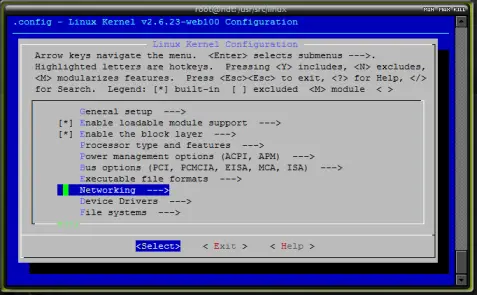
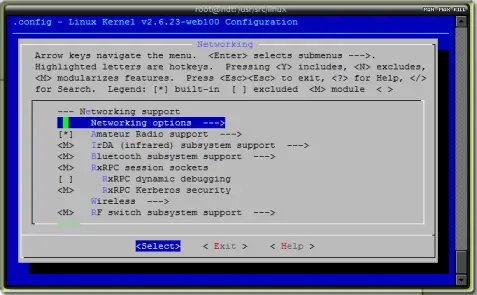
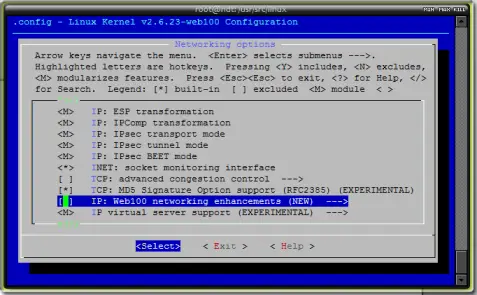
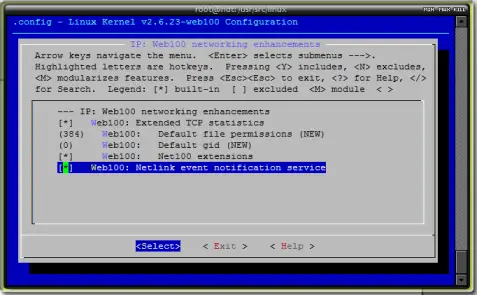
Now if you chose "exit" four times, you should be prompted to save your new kernel - Do so.
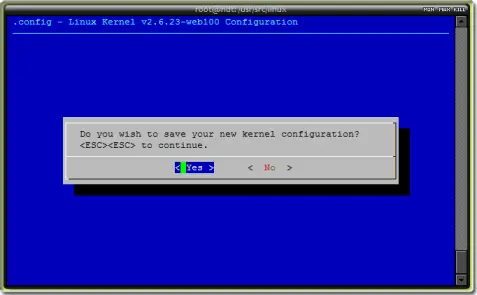
Issue the following command to not only compile your new kernel, but to also create .deb packages that you can use to install the web100 patched kernel on other Ubuntu systems (or keep as backups), so you can skip this step the next time.
make-kpkg clean
fakeroot make-kpkg --initrd --append-to-version=-web100 kernel_image kernel_headers
This process will take a long time (it could and probably will take several hours), so now is a good time to go get a cup of coffee, read a book or to walk the dog.
Okay, so the wait is over... Let's make sure that our files are there. Run the following two commands:
cd /usr/src
ls -l
You should see two files named:
linux-headers-2.6.23-web100-web100_2.6.23-web100-web100-10.00.Custom_i386.deb
linux-image-2.6.23-web100-web100_2.6.23-web100-web100-10.00.Custom_i386.deb
If you see them, then it is time to go ahead and install them. Issue the following commands:
dpkg -i linux-image-2.6.23-web100-web100_2.6.23-web100-web100-10.00.Custom_i386.deb
dpkg -i linux-headers-2.6.23-web100-web100_2.6.23-web100-web100-10.00.Custom_i386.deb
Once the process has completed, you need to reboot your server to make the new kernel active.
shutdown -r now
Once the system has rebooted, make sure that your new kernel is operational.
uname -r
That should return output such as this:
2.6.23-web100-web100





