
Setting Up An iSCSI Environment On Linux
Nowadays, the iSCSI technology is quite popular in the storage world. This article shows an iSCSI demo environment which consists of one Debian Linux host and one Netapp Filer.We try to show the most important features of this protocol.
1. What is iSCSI?
It is a network storage protocol above TCP/IP. This protocol encapsulates SCSI data into TCP packets. iSCSI allows us to connect a host to a storage array via a simple Ethernet connection (tape drive). This solution is cheaper than the Fibre Channel SAN (Fibre channel HBAs and switches are expensive). From the host view the user sees the storage array LUNs like a local disks. iSCSI devices should not be confused with the NAS devices (for example NFS). The most important difference is that NFS volumes can be accessed by multiple hosts, but one iSCSI volume can by accessed by one host. It is similar to SCSIi protocol: usually only one host has access to one SCSI disk (the difference is the cluster enviroment). The iSCSI protocol is defined in the RFC3720 document by the IETF (Internet Engineering Task Force).
Some critics said that iSCSI has a worse performance comparing to Fibre Channel and causes high CPU load at the host machines. I think if we use Gigabit ethernet, the speed can be enough. To overcome the high CPU load, some vendors developed the iSCSI TOE-s (TCP Offload Engine). It means that the card has a built in network chip, which creates and computes the tcp frames. The Linux kernel doesn't support directly this and the card vendors write their own drivers for the OS.
The most important iscsi terms:
Initiator:
The initiator is the name of the iSCSI client. The iSCSI client has a block level access to the iSCSI devices, which can be a disk, tape drive, DVD/CD writer. One client can use multiple iSCSI devices.
Target:
The target is the name of the iSCSI server. The iSCSI server offers its devices (disks, tape, dvd/cd ... etc.) to the clients. One device can by accessed by one client.
Discovery:
Discovery is the process which shows the targets for the initiator.
Discovery method:
Describes the way in which the iSCSI targets can be found.The methods are currently available:
- Internet Storage Name Service (iSNS) - Potential targets are discovered by interacting with one or more iSNS servers.
- SendTargets – Potential targets are discovered by using a discovery-address.
- SLP - Discover targets via Service Location protocol (RFC 4018)
- Static – Static target adress is specified.
iSCSI naming:
The RFC document also covers the iSCSI names.The iSCSI name consists of two parts: type string and unique name string.
The type string can be the following:
- iqn. : iscsi qualifiled name
- eui. : eui-64 bit identifier
Most of the implementations use the iqn format. Let'S see our initiator name: iqn.1993-08.org.debian:01.35ef13adb6d
iqn : we use iSCSI qualified name adress.
1993-08 : the year of the month on which the naming authority acquired the domain name which is used in the iSCSI name.
org.debian : reversed dns name which defines the organizational naming authority.
01.35ef13adb6d : this string is defined by the naming authority.
Our target name is similar (iqn.1992-08.com.netapp:sn.84211978). The difference is that contains the serial number of Netapp filer. Both names are user editable (initiator,target). We need also two ip adresses for the the target and for the initator, too.
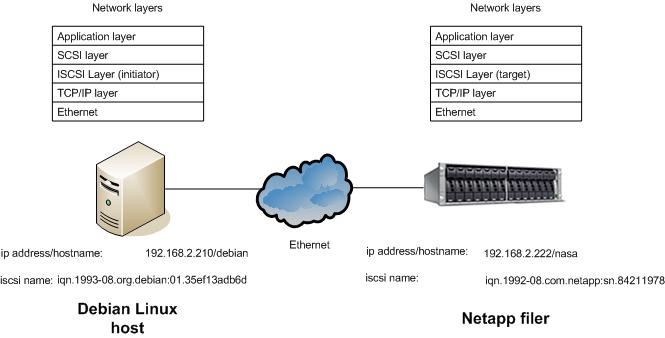
The following figure shows our demo environment. It consists of one Debian host which is the iSCSI initiator, and accesses the
iSCSI disk via /dev/sdb device. The Netapp filer is our iSCSI target device, which offers /vol/iscsivol/tesztlun0 disk or lun for the Debian Linux host. The iSCSI session consists of login phase, then the data exchange phase.
2. iSCSI support on other Unix platforms
The Cisco iSCSI Driver is one of the earliest software iSCSI initiator implementations.This driver supports all of the major commercial Unix systems and their versions (HPUX:10.20,11,11i, AIX:4.3.3,5.1,5.2, Solaris: 2.6,7,8,9). The earliest release can be dated back to 2001. Currently each Unix vendor implements its own driver, and we investigate these drivers.
Solaris:
Solaris 10 (from 1/06 release) supports iSCSI. The initiator driver can do the following:
- Multiple sessions to one target support: this feature enables that one client can create more iSCSI sessions to one target as needed, and it increases the performance.
- Multipathing: with the help of Solaris Mpxio or IPMP feature we can create redundant paths to the targets.
- 2 Tb disks and CHAP authentication are also supported. The Solaris driver can use the three discovery methods (SLP can't). iSCSI disks can be
accessed by the format program.
HPUX:
HP supported the iSCSI from the HP11i v1 os. This driver can discover the targets via SLP (Service Location Protocol) which is also defined by IETF (RFC 4018). This means that the iSCSI initiator and targets register themselves at the SLP Directory agent. After the registration the iSCSIi initiator queries only the Directory agent. HPUX driver implements all of the discovery methods. The CHAP authentication is also implemented and the OS multipath tools (PVLinks) also supported. The HPUX driver provides transport statistics, too.
AIX:
From 5.2 AIX supports iSCSI.The driver implements the static target discovery only.We can use the iSCSI disks with AIX multi pathing called MPIO. The CHAP authentication is also supported.
None of the drivers allows us to boot from iSCSI. This can be a next step in the driver development.
3. iscsi Linux implementations
Initiator implementations:
Cisco also released Linux driver but it is quite old.
The Intel iSCSI implementation contains both target and initiator drivers and a handy tool for generating workloads.
UNH-iSCSI is an initiator and target implementation of the University of New hampshire.
The Open-iSCSI project is the newest implementation.It can be used with 2.6.11 kernels and up. We will test this driver with the Debian host. It contains kernel modules and an iscsid daemon.
The iscsid can be started with the following command:
/etc/init.d/open-scsi start
The iSCSI operations can be controlled with the iscsiadm command. The command can discover the targets, login/logout to the target, and displays the session information.
The configuration files are under the /etc/iscsi directory:
- iscsid.conf: Configuration file for the iscsi daemon. It is read at startup.
- initiatorname.iscsi: The name of initator, which the daemon reds at the startup.
- nodes directory: The directory contains the nodes and their targets.
- send_targets directory: The directory contains the discovered targets.
The installation process is quite simple. Issue:
apt-get install open-iscsi
This driver implements currently the Sendtargets discovery method.
Target implementations:
iSCSI enterprise target is the open source target implementation for Linux. It based on the Ardis iSCSI Linux implementation and requires the 2.6.14 kernel.
Openfiler is a quite popular Linux NAS implementation, and offers a Linux based NAS software with a web based GUI.
Many other companies offer software-based commercial iSCSI target drivers (Amgeon, Mayastor, Chelsio).
The storage array manufacturers offer also a native support for iSCSI (EMC, Netapp, etc.).
We have chosen Netapp FAS filer for the testing, but you can test it with a free software. There is a link at the bottom of the article which shows how can we do it with Openfiler.
4. Setting up the iSCSI Linux demo environment
Our demo environment contains one Debian Linux host and one Netapp filer. The Debain host is the initiator, and the Netapp filer is the target.
The setup process is the following briefly:
- We should set up the tcp/ip connection between Debian and Netapp filer. The initiator and target must ping each other. We assume that the open-iscsi package is already installed on Debian.
- The Debian host must discover the Netapp targets. It is called a "discovery" process. Then the target sends the target lists.
- The target must enable to the initator to access the LUN. On the Netapp side, it means that we should create one initiator group, which is a logical binding between the hosts and the luns. The initiator group contains the lun and one Debian host which can access this lun.
- When the initator gets the target lists, it must "login" to the target.
- When the "login" process completes successfully and Netapp filer allows the access, the initiator can use the iSCSI disk as the normal disk. It appears under /dev/sdx devices and you can format, mount it like the normal disk.
Here are the detailed steps:
1. We ping the Netapp filer from the Linux host:
debian:~# ping nasa
PING nasa (192.168.2.222) 56(84) bytes of data.
64 bytes from nasa (192.168.2.222): icmp_seq=1 ttl=255 time=0.716 ms
64 bytes from nasa (192.168.2.222): icmp_seq=2 ttl=255 time=0.620 ms
It is successful.
2. We discover the netapp filer iSCSI LUNs with the iscsiadm command. We have choosen the st (sendtargets) discovery method. Currently it is implemented with this driver:
debian:~# iscsiadm -m discovery -t st -p 192.168.2.222
192.168.2.222:3260 via sendtargets
Let's see the discovered targets:
debian:~# iscsiadm -m node
192.168.2.222:3260,1000 iqn.1992-08.com.netapp:sn.84211978
3. We have to prepare the Netapp side: In this example we will create one 4GB LUN (part of the RAID group), and assign it to the Debian host. We should check the free space:
nasa> df -k
Filesystem
total
used avail capacity Mounted on
/vol/vol0/
8388608KB 476784KB
7911824KB 6% /vol/vol0/
/vol/vol0/.snapshot
2097152KB 10952KB
2086200KB 1%
/vol/vol0/.snapshot
/vol/iscsiLunVol/ 31457280KB 20181396KB 11275884KB 64% /vol/iscsiLunVol/
/vol/iscsiLunVol/.snapshot
0KB
232KB
0KB ---%
/vol/iscsiLunVol/.snapshotunVol/testlun1
The following command creates one 4GB Lun on the iscsiLunVol volume:
nasa> lun create -s 4g -t linux /vol/iscsiLunVol/testlun1
Check it:
nasa> lun show
/vol/iscsiLunVol/iscsitestlun 7.0g
(7526131200) (r/w, online, mapped)
/vol/iscsiLunVol/iscsitestlun2 7.0g
(7526131200) (r/w, online, mapped)
/vol/iscsiLunVol/testlun1 4g
(4294967296) (r/w, online)
We should check if the Debian host is visible from netapp host:
nasa> iscsi initiator show
Initiators connected:
TSIH TPGroup Initiator
19 1000 debian (iqn.1993-08.org.debian:01.35ef13adb6d / 00:02:3d:00:00:00)
Ok, we see the Debain host. Let's create the initiator group, called Debian2.
nasa> igroup create -i -t linux Debian2 iqn.1993-08.org.debian:01.35ef13adb6d
nasa> igroup show
    Debian2 (iSCSI) (ostype: linux):
        iqn.1993-08.org.debian:01.35ef13adb6d (logged in on: e0a)
We should assign the newly created Lun to the Debian2 hosts.
nasa> lun map /vol/iscsiLunVol/testlun1 Debian2
lun map: auto-assigned Debian2=2
The check command:
nasa> lun show -v
/vol/iscsiLunVol/testlun1 4g
(4294967296) (r/w, online, mapped)
Serial#: hpGBe4AZsnLV
Share: none
Space Reservation: enabled
Multiprotocol Type: linux
Maps: Debian2=2
4. Lets go back to our initator host. Now everything is prepared to access the 4GB lun. The following command makes the disk accessible from the Linux host.
debian:~# iscsiadm -m node -T iqn.1992-08.com.netapp:sn.84211978 -p
192.168.2.222:3260 --login
We should see the following entries in the messages file:
debian:~# tail /var/log/messages
Apr 13 00:31:34 debian kernel: scsi: unknown device type 31
Apr
13 00:31:34 debian kernel: Vendor: NETAPP
Model:
LUN Rev: 0.2
Apr
13 00:31:34 debian kernel:
Type:
Unknown ANSI SCSI revision: 04
Apr 13 00:31:34 debian kernel:
Vendor: NETAPP Model:
LUN Rev: 0.2
Apr
13 00:31:34 debian kernel:
Type:
Direct-Access ANSI SCSI revision: 04
Apr 13 00:31:34 debian kernel: SCSI device sdb: 8388608 512-byte hdwr sectors (4295 MB)
Apr 13 00:31:34 debian kernel: sdb: Write Protect is off
Apr 13 00:31:34 debian kernel: SCSI device sdb: drive cache: write through
Apr 13 00:31:34 debian kernel: sd 1:0:0:2: Attached scsi disk sdb
The disk appears as the sdb device (/dev/sdb).
5. We can use it as the normal disk. You can create one partion, and you can easily mount it.
debian:~# fdisk /dev/sdb
debian:~# mkfs /dev/sdb1 ; mount /dev/sdb1 /mnt
If you want to use sdb after the next reboot, you should change the following entry:
node.conn[0].startup = manual to automatic
in the /etc/iscsi/nodes/<iscsi target name>/<ip address> file. After you change it the iSCSI daemon will login to this target. Adding an automatic mount entry (/dev/sdb1 /mnt) in the /etc/fstab file doesn't work, because the open-iscsi daemon will start later than the mounting of filesystems. One simple script can solve this problem, which does the automatic mounting after the iSCSI daemon starts.
The open-iscsi initiator implementation tolerates network errors well. If you disconnect the Ethernet cable and connect it again, you must start the io process again, but the reconnection occurs automatically.
Another good solution is for the network failures, if you create multiple paths for the one LUN (For example: /dev/sdb, /dev/sdc), the initator logs in to two locations (two RAID controllers) and you make the two disks as a single logical disk using Linux multipath software (dmsetup).
I recommend another alternative for iSCSI target implementation: Openfiler (if you cant test on the Netapp box). It is a free Linux based NAS sofware, which can be managed with a web based GUI.
The iSCSI setup process is quite similar in the case of other Unix implementations.
5. Summary and results
iSCSI is a good solution for a cheap disaster recovery site.You shouldn't buy an expensive Fibre Channel card at the disaster recovery site, you can use the Ethernet and iSCSI. You can also use it for connecting hosts to disk arrays without Fibre Channel host adapters (if the arrays are iSCSI capable).
During the test I ran the Debian host in the Vmware player program, and my network connection was 100 Mbit/s. I cannot reach more than 15 MB/s read/write performance but it isn't relevant. With Gigabit Ethernet you can reach much better performance, the only drawback is that it increases the CPU load (CPU must build and compute TCP frames).
Here is my simple home page.





