
This tutorial exists for these OS versions
On this page
Installing Nginx With PHP5 And MySQL Support On Fedora 12
Version 1.0
Author: Falko Timme  Follow me on Twitter
Nginx (pronounced "engine x") is a free, open-source, high-performance HTTP server. Nginx is known for its stability, rich feature set, simple configuration, and low resource consumption. This tutorial shows how you can install Nginx on a Fedora 12 server with PHP5 support (through FastCGI) and MySQL support.
I do not issue any guarantee that this will work for you!
1 Preliminary Note
In this tutorial I use the hostname server1.example.com with the IP address 192.168.0.100. These settings might differ for you, so you have to replace them where appropriate.
2 Installing MySQL 5
First we install MySQL 5 like this:
yum install mysql mysql-server
Then we create the system startup links for MySQL (so that MySQL starts automatically whenever the system boots) and start the MySQL server:
chkconfig --levels 235 mysqld on
/etc/init.d/mysqld start
Now check that networking is enabled. Run
netstat -tap | grep mysql
It should show something like this:
[root@server1 ~]# netstat -tap | grep mysql
tcp        0      0 *:mysql                     *:*                         LISTEN      1376/mysqld
[root@server1 ~]#
If it does not, edit /etc/my.cnf and comment out the option skip-networking:
vi /etc/my.cnf
[...] #skip-networking [...] |
and restart your MySQL server:
/etc/init.d/mysqld restart
Run
mysqladmin -u root password yourrootsqlpassword
mysqladmin -h server1.example.com -u root password yourrootsqlpassword
to set a password for the user root (otherwise anybody can access your MySQL database!).
3 Installing Nginx
Nginx is available as a package for Fedora 12 which we can install as follows:
yum install nginx
Then we create the system startup links for nginx and start it:
chkconfig --levels 235 nginx on
/etc/init.d/nginx start
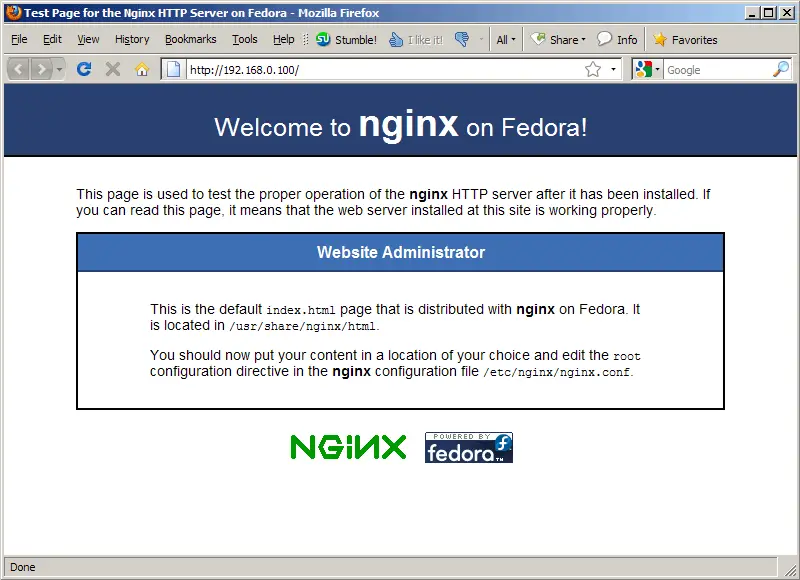
Type in your web server's IP address or hostname into a browser (e.g. http://192.168.0.100), and you should see the nginx welcome page:
4 Installing PHP5
We can make PHP5 work in nginx through FastCGI. There's no standalone FastCGI daemon package for Fedora, therefore we use the FastCGI package of lighttpd (lighttpd-fastcgi) and install it together with php-cli and some PHP5 modules like php-mysql which you need if you want to use MySQL from your PHP scripts:
yum install lighttpd-fastcgi php-cli php-mysql php-gd php-imap php-ldap php-odbc php-pear php-xml php-xmlrpc php-eaccelerator php-magickwand php-magpierss php-mapserver php-mbstring php-mcrypt php-mssql php-shout php-snmp php-soap php-tidy
Then open /etc/php.ini and add the line cgi.fix_pathinfo = 1 right at the end of the file:
vi /etc/php.ini
[...] cgi.fix_pathinfo = 1 |
The lighttpd-fastcgi package comes with the executable /usr/bin/spawn-fcgi which we can use to start FastCGI processes. Take a look at
spawn-fcgi --help
to learn more about it.
To start a PHP FastCGI daemon listening on port 9000 on localhost and running as the user and group nginx, we run the following command:
/usr/bin/spawn-fcgi -a 127.0.0.1 -p 9000 -u nginx -g nginx -f /usr/bin/php-cgi -P /var/run/fastcgi-php.pid
Of course, you don't want to type in that command manually whenever you boot the system, so to have the system execute the command automatically at boot time, open /etc/rc.local...
vi /etc/rc.local
... and add the command at the end of the file:
[...] /usr/bin/spawn-fcgi -a 127.0.0.1 -p 9000 -u nginx -g nginx -f /usr/bin/php-cgi -P /var/run/fastcgi-php.pid |





