How To Shrink VMware Virtual Disk Files (.vmdk)

Do you like HowtoForge? Please consider to support us by becoming a subscriber.
Submitted by falko (Contact Author) (Forums) on Wed, 2008-08-27 16:57. :: Virtualization

How To Shrink VMware Virtual Disk Files (.vmdk)

Version 1.0
Author: Falko Timme <ft [at] falkotimme [dot] com>
Last edited 08/13/2008

This guide shows how you can shrink the virtual disk files (they have the extension .vmdk) of your VMware virtual machines so that if you zip them, they will use much less space. It is then easier to upload and share them with other people.

This document comes without warranty of any kind! I do not issue any guarantee that this will work for you!


1 Preliminary Note

I'm using vmware-vdiskmanager with the -k switch to shrink disk files. The -k switch is supported on Windows hosts only, therefore I'm using Windows XP as the host and run VMware Server on it with a Debian VM. I got good shrink results with this constellation.

In a second step I've tried to shrink disk files on a Linux host (Ubuntu). vmware-vdiskmanager doesn't support the -k switch on Linux, but I've tried the -d switch (defragment) instead and got good results as well, but I'm not guaranteeing that this will work for you as well.


2 Windows Host

Before we try to shrink the virtual disk files, we should try to remove any unneeded files from the virtual machine to free space. For example, on Debian-based VMs, you can run

apt-get clean

to clear out the local repository of retrieved package files.

Next, run

cat /dev/zero > zero.fill;sync;sleep 1;sync;rm -f zero.fill

to fill the unused space with zeros.

Then power down the VM and open the command window on the Windows host:
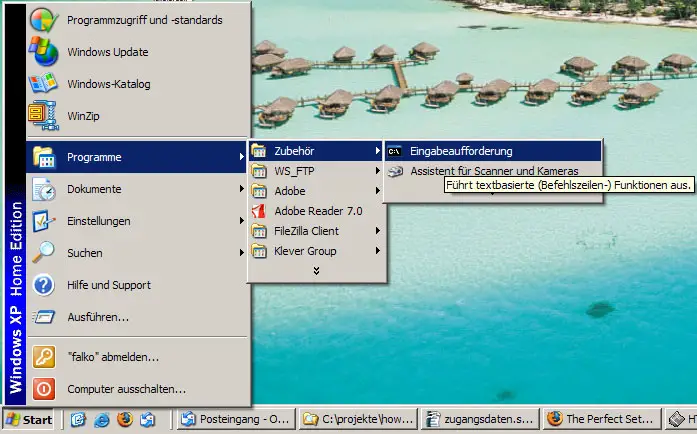
Navigate to the directory where the .vmdk files are located, e.g.:

cd C:\Virtual Machines\apache2_mpm_itk_debian_etch

Try to find out where the vmware-vdiskmanager.exe program is located on your Windows system (mine is C:\Programme\VMware\VMware Server\vmware-vdiskmanager.exe), and how your .vmdk file is named (e.g. Other Linux 2.6.x kernel.vmdk). You can then shrink the .vmdk file as follows:

"C:\Programme\VMware\VMware Server\vmware-vdiskmanager.exe" -k "Other Linux 2.6.x kernel.vmdk"

That way I was able to shrink a .vmdk file from ~1.6GB to 1.3GB, and compressed (.zip) from ~430MB to 240MB.


3 Linux Host

Before we try to shrink the virtual disk files, we should try to remove any unneeded files from the virtual machine to free space. For example, on Debian-based VMs, you can run

apt-get clean

to clear out the local repository of retrieved package files.

Next, run

cat /dev/zero > zero.fill;sync;sleep 1;sync;rm -f zero.fill

to fill the unused space with zeros.

Then power down the VM and open a terminal on the Linux host.

Navigate to the directory where the .vmdk files are located, e.g.:

cd /var/lib/vmware/Virtual\ Machines/Ubuntu\ 8.04\ Desktop/

You can defragment a .vmdk file as follows:

vmware-vdiskmanager -d Ubuntu\ 8.04\ Desktop.vmdk

If you take a look at the .vmdk file after the defragmentation, you will notice that its size hasn't changed, but if you compress the VM (e.g. .zip or .tar.gz), the compressed file will be much smaller than before the defragmentation. That way I was able to save 250MB for one compressed VM (before the defragmentation, the compressed VM was ~1GB, after the defragmentation it used only about 750MB).


4 Links


Please do not use the comment function to ask for help! If you need help, please use our forum.
Comments will be published after administrator approval.
Submitted by John HP (not registered) on Wed, 2009-06-10 16:33.

If you want to squish the image size down in linux, you can convert the disk type to the same type after filling the free space with zeroes (as shown above). For example:

 vmware-vdiskmanager -r olddiskfile.vmdk -t 0 newdiskfile.vmdk

Seems to work better for me than the defrag util. Which doesn't seem to do much. 

Submitted by Mansh Singh (not registered) on Fri, 2009-04-24 18:25.
Thank you very much. This was very useful. I reduced the size of my Red Hat Enterprise Linux 4 VM image from 47 GB to 27 GB. Cheers. Manish
Submitted by Terry Wang (not registered) on Tue, 2009-04-07 05:24.

Actually the vmware-vdiskmanager -k option does not work for Linux guest OS images. It's really weird at first. However, after seeing the workaround. I understand.

Thank you very much guys for the tips.

 cat /dev/zero > zero.fill;sync;sleep 1;sync;rm -f zero.fill

Works like a charm!!!

Submitted by keyboard.operator (not registered) on Fri, 2008-12-12 19:45.

The zero fill technique helps, but I found that I had to the following:

  1. Write a file filled with non-zeros.
  2. Run sync
  3. Replace that file with all zeros.
  4. Run sync.
  5. Remove the zero fill file.
  6. Shutdown the OS and then run the shrink.
I tried this when I noticed that writing all zeros does not change the size of the underlying vmdk.  I assume there is an optimization somewhere that handles the zero case.
Submitted by make-fun (registered user) on Mon, 2008-10-20 04:32.
On the Windows side the VMware Converter may also be an option. You can convert an existing VM(Virtual Appliance) from your local disc, by selecting it as your Source/Source Type and then in your destination settings adjust the New Disk Space — you'll see a difference between Maintain Size and Minimal Size. I was able to shrink from a 29G to a 7G VM, after I deleted a lot of unwanted files from the initial conversion. It has worked with W2k, XP and Ubuntu 6.06 VMs for me.
Submitted by DanKegel (registered user) on Sun, 2008-08-31 05:50.

http://kegel.com/linux/jeos-vmware-player/jeos-vmware-player-howto.html is my recipe for how to do it; this produced an 87 megabyte downloadable virtual machine.

Submitted by jhansonxi (registered user) on Sat, 2008-08-30 03:28.
VMware Tools installed in a Windows guest has a "shrink disk" option.  How does that compare with vdiskmanager?
Submitted by Terry (not registered) on Tue, 2008-10-07 01:55.

@jhansonxi

I think vdiskmanager can shrink the vmdk 'offline'. While VMWare tools require the guest os on.

 The other thing to consider is that if you run a Linux VM with no X, pure text mode, you will not be able to shrink it even with vmware tools. So it is better to do it offline using the tool. That's the point why VMWare Inc makes another tool available.

And thanks Falko for the great article!