
How To Set Up A Serial Port Between Two Virtual Machines In VirtualBox
I needed to test serial communication between two VirtualBox guest machines on Linux. This tutorial describes what I did to set up a serial port between two virtual machines running on VirtualBox.
- My host operating system was Ubuntu 10.10
- My guest operating systems were Microsoft Windows XP and Debian Lenny.
On the host machine you don't need to install or configure anything.
On guest virtual machines you need to configure serial port settings.
First Guest VM Serial Port Settings - Debian
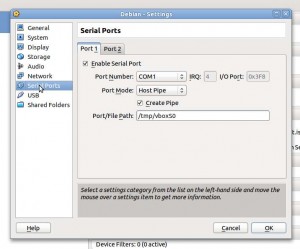
Figure 1. - First Guest VM Serial Port Settings
Enable Serial Port check box: checked (enabled)
Port Number: COM1
Port Mode: Host Pipe
Create Pipe check box: checked (enabled)
Port/File Path: /tmp/vboxS0
Second Guest VM Serial Port Settings - Microsoft Windows XP

Figure 2. - Second VM Serial Port Settings
Enable Serial Port check box: checked (enabled)
Port Number: COM1
Port Mode: Host Pipe
Create Pipe checking box: unchecked (disabled)
Port/File Path: /tmp/vboxS0
Starting VirtualBox Machines
First you need to start a machine with checked "Create Pipe" check box (in my example this is the Debian VM). Afterwards you can start your second machine (in my example this is my Microsoft Windows XP VM).
If you try to start the first machine with an unchecked "Create Pipe" check box then you will get one error message.
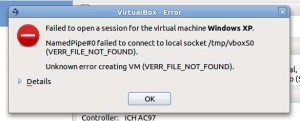
Figure 3. - Error message if you try to start VM with unchecked "Create Pipe" check box
Testing
I have enabled serial console login in Debian Linux and I don't have any problem to connect to the Linux machine from the Windows terminal program.
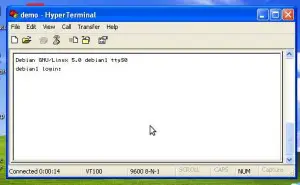
Figure 4. - Proof of working serial port connection
Rudolf - http://www.bodocsi.net





