
How To Save Traffic With Lighttpd's mod_compress (Debian Squeeze)
Version 1.0
Author: Falko Timme  Follow me on Twitter
In this tutorial I will describe how to configure mod_compress on a Lighttpd web server (on Debian Squeeze). mod_compress allows Lighttpd to compress files and deliver them to clients (e.g. browsers) that can handle compressed content which most modern browsers do. With mod_compress, you can compress HTML, CSS, Javascript, text or XML files to approx. 20 - 30% of their original sizes, thus saving you server traffic and making your modem users happier.
Compressing files causes a slightly higher load on the server, but in my experience this is compensated by the fact that the clients' connection times to your server decrease a lot. For example, a modem user that needed seven seconds to download an uncompressed HTML file might now only need two seconds for the same, but compressed file.
By using mod_compress you don't have to be afraid that you exclude users with older browsers that cannot handle compressed content. The browser negotiates with the server before any file is transferred, and if the browser does not have the capability to handle compressed content, the server delivers the files uncompressed.
I do not issue any guarantee that this will work for you!
1 Preliminary Note
I'm assuming you have a working Lighttpd setup on your Debian Squeeze server, e.g. as shown in this tutorial: Installing Lighttpd With PHP5 And MySQL Support On Debian Squeeze
2 Enabling And Configuring mod_compress
Open /etc/lighttpd/lighttpd.conf...
vi /etc/lighttpd/lighttpd.conf
... and check if mod_compress is active in the server.modules stanza (it should be active by default on Debian Squeeze):
server.modules = (
        "mod_expire",
        "mod_access",
        "mod_alias",
        "mod_compress",
        "mod_redirect",
#       "mod_rewrite",
)
[...]
|
You should also find the following two lines further down the file:
[...]
compress.cache-dir          = "/var/cache/lighttpd/compress/"
compress.filetype           = ("application/x-javascript", "text/css", "text/html", "text/plain")
[...]
|
The compress.cache-dir directive tells Lighttpd to store compressed files in the directory /var/cache/lighttpd/compress/; the compress.filetype directive tells Lighttpd what file types to compress (usually Javascript, CSS, HTML, and plain text files). As Javascript files might have different file types on each server, we should extend that directive so that it looks as follows:
[...]
compress.filetype           = ("application/x-javascript", "application/javascript", "text/javascript", "text/x-js", "text/css", "text/html", "text/plain")
[...]
|
Next make sure that the directory /var/cache/lighttpd/compress/ exists and is owned by the user and group www-data (both should be true by default on Debian Squeeze):
ls -la /var/cache/lighttpd/compress/
root@server1:~# ls -la /var/cache/lighttpd/compress/
total 8
drwxr-xr-x 2 www-data www-data 4096 Nov 12 12:45 .
drwxr-xr-x 4 www-data www-data 4096 Feb 17 17:57 ..
root@server1:~#
If the directory does not exist, create it as follows:
mkdir -p /var/cache/lighttpd/compress/
chown www-data:www-data /var/cache/lighttpd/compress/
Now restart Lighttpd:
/etc/init.d/lighttpd restart
3 Compressing PHP
PHP provides compression support by itself, therefore this must not be handled by Lighttpd. To enable PHP compression, open /etc/php5/cgi/php.ini...
vi /etc/php5/cgi/php.ini
... and set zlib.output_compression to On:
[...] ; Transparent output compression using the zlib library ; Valid values for this option are 'off', 'on', or a specific buffer size ; to be used for compression (default is 4KB) ; Note: Resulting chunk size may vary due to nature of compression. PHP ; outputs chunks that are few hundreds bytes each as a result of ; compression. If you prefer a larger chunk size for better ; performance, enable output_buffering in addition. ; Note: You need to use zlib.output_handler instead of the standard ; output_handler, or otherwise the output will be corrupted. ; http://php.net/zlib.output-compression zlib.output_compression = On [...] |
Restart Lighttpd afterwards:
/etc/init.d/lighttpd restart
4 Cleaning Up Lighttpd's Compression Directory
The directory where Lighttpd stores the compressed files (/var/cache/lighttpd/compress/ by default) should be cleaned from old, unused files regularly. On Debian Squeeze, you should find a cron job that does this on a daily basis in /etc/cron.daily/lighttpd:
cat /etc/cron.daily/lighttpd
#!/bin/sh
# Cleanup lighttpd compress cache

cache=/var/cache/lighttpd
if test -d "$cache/compress"; then
    su -s /bin/sh -c "find $cache/compress -type f -atime +30 -print0 | xargs -0 -r rm" www-data
fi
if test -d "$cache/uploads"; then
    su -s /bin/sh -c "find $cache/uploads -type f -atime +1 -print0 | xargs -0 -r rm" www-data
fi
|
This cleans the directory from files that haven't been accessed in the last 30 days.
If /etc/cron.daily/lighttpd does not exist, you can create a cron job yourself:
crontab -e
23 4 * * * /usr/bin/find /var/cache/lighttpd/compress -type f -atime +30 -print0 | /usr/bin/xargs -0 -r /bin/rm |
(This cron job would run each day at 04.23h.)
5 Testing
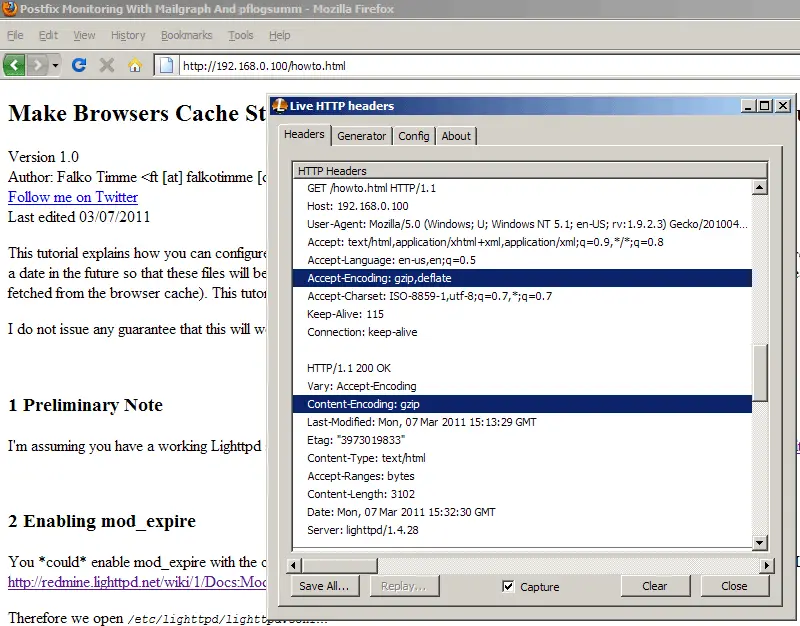
To test if your configuration works, you can install the Live HTTP Headers plugin for Firefox and access text file through Firefox (e.g. a static HTML page). In the Live HTTP Headers output, you should now see that the client (Firefox) sent an Accept-Encoding: gzip,deflate header to tell the server that it accepts compressed content in the formats gzip and deflate; the server should compress the file and send it with a Content-Encoding: gzip header:
If you check your compression directory /var/cache/lighttpd/compress/, you should see that it's not empty anymore; it should now contain the compressed versions of the requested files:
ls -la /var/cache/lighttpd/compress/
root@server1:~# ls -la /var/cache/lighttpd/compress/
total 16
drwxr-xr-x 2 www-data www-data 4096 Mar  7 16:32 .
drwxr-xr-x 4 www-data www-data 4096 Feb 17 17:57 ..
-rw------- 1 www-data www-data 3102 Mar  7 16:32 howto.html-gzip-237485-9070-1299510809
-rw------- 1 www-data www-data 1562 Mar  7 16:30 index.lighttpd.html-gzip-237105-3585-1297961821
root@server1:~#
6 Links
- Lighttpd mod_compress: http://redmine.lighttpd.net/wiki/1/Docs:ModCompress
- Live HTTP Headers Plugin for Firefox: https://addons.mozilla.org/en-us/firefox/addon/live-http-headers/
- Debian: http://www.debian.org/





