
How To Migrate From Trac To Redmine
This tutorial describes how to migrate from trac to redmine. Originally written to perform an upgrade from trac 0.10.3 (old etch server) to Redmine 1.0.1 (squeeze) but was successfully tested with trac 0.11 and 0.12, as well as Redmine 1.0.5 and 1.1.2 (1.2 is also working. This version was also tested to produce the upstream patch but not intensively).
Do not forget to disable trac to prevent users from using it during the migration.
1. Back Up Trac Data
ssh oldtracserver
cd /var/lib/
tar -czf trac.tar.gz trac
scp /var/lib/trac.tar.gz newredmineserver:/tmp/
2. Install Redmine On The New Server
Pretty straightforward even if running the standalone server requires some tricks :
aptitude install redmine
cd /usr/share/redmine/
mkdir tmp
chown -R www-data:www-data tmp/
mkdir log
touch log/production.log
chown -R www-data:www-data log/
# Running the standalone server
sudo -u www-data X_DEBIAN_SITEID="default" ruby script/server webrick -e production -b newredmineserverip
Now you now can go to http://newredmineserver:3000 to be greeted by the default redmine page.
3. Install A Development Environment
People might argue that this is optional but it is a very important step. You are likely to do a lot of mistakes with a new unfamiliar tool so you will be glad that you tried it on dev beforehand. The production database will be kept clean of all trial and errors which might save you from redoing a lengthy migration.
vi /etc/redmine/default/database.yml
development:
adapter: sqlite3
database: /var/lib/dbconfig-common/sqlite3/redmine/instances/default/redmine_default-dev
encoding: utf8
cd /usr/share/redmine
rake db:migrate RAILS_ENV="development"
rake redmine:load_default_data RAILS_ENV="development"
touch log/development.log
chown -R www-data:www-data log/
chown www-data:www-data /var/lib/dbconfig-common/sqlite3/redmine/instances/default/redmine_default-dev
sudo -u www-data X_DEBIAN_SITEID="default" ruby script/server webrick -e development -b newredmineserverip -p 3001
4. Clean Up Redmine Test Environment
If you still managed to mess up your database during your migration, here is how to recover a clean redmine environment:
rm /var/lib/dbconfig-common/sqlite3/redmine/instances/default/redmine_default*
rm /var/lib/redmine/default/files/*
cd /usr/share/redmine
rake db:migrate RAILS_ENV="production"
rake db:migrate RAILS_ENV="development"
rake redmine:load_default_data RAILS_ENV="development"
rake redmine:load_default_data RAILS_ENV="production"
chown www-data:www-data /var/lib/dbconfig-common/sqlite3/redmine/instances/default/redmine_default*
5. Migrate Trac DB To Redmine's
The script used for the migration has been heavily customised to import more data from trac than the default script shipped with redmine. I based my work on the Trac Importer Patch Coordination effort from Redmine's forum. More specifically on the most advanced version of the script that can be found here.
My modifications add the following enhancements:
- Handle many more ticket property changes:
- change of ownership (re-assignement)
- change of components (category)
- change of priority
- change in the summary (one line description)
- change of issue type (bug, feature...)
- change of completion ratio
- Populate the completion ratio. This is done through a mapping hash that maps it to trac's resolution. By default :
RATIO_MAPPING = {'' => 0,
'fixed' => 100,
'invalid' => 0,
'wontfix' => 0,
'duplicate' => 100,
'worksforme' => 0} - Handle CCs field by adding watchers accordingly
- Add start date (first's comment date) and the due date (when done_ratio is 100%) to populate the calendar and gantts charts
- Add timelog entries to handle migration from timeandestimation plugin (hours spent, total hours), estimated hours already exists in redmine. Timelog comments links to the correct note in the ticket.
- Add a new task tracker with a correct workflow and map it to trac's tasks.
- Enable all redmine modules by default (yes it is pure lazyness :o) )
It also fixes some bugs in the current script:
- Add a ticket's author to the list of project reporter
- Put correct updated time on ticket
- Plenty of small issues
And some ugly hack that might be removed:
- Add an ugly hack to set the 'billable' custom field type to a checkbox. A proper fix would require to parse the trac.ini which would be a bigger implementation.
I sent it upstream hoping they will put it in a future version of redmine. Else you can download it from our public SVN: trac-redmine/migrate_from_trac.rake. The corresponding patch for Redmine's trunk revision 5857 is here: trac-redmine/migrate_from_trac.rake_r5857.patch.
Once you have the new script, run:
rake redmine:migrate_from_trac RAILS_ENV="production"
WARNING: a new project will be added to Redmine during this process.
Are you sure you want to continue ? [y/N] y
Trac directory []: /tmp/trac/mytracproject
Trac database adapter (sqlite, sqlite3, mysql, postgresql) [sqlite3]:
Trac database encoding [UTF-8]:
Target project identifier []: myredmineproject
# Repeat for all projects
rake redmine:migrate_from_trac RAILS_ENV="development"
# Repeat for dev environment
As said above each my script will add a link in each timelog comments pointing to the correct note in the issue. Unfortunately timelog entries are not textiled and so are displayed as raw text. If you want to change this behaviour you will have to apply the patch from this issue to your Redmine:
cd /usr/share/redmine
wget "http://www.redmine.org/attachments/download/2807/textilize-timelog-entry-comment_r3084.patch"
patch -p0 < textilize-timelog-entry-comment_r3084.patch
6. SVN Migration
If you are migrating SVN to a new server as well, here is a small procedure. Nothing exciting you will find the same all over the web, this is just for reference:
6.1. Back Up SVN On The Old host
ssh oldsvnserver
cd /var/lib/svn/repository
for project in *; do svnadmin dump ${project} | gzip > ${project}.gz ; done
scp *.gz newsvnserver:/tmp/
6.2. Import On The New Host
svnadmin create project1
zcat project1.gz | svnadmin load project1
7. Link Redmine To SVN
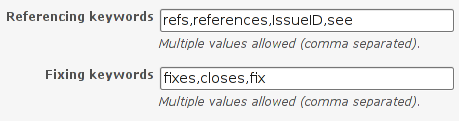
If you used trac tickets links in your commit message with "See #" and "Fix #" heavily like us then don't forget to add the following:
In redmine, go to Administration -> Settings -> Repository (i.e. http://newredmineserver:3000/settings?tab=repositories) to include see/fix:
7.1. Add pre-revprop-change Hooks To Allow Revision Modifications
cd /var/lib/svn/
vi pre-revprop-change
#!/bin/sh
exit 0
ln -s /var/lib/svn/pre-revprop-change project1/hooks/
ln -s /var/lib/svn/pre-revprop-change project2/hooks/
...
ln -s /var/lib/svn/pre-revprop-change projectn/hooks/
7.2. Modify SVN Commits' Logs
rake redmine:migrate_from_trac_svn RAILS_ENV="production"
WARNING: all commit messages with references to trac pages will be modified
Are you sure you want to continue ? [y/N] y

Subversion repository url []: file:///var/lib/svn/project1
Subversion repository username []:
Subversion repository password []:
Redmine project identifier []: myredmineproject
# Repeat for all projects
rm */hooks/pre-revprop-change
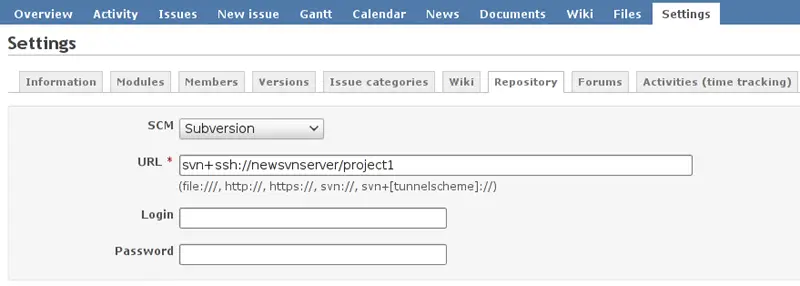
7.3. Set Up All Repositories In Redmine
In redmine, go to: your project -> Settings -> Repository (i.e. http://newredmineserver:3000/project1/settings/repository):
7.4. Sync Redmine DB From SVN
You have to generate a key first by going back in Administration -> Settings -> Repository (i.e. http://newredmineserver:3000/settings?tab=repositories):

Then to import all projects' repository at once run:
wget "http://newredmineserver:3000/sys/fetch_changesets?key=8qKxftrhICYt8bPEShVa"
8. Upgrade To Redmine 1.0.5
Squeeze version of redmine is vulnerable to this security advisory (at the time of writing 21/04/2011) which is corrected in 1.0.5.
aptitude -t squeeze-backports install redmine redmine-sqlite
That's it! Your trac projects should now be migrated completely to redmine. The only remaining issues we encountered where from bogus data in Trac, or badly formatted HTML in wiki pages that needed to be modified manually. Despite these few exceptions the script will do pretty much all the work for you.





