
How To Integrate ClamAV (Through mod_clamav) Into ProFTPd For Virus Scanning On Ubuntu 10.04
This tutorial explains how you can integrate ClamAV into ProFTPd for virus scanning on an Ubuntu 10.04 system. This is achieved through mod_clamav. In the end, whenever a file gets uploaded through ProFTPd, ClamAV will check the file and delete it if it is malware.
I do not issue any guarantee that this will work for you!
1 Preliminary Note
You should have a working ProFTPd setup on your Ubuntu 10.04 server.
Because we will run all the steps from this tutorial with root privileges, we can either prepend all commands in this tutorial with the string sudo, or we become root right now by typing
sudo su
2 Installing ClamAV
ClamAV can be installed as follows:
aptitude install clamav clamav-daemon libclamav-dev
Now we must reconfigure ClamAV so that Clamd uses TCP connections instead of a local Unix socket. It is highly recommended that Unix socket connections are avoided when using the Chroot feature of ProFTPd (DefaultRoot ~). The reason is that if mod_clamav needs to connect to Clamd, the Unix socket is not available in the chroot environment.
Run
dpkg-reconfigure clamav-base
... and answer these questions as follows (accept the default values for all other questions):
Socket type: <-- TCP
TCP port clamd will listen on: <-- 3310
IP address clamd will listen on: <-- 127.0.0.1
Then restart Clamd and freshclam:
/etc/init.d/clamav-daemon restart
/etc/init.d/clamav-freshclam restart
Now run
netstat -tap | grep clamd
... and you should see that Clamd is listening on localhost through TCP:
root@server1:~# netstat -tap | grep clamd
tcp        0      0 localhost.localdom:3310 *:*                     LISTEN      7911/clamd
root@server1:~#
3 Rebuilding ProFTPd
Unfortunately mod_clamav isn't part of ProFTPd by default, and there's no Ubuntu package for mod_clamav, so we have to rebuild ProFTPd with mod_clamav. I will use the Ubuntu source package of ProFTPd and build new ProFTPd .deb packages with mod_clamav support.
First we install all packages that are needed to rebuild ProFTPd:
aptitude build-dep proftpd-dfsg
We also need the following packages:
aptitude install libpam-dev dpkg-dev libmysqlclient-dev debhelper libpq-dev libldap2-dev libwrap0-dev libcap2-dev autotools-dev libncurses5-dev dpatch libacl1-dev libattr1-dev unixodbc-dev libsqlite3-dev
Now we download the ProFTPd source package to /usr/src:
cd /usr/src
apt-get source proftpd-dfsg
Next we download mod_clamav to /usr/src and unpack it:
wget --no-check-certificate https://secure.thrallingpenguin.com/redmine/attachments/download/1/mod_clamav-0.11rc.tar.gz
tar xzvf mod_clamav-0.11rc.tar.gz
Then we copy the mod_clamav-0.11rc/mod_clamav.* files to the proftpd-dfsg-1.3.2c/contrib directory...
cp mod_clamav-0.11rc/mod_clamav.* proftpd-dfsg-1.3.2c/contrib
... and patch the ProFTPd sources:
cd proftpd-dfsg-1.3.2c
patch -p1 < ../mod_clamav-0.11rc/proftpd.patch
Next we must edit debian/rules:
vi debian/rules
Search the CONF_ARGS section and add --with-modules=mod_clamav to it:
[...]
CONF_ARGS := --prefix=/usr \
             --with-includes=$(shell pg_config --includedir):$(shell mysql_config --include|sed -e 's/-I//') \
             --mandir=/usr/share/man --sysconfdir=/etc/$(NAME) --localstatedir=/var/run --libexecdir=/usr/lib/$(NAME) \
             --enable-sendfile --enable-facl --enable-dso --enable-autoshadow --enable-ctrls --with-modules=mod_readme \
             --enable-ipv6 --enable-nls --with-modules=mod_clamav
[...]
|
Now we can rebuild ProFTPd:
dpkg-buildpackage
Now we go one directory up, that's where the new .deb packages have been created:
cd ..
The command
ls -l
shows you the available packages:
root@server1:/usr/src# ls -l
total 7500
drwxr-xr-x 24 root root    4096 2010-04-29 14:00 linux-headers-2.6.32-21
drwxr-xr-x  7 root root    4096 2010-04-29 14:00 linux-headers-2.6.32-21-server
drwxr-xr-x  2  501  501    4096 2009-04-20 10:22 mod_clamav-0.11rc
-rw-r--r--  1 root src     5115 2010-10-04 17:21 mod_clamav-0.11rc.tar.gz
-rw-r--r--  1 root src   930578 2010-10-04 17:38 proftpd-basic_1.3.2c-1_amd64.deb
-rw-r--r--  1 root src   630168 2010-10-04 17:38 proftpd-dev_1.3.2c-1_amd64.deb
drwxr-xr-x 14 root root    4096 2010-10-04 17:37 proftpd-dfsg-1.3.2c
-rw-r--r--  1 root src     4522 2010-10-04 17:38 proftpd-dfsg_1.3.2c-1_amd64.changes
-rw-r--r--  1 root src    98674 2010-10-04 17:30 proftpd-dfsg_1.3.2c-1.diff.gz
-rw-r--r--  1 root src     1138 2010-10-04 17:30 proftpd-dfsg_1.3.2c-1.dsc
-rw-r--r--  1 root src  3018899 2009-12-22 07:05 proftpd-dfsg_1.3.2c.orig.tar.gz
-rw-r--r--  1 root src  1408070 2010-10-04 17:38 proftpd-doc_1.3.2c-1_all.deb
-rw-r--r--  1 root src   315326 2010-10-04 17:38 proftpd-mod-ldap_1.3.2c-1_amd64.deb
-rw-r--r--  1 root src   305076 2010-10-04 17:38 proftpd-mod-mysql_1.3.2c-1_amd64.deb
-rw-r--r--  1 root src   306848 2010-10-04 17:38 proftpd-mod-odbc_1.3.2c-1_amd64.deb
-rw-r--r--  1 root src   304762 2010-10-04 17:38 proftpd-mod-pgsql_1.3.2c-1_amd64.deb
-rw-r--r--  1 root src   304634 2010-10-04 17:38 proftpd-mod-sqlite_1.3.2c-1_amd64.deb
root@server1:/usr/src#
We can install the new ProFTPd .deb packages as follows:
dpkg -i proftpd*.deb
4 Configuring ProFTPd
Now we must configure ProFTPd to use mod_clamav whenever a file is uploaded. Open /etc/proftpd/proftpd.conf...
vi /etc/proftpd/proftpd.conf
... and add the stanza
<IfModule mod_clamav.c>
   ClamAV on
   ClamServer 127.0.0.1
   ClamPort 3310
</IfModule>
somewhere, e.g. below the
<IfModule mod_ctrls_admin.c>
AdminControlsEngine off
</IfModule>
section:
[...] <IfModule mod_ctrls_admin.c> AdminControlsEngine off </IfModule> <IfModule mod_clamav.c> ClamAV on ClamServer 127.0.0.1 ClamPort 3310 </IfModule> # # Alternative authentication frameworks # #Include /etc/proftpd/ldap.conf #Include /etc/proftpd/sql.conf [...] |
Restart ProFTPd:
/etc/init.d/proftpd restart
Now check if mod_clamav is loaded by running:
proftpd -vv
mod_clamav should be listed in the output:
root@server1:~# proftpd -vv
ProFTPD Version: 1.3.2c (maint)
  Scoreboard Version: 01040002
  Built: Mon Oct 4 17:34:10 CEST 2010

Loaded modules:
  mod_ifsession/1.0
  mod_dynmasq/0.2.1
  mod_wrap2_file/1.2
  mod_wrap2/2.0.6
  mod_ban/0.5.3
  mod_load/1.0.1
  mod_rewrite/0.7
  mod_wrap.c
  mod_quotatab_radius.c
  mod_quotatab_file.c
  mod_quotatab/1.3.0
  mod_radius/0.9
  mod_tls/2.2.2
  mod_ctrls_admin/0.9.5
  mod_lang/0.9
  mod_ctrls/0.9.4
  mod_cap/1.0
  mod_clamav.c
  mod_auth_pam/1.1
  mod_ident/1.0
  mod_dso/0.4
  mod_facts/0.1
  mod_delay/0.6
  mod_site.c
  mod_log.c
  mod_ls.c
  mod_auth.c
  mod_auth_file/0.8.3
  mod_auth_unix.c
  mod_xfer.c
  mod_core.c
root@server1:~#
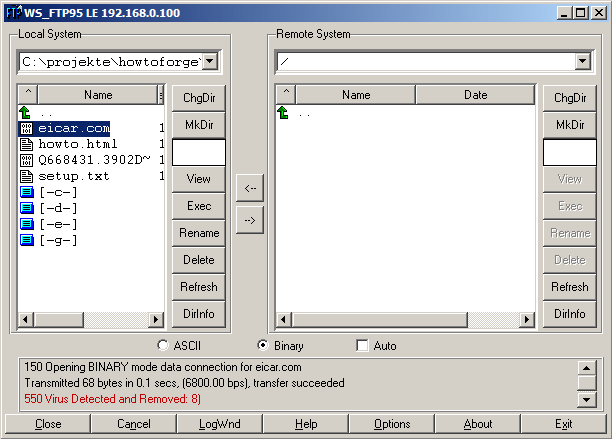
That's it! Now whenever someone tries to upload malware to your server through ProFTPd, the "bad" file(s) will be deleted. You can test that by downloading the Eicar test virus from http://www.eicar.org/anti_virus_test_file.htm; try to upload it to your ProFTPd server, and if all goes well, it should be deleted:
5 Links
- ProFTPd: http://www.proftpd.org/
- mod_clamav: http://www.thrallingpenguin.com/resources/mod_clamav.htm
- ClamAV: http://www.clamav.net/
- Ubuntu: http://www.ubuntu.com/





