
How To Integrate ClamAV (Through mod_clamav) Into ProFTPd For Virus Scanning On Debian Lenny
This tutorial explains how you can integrate ClamAV into ProFTPd for virus scanning on a Debian Lenny system. This is achieved through mod_clamav. In the end, whenever a file gets uploaded through ProFTPd, ClamAV will check the file and delete it if it is malware.
I do not issue any guarantee that this will work for you!
1 Preliminary Note
You should have a working ProFTPd setup on your Debian Lenny server.
2 Installing ClamAV
ClamAV can be installed as follows:
aptitude install clamav clamav-daemon libclamav-dev
Now we must reconfigure ClamAV so that Clamd uses TCP connections instead of a local Unix socket. It is highly recommended that Unix socket connections are avoided when using the Chroot feature of ProFTPd (DefaultRoot ~). The reason is that if mod_clamav needs to connect to Clamd, the Unix socket is not available in the chroot environment.
Run
dpkg-reconfigure clamav-base
... and answer these questions as follows (accept the default values for all other questions):
Socket type: <-- TCP
TCP port clamd will listen on: <-- 3310
IP address clamd will listen on: <-- 127.0.0.1
Then restart Clamd and freshclam:
/etc/init.d/clamav-daemon restart
/etc/init.d/clamav-freshclam restart
Now run
netstat -tap | grep clamd
... and you should see that Clamd is listening on localhost through TCP:
server1:~# netstat -tap | grep clamd
tcp        0      0 localhost.localdom:3310 *:*                     LISTEN      29430/clamd
server1:~#
3 Rebuilding ProFTPd
Unfortunately mod_clamav isn't part of ProFTPd by default, and there's no Debian package for mod_clamav, so we have to rebuild ProFTPd with mod_clamav. I will use the Debian source package of ProFTPd and build new ProFTPd .deb packages with mod_clamav support.
First we install all packages that are needed to rebuild ProFTPd:
aptitude build-dep proftpd
We also need the following package (which doesn't get installed by the previous command for some reason...):
aptitude install libpam-dev
Now we download the ProFTPd source package to /usr/src:
cd /usr/src
apt-get source proftpd
Next we download mod_clamav to /usr/src and unpack it:
wget --no-check-certificate https://secure.thrallingpenguin.com/redmine/attachments/download/1/mod_clamav-0.11rc.tar.gz
tar xzvf mod_clamav-0.11rc.tar.gz
Then we copy the mod_clamav-0.11rc/mod_clamav.* files to the proftpd-dfsg-1.3.1/contrib directory...
cp mod_clamav-0.11rc/mod_clamav.* proftpd-dfsg-1.3.1/contrib
... and patch the ProFTPd sources:
cd proftpd-dfsg-1.3.1
patch -p1 < ../mod_clamav-0.11rc/proftpd.patch
Next we must edit debian/rules:
vi debian/rules
Search the CONF_ARGS section and add --with-modules=mod_clamav to it:
[...]
CONF_ARGS := --prefix=/usr \
             --with-includes=$(shell pg_config --includedir):$(shell mysql_config --include|sed -e 's/-I//') \
             --mandir=/usr/share/man --sysconfdir=/etc/$(NAME) --localstatedir=/var/run --libexecdir=/usr/lib/$(NAME) \
             --enable-sendfile --enable-facl --enable-dso --enable-autoshadow --enable-ctrls --with-modules=mod_readme \
             --enable-ipv6 --enable-nls --with-modules=mod_clamav
[...]
|
Now we can rebuild ProFTPd:
dpkg-buildpackage
Now we go one directory up, that's where the new .deb packages have been created:
cd ..
The command
ls -l
shows you the available packages:
server1:/usr/src# ls -l
total 5472
drwxr-xr-x  2  501  501    4096 2009-04-20 10:22 mod_clamav-0.11rc
-rw-r--r--  1 root src     5115 2010-10-01 03:28 mod_clamav-0.11rc.tar.gz
-rw-r--r--  1 root src   195066 2010-10-01 03:32 proftpd_1.3.1-17lenny4_all.deb
-rw-r--r--  1 root src   690228 2010-10-01 03:32 proftpd-basic_1.3.1-17lenny4_i386.deb
drwxr-xr-x 13 root root    4096 2010-10-01 03:32 proftpd-dfsg-1.3.1
-rw-r--r--  1 root src   107998 2010-10-01 03:29 proftpd-dfsg_1.3.1-17lenny4.diff.gz
-rw-r--r--  1 root src     1103 2010-10-01 03:29 proftpd-dfsg_1.3.1-17lenny4.dsc
-rw-r--r--  1 root src     3305 2010-10-01 03:32 proftpd-dfsg_1.3.1-17lenny4_i386.changes
-rw-r--r--  1 root src  2662056 2007-10-16 01:02 proftpd-dfsg_1.3.1.orig.tar.gz
-rw-r--r--  1 root src  1255660 2010-10-01 03:32 proftpd-doc_1.3.1-17lenny4_all.deb
-rw-r--r--  1 root src   213004 2010-10-01 03:32 proftpd-mod-ldap_1.3.1-17lenny4_i386.deb
-rw-r--r--  1 root src   203562 2010-10-01 03:32 proftpd-mod-mysql_1.3.1-17lenny4_i386.deb
-rw-r--r--  1 root src   203512 2010-10-01 03:32 proftpd-mod-pgsql_1.3.1-17lenny4_i386.deb
server1:/usr/src#
We can install the new ProFTPd .deb packages as follows:
dpkg -i proftpd*.deb
4 Configuring ProFTPd
Now we must configure ProFTPd to use mod_clamav whenever a file is uploaded. Open /etc/proftpd/proftpd.conf...
vi /etc/proftpd/proftpd.conf
... and add the stanza
<IfModule mod_clamav.c>
   ClamAV on
   ClamServer 127.0.0.1
   ClamPort 3310
</IfModule>
somewhere, e.g. below the
<IfModule mod_ctrls_admin.c>
AdminControlsEngine off
</IfModule>
section:
[...] <IfModule mod_ctrls_admin.c> AdminControlsEngine off </IfModule> <IfModule mod_clamav.c> ClamAV on ClamServer 127.0.0.1 ClamPort 3310 </IfModule> # # Alternative authentication frameworks # #Include /etc/proftpd/ldap.conf Include /etc/proftpd/sql.conf [...] |
Restart ProFTPd:
/etc/init.d/proftpd restart
Now check if mod_clamav is loaded by running:
proftpd -vv
mod_clamav should be listed in the output:
server1:~# proftpd -vv
 - ProFTPD Version: 1.3.1 (stable)
 -   Scoreboard Version: 01040002
 -   Built: Fri Oct 1 03:31:03 CEST 2010
 -     Module: mod_core.c
 -     Module: mod_xfer.c
 -     Module: mod_auth_unix.c
 -     Module: mod_auth_file/0.8.3
 -     Module: mod_auth.c
 -     Module: mod_ls.c
 -     Module: mod_log.c
 -     Module: mod_site.c
 -     Module: mod_delay/0.6
 -     Module: mod_dso/0.4
 -     Module: mod_auth_pam/1.0.1
 -     Module: mod_clamav.c
 -     Module: mod_cap/1.0
 -     Module: mod_ctrls/0.9.4
 -     Module: mod_lang/0.8
server1:~#
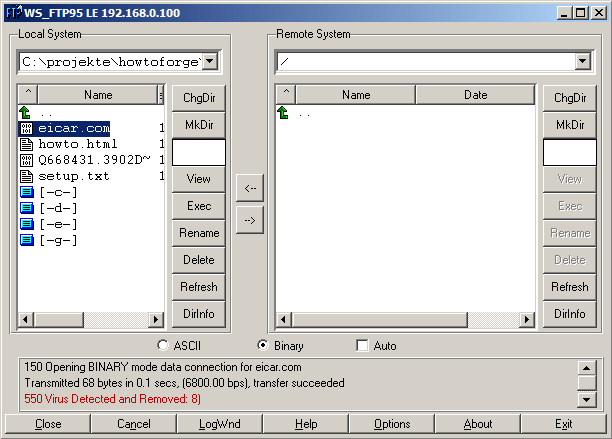
That's it! Now whenever someone tries to upload malware to your server through ProFTPd, the "bad" file(s) will be deleted. You can test that by downloading the Eicar test virus from http://www.eicar.org/anti_virus_test_file.htm; try to upload it to your ProFTPd server, and if all goes well, it should be deleted:
5 Links
- ProFTPd: http://www.proftpd.org/
- mod_clamav: http://www.thrallingpenguin.com/resources/mod_clamav.htm
- ClamAV: http://www.clamav.net/
- Debian: http://www.debian.org/





