
On this page
- How To Compile rTorrent From SVN In Ubuntu 10.04 Lucid Lynx / Debian 5 Lenny With Coloured Interface
- Introduction
- Notice for Debian Lenny
- 1. Remove current rtorrent installation
- 2. Install necessary packages
- 3. Create rtorrent folder
- 4. Go into the rtorrent folder
- 5. Get the rtorrent sources by svn
- 6. Get into the trunk folder
- 7. Download the patches
- 8. Apply the patches
- 9. Get into the libtorrent folder
- 10. Run the autogen.sh script
- 11. Configure libtorrent
- 12. Compile libtorrent
- 13. Install libtorrent
- 14. Extend /etc/ld.so.conf
- 15. Updated ld.so cache
- 16. Get into the rtorrent folder
- 17. Run the autogen.sh script
- 18. Configure rtorrent
- 19. Compile rtorrent
- 20. Install rtorrent
- 21. Extend rtorrent configuration
- 22. Run rtorrent
- Enjoy
- The following steps apply if you want to compile c-ares and curl yourself. This is recommended for Debian Lenny - because of that I will not use "sudo" below. If you're on Ubuntu, just add sudo accordingly.
- B1. Remove current rtorrent installation
- B2. Install necessary packages
- B3. Create rtorrent folder
- B4. Go into the rtorrent folder
- B5. Download c-ares and curl
- B6. Extract c-ares and curl
- B7. Enter c-ares folder, configure, make and install
- B8. Enter curl folder, configure with c-ares, make and install
- B9. Continue with step 4 of the normal howto by entering the rtorrent folder
How To Compile rTorrent From SVN In Ubuntu 10.04 Lucid Lynx / Debian 5 Lenny With Coloured Interface
Author: Stephan Jau
Revision: v1.0
Last Change: August 28, 2010
Introduction
rTorrent is a popular command line based bittorrent client. It provides very powerful features yet it is very light on the system - contrary to other bittorrent clients like Vuze. There are a couple of webinterfaces for it but they are not truly need. SSH access combined with the "screen" program provide you all the tools you need.
In the previous howto patches for magnet link support were provided. With the current revision 1169 magnet link support has already been integrated. However some of the inner workings were changed and the colour patch was modified to work in the current revision.
This howto works for Ubuntu 10.04 Lucid Lynx and for Debian 5 Lenny. The difference is that commands that contain sudo must be executed as root.
In this howto I assume you download and compile the sources from your ~/rtorrent resp. ~/rtorrent/trunk folder.
Notice for Debian Lenny
If you run Debian Lenny, it's recommended that you also update c-ares and curl. This means you'll compile that also. In order to do that, see the very bottom of this howto and then continue at step 4.
1. Remove current rtorrent installation
sudo apt-get remove rtorrent libtorrent*
2. Install necessary packages
sudo apt-get install subversion build-essential libtool automake openssl libsigc++-2.0-dev libncurses5-dev libncursesw5-dev libcurl4-openssl-dev libcppunit-dev
3. Create rtorrent folder
mkdir ~/rtorrent
4. Go into the rtorrent folder
cd ~/rtorrent
Current location: /home/USER/rtorrent
5. Get the rtorrent sources by svn
svn co svn://rakshasa.no/libtorrent/trunk
Current rtorrent version is: rev. 1169.
6. Get into the trunk folder
cd trunk
Current location: /home/USER/rtorrent/trunk
7. Download the patches
Colour support for rtorrent:
wget http://www.simplylinux.ch/rtorrent/canvas-color_1169.patch
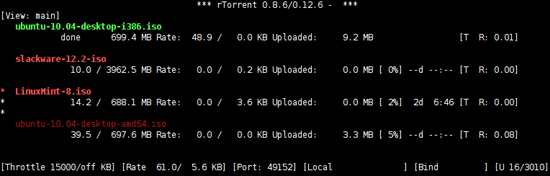
This patch enables you to colorize the rtorrent cli interfaces. It differentiaties between completed/uncompleted torrents and active/inactive ones. I first had to get used to it also but meanwhile I think it's really a good enhancement. The patch was originally supplied here: http://libtorrent.rakshasa.no/ticket/1382. However that patch does not work with the current rev. 1105. Because of that I fixed it and supply it also from my server.
Torrent Tracker Stats:
wget http://www.simplylinux.ch/rtorrent/trackerinfo.patch
This patch shows the number of seeders/leechers/completed as supplied by the tracker in the tracker view. Often it's not accurate however it's usefull for me to check if a tracker has any peers at all listed for a given torrent.
8. Apply the patches
Colour support for rtorrent:
patch -p0 < canvas-color_1169.patch
Torrent Tracker Stats:
patch -p0 < trackerinfo.patch
9. Get into the libtorrent folder
cd libtorrent
Current location: /home/USER/rtorrent/trunk/libtorrent
10. Run the autogen.sh script
./autogen.sh
11. Configure libtorrent
./configure
12. Compile libtorrent
make
13. Install libtorrent
sudo make install
14. Extend /etc/ld.so.conf
echo "include /usr/local/lib" | sudo tee -a /etc/ld.so.conf
15. Updated ld.so cache
sudo ldconfig
16. Get into the rtorrent folder
cd ../rtorrent
Current location: /home/USER/rtorrent/trunk/rtorrent
17. Run the autogen.sh script
./autogen.sh
18. Configure rtorrent
./configure
19. Compile rtorrent
make
20. Install rtorrent
sudo make install
21. Extend rtorrent configuration
Magnet Link support as provided by this howto requires a session folder. If there is no session folder defined yet in the ~/.rtorrent.rc config file or if that config file does not exist yet, then it has to be added. An example for an ~/.rtorrent.rc file can be found here: http://libtorrent.rakshasa.no/browser/trunk/rtorrent/doc/rtorrent.rc#latest. In addition I would also set the DHT option to "on".
You can also just copy the .rtorrent.rc config file from the trunk and then edit it:
cp ~/rtorrent/trunk/rtorrent/doc/rtorrent.rc ~/.rtorrent.rc
To make use of the colour patch, also the colour options need to be added to the ~/.rtorrent.rc config. I use this example below:
# Color / Canvas patch
done_fg_color = 2
#done_bg_color = 2
active_fg_color = 1
#active_bg_color = 4
With these options inactive completed torrents will be displayed as dark green, active ones as bright green, inactive incompleted torrents are displayed in dark red, active ones in bright red. To customize this further you can use those colours: 0 = black; 1 = red; 2 = green; 3 = yellow; 4 = blue; 5 = magenta; 6 = cyan; 7 = white
rTorrent also allows custom views or modify existing views. The rTorrent Common Tasks page has one very useful entry:
schedule = filter_active,30,30,"view_filter = active,\"or={d.get_up_rate=,d.get_down_rate=}\""
Add this also to your .rtorrent.rc config file. Maybe change the value of 30 to 10 or so. Basically this customization allows you to modify that "active view" (view 9) to only show torrents that are currently sending or receiving data from peers.
If you don't have a .rtorrent.rc config file in your home dir then you can get one with the command below. However it needs a lot of work (especially enabling a download and session dir)
wget http://libtorrent.rakshasa.no/export/1169/trunk/rtorrent/doc/rtorrent.rc -O ~/.rtorrent.rc
22. Run rtorrent
rtorrent
Enjoy
The following steps apply if you want to compile c-ares and curl yourself. This is recommended for Debian Lenny - because of that I will not use "sudo" below. If you're on Ubuntu, just add sudo accordingly.
B1. Remove current rtorrent installation
apt-get remove rtorrent libtorrent* libcurl4-openssl-dev
B2. Install necessary packages
apt-get install subversion build-essential libtool automake openssl libsigc++-2.0-dev libncurses5-dev libncursesw5-dev libcppunit-dev libssl-dev
B3. Create rtorrent folder
mkdir ~/rtorrent
B4. Go into the rtorrent folder
cd ~/rtorrent
Current location: /home/USER/rtorrent
B5. Download c-ares and curl
wget http://c-ares.haxx.se/c-ares-1.7.3.tar.gz
wget http://curl.haxx.se/download/curl-7.21.1.tar.gz
B6. Extract c-ares and curl
tar xvfz c-ares-1.7.3.tar.gz
tar xvfz curl-7.21.1.tar.gz
B7. Enter c-ares folder, configure, make and install
cd ~/rtorrent/c-ares-1.7.3
./configure
make
make install
B8. Enter curl folder, configure with c-ares, make and install
cd ~/rtorrent/curl-7.21.1
./configure --with-ares
make
make install
B9. Continue with step 4 of the normal howto by entering the rtorrent folder
cd ~/rtorrent





