
Enabling SquirrelMail For Your Web Sites On An ISPConfig 3 Server (Debian Lenny)
On this page
Lots of people have reported problems (such as getting 404 Not Found errors) using the SquirrelMail webmail package in their websites created through ISPConfig 3. If you have followed the "Perfect Server" guides for ISPConfig 3, you have SquirrelMail already installed, but if you are still having the same problems, then this guide is for you. This guide explains how to configure SquirrelMail on a Debian Lenny server so that you can use it from within your websites (created through ISPConfig).
Configuring SquirrelMail
SquirrelMail's Apache configuration is in the file /etc/squirrelmail/apache.conf, but this file isn't loaded by Apache because it is not in the /etc/apache2/conf.d/ directory. Therefore we create a symlink called squirrelmail.conf in the /etc/apache2/conf.d/ directory that points to /etc/squirrelmail/apache.conf and reload Apache afterwards:
cd /etc/apache2/conf.d/
ln -s ../../squirrelmail/apache.conf squirrelmail.conf
/etc/init.d/apache2 reload
That's it already - /etc/apache2/conf.d/squirrelmail.conf defines an alias called /squirrelmail that points to SquirrelMail's installation directory /usr/share/squirrelmail.
Now go to the PHP open_basedir field on the Options tab of your web site in ISPConfig and add the directories /usr/share/squirrelmail and /etc/squirrelmail (that's the directory where SquirrelMail's configuration is stored) to the line, e.g. as follows:
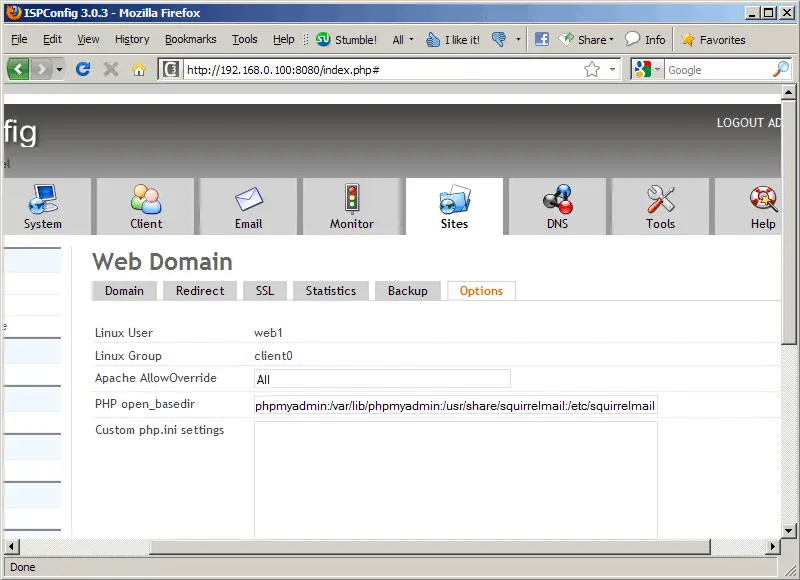
Wait two or three minutes until ISPConfig has updated the site configuration. You can now access SquirrelMail from your web site as follows:
http://www.example.com/squirrelmail
You can also access it from the ISPConfig control panel vhost as follows (this doesn't need any configuration in ISPConfig):
http://server1.example.com:8080/squirrelmail
If you'd like to use the alias /webmail instead of /squirrelmail, simply open /etc/apache2/conf.d/squirrelmail.conf...
vi /etc/apache2/conf.d/squirrelmail.conf
... and add the line Alias /webmail /usr/share/squirrelmail:
Alias /squirrelmail /usr/share/squirrelmail
Alias /webmail /usr/share/squirrelmail

<Directory /usr/share/squirrelmail>
  Options Indexes FollowSymLinks
  <IfModule mod_php4.c>
    php_flag register_globals off
  </IfModule>
  <IfModule mod_php5.c>
    php_flag register_globals off
  </IfModule>
  <IfModule mod_dir.c>
    DirectoryIndex index.php
  </IfModule>

  # access to configtest is limited by default to prevent information leak
  <Files configtest.php>
    order deny,allow
    deny from all
    allow from 127.0.0.1
  </Files>
</Directory>

# users will prefer a simple URL like http://webmail.example.com
#<VirtualHost 1.2.3.4>
#  DocumentRoot /usr/share/squirrelmail
#  ServerName webmail.example.com
#</VirtualHost>

# redirect to https when available (thanks [email protected])
#
#  Note: There are multiple ways to do this, and which one is suitable for
#  your site's configuration depends. Consult the apache documentation if
#  you're unsure, as this example might not work everywhere.
#
#<IfModule mod_rewrite.c>
#  <IfModule mod_ssl.c>
#    <Location /squirrelmail>
#      RewriteEngine on
#      RewriteCond %{HTTPS} !^on$ [NC]
#      RewriteRule . https://%{HTTP_HOST}%{REQUEST_URI}  [L]
#    </Location>
#  </IfModule>
#</IfModule>
Then reload Apache:
service apache2 reload
Now you can access Squirrelmail as follows:
http://www.example.com/webmail
http://server1.example.com:8080/webmail
If you'd like to define a vhost like webmail.example.com where your users can access SquirrelMail, you'd have to add the following vhost configuration to /etc/apache2/conf.d/squirrelmail.conf:
nano /etc/apache2/conf.d/squirrelmail.conf
[...]
<VirtualHost 1.2.3.4:80>
  DocumentRoot /usr/share/squirrelmail
  ServerName webmail.example.com
</VirtualHost>
Make sure you replace 1.2.3.4 with the correct IP address of your server. Of course, there must be a DNS record for webmail.example.com that points to the IP address that you use in the vhost configuration. Also make sure that the vhost webmail.example.com does not exist in ISPConfig (otherwise both vhosts will interfere with each other!).
Now reload Apache...
service apache2 reload
... and you can access SquirrelMail under http://webmail.example.com!
Links
- SquirrelMail: http://squirrelmail.org/
- The Perfect Server – Debian Lenny (Debian 5.0) With MyDNS & Courier [ISPConfig 3]: https://www.howtoforge.com/perfect-server-debian-lenny-ispconfig3
- The Perfect Server – Debian Lenny (Debian 5.0) With BIND & Dovecot [ISPConfig 3]: https://www.howtoforge.com/perfect-server-debian-lenny-debian-5.0-with-bind-and-dovecot-ispconfig-3
- ISPConfig: http://www.ispconfig.org/
- Debian: http://www.debian.org/
- Apache mod_rewrite





