
Creating A DNS Cache With djbdns
Building a local DNS cache will speed up your internet connection since the time for the “translation job” (converting domain names into IP addresses) will become negligible with the assumption that the DNS cache gets the information from the parent DNS.
FreeBSD already ships bind in each release but I prefer to use djbdns. 
Simple way to build local DNS cache in FreeBSD using ports:
1. Install djbdns ports
su-2.05b# whereis djbdns
djbdns: /usr/ports/dns/djbdns
su-2.05b# cd /usr/ports/dns/djbdns && make install clean
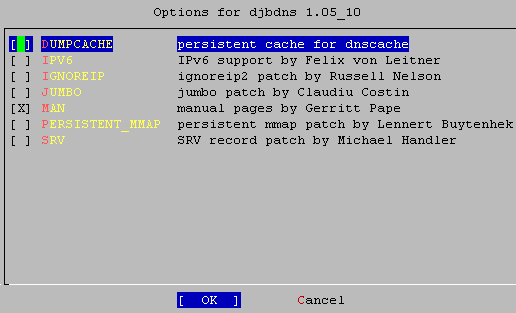
Just press OK and the installation process will begin.
2. Configuration
# pw groupadd nofiles -g 800
# pw useradd dnslog   -g nofiles -u 810 -d /nonexistent -s /sbin/nologin
# pw useradd dnscache -g nofiles -u 811 -d /nonexistent -s /sbin/nologin
These commands will add the group nofiles, and the users dnslog and dnscache.
# dnscache-conf dnscache dnslog /etc/dnscache 127.0.0.1
# ln -s /etc/dnscache /var/service
# echo ‘nameserver 127.0.0.1? >/etc/resolv.conf
These commands will make the IP address 127.0.0.1 a DNS cache “only” for that computer.
In order to be able to use the DNS cache in our network, we need to issue more commands:
# dnscache-conf dnscache dnslog /etc/dnscache 192.168.1.1
# touch /etc/dnscache/root/ip/192.168.1
# ln -s /etc/dnscache /var/service
Now, each client can add 192.168.1.1 as a valid DNS resolver:
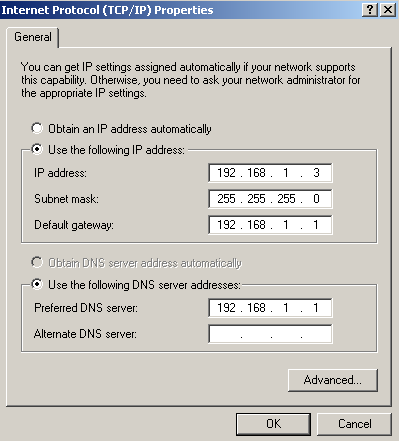
To use “daemontools” power we need to add this entry in rc.conf:
svscan_enable=”YES”
The first time, we need to start it manually:
su-2.05b# /usr/local/etc/rc.d/svscan.sh start
Check for running service:
su-2.05b# ps -ax | grep dns
338  ??  I      0:00.03 supervise dnscache
90515  ??  S      0:03.51 /usr/local/bin/dnscache
To check if dnscache “really works”:
su-2.05b# tail -f /etc/dnscache/log/main/current
Example output:
su-2.05b# tail -f /etc/dnscache/log/main/current
@4000000046375a22168f3ee4 cached 1 i.gtld-servers.net.
@4000000046375a22168fcf6c cached 1 j.gtld-servers.net.
@4000000046375a2216905ff4 cached 1 k.gtld-servers.net.
@4000000046375a221690ec94 cached 1 l.gtld-servers.net.
@4000000046375a2216917d1c cached 1 m.gtld-servers.net.
@4000000046375a22169209bc cached 1 a.gtld-servers.net.
@4000000046375a221692c154 cached 1 b.gtld-servers.net.
@4000000046375a22169351dc cached 1 c.gtld-servers.net.
@4000000046375a221693de7c cached 1 d.gtld-servers.net.
@4000000046375a2216945794 tx 0 255 mx44.alanistz.com. com. c005061e c0304f1e c036701e c023331e c037531e c02a5d1e c01a5c1e c0210e1e c029a21e c00c5e1e c02bac1e c01f501e c034b21e
@4000000046375a222673d964 rr cc4a7021 86400 1 mx74mi.clarmu.info. d035034a
@4000000046375a2226787514 rr cc4a7021 86400 1 mx144pb.clarmu.info. 42212090
@4000000046375a222678889c rr cc4a7021 86400 1 mx174hi.clarmu.info. 42f890ae
@4000000046375a222678983c rr cc4a7021 86400 1 mx187tr.clarmu.info. 416f11bb
@4000000046375a222678abc4 rr cc4a7021 86400 1 mx204pa.clarmu.info. 42217dcc
@4000000046375a222678bb64 rr cc4a7021 86400 ns clarmu.info. mx74mi.clarmu.info.
@4000000046375a222678ceec rr cc4a7021 86400 ns clarmu.info. mx204pa.clarmu.info.
@4000000046375a222678de8c rr cc4a7021 86400 ns clarmu.info. mx187tr.clarmu.info.
@4000000046375a222679059c rr cc4a7021 86400 ns clarmu.info. mx174hi.clarmu.info.
@4000000046375a222679153c rr cc4a7021 86400 ns clarmu.info. mx144pb.clarmu.info.
@4000000046375a22267924dc stats 379 144625 13 0
@4000000046375a2226793864 cached 1 mx74mi.clarmu.info.
@4000000046375a2226794804 cached 1 mx204pa.clarmu.info.
@4000000046375a22267957a4 cached 1 mx187tr.clarmu.info.
@4000000046375a2226796744 cached 1 mx174hi.clarmu.info
Congratulations, your DNS cache is working well.





