
Command-Line Copy&Paste With xclip (Debian/Ubuntu)
Version 1.0
Author: Falko Timme
 Follow me on Twitter
xclip is a command line interface to the X11 clipboard. It allows you to put the output of a command directly into the clipboard so that you don't have to copy&paste from the terminal manually (which can be a tedious task especially if the output is very long). It also allows you to put the contents of a file directly into the clipboard.
I do not issue any guarantee that this will work for you!
1 Installing xclip
xclip is available as a package for Debian and Ubuntu so that it can be installed with aptitude. Open a terminal (Applications > Accessories > Terminal)...
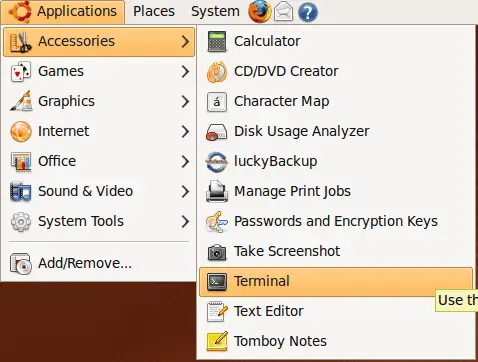
... and run:
sudo aptitude install xclip
2 Using xclip
To put the output of a command into the clipboard, we have to pipe the command into xclip, e.g. like this:
ls -la | xclip
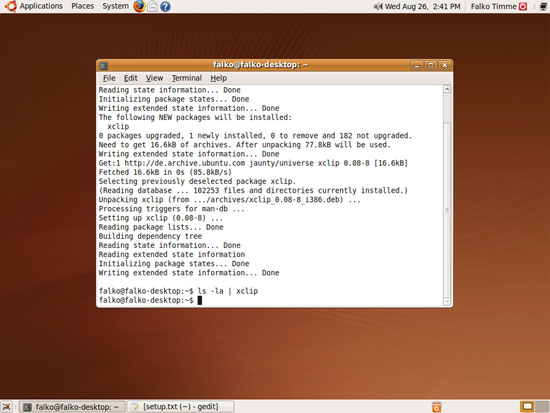
This puts the output of the ls -la command into the clipboard, and you can now paste the output into any other program (e.g. a text editor) by pressing the middle button of your mouse:
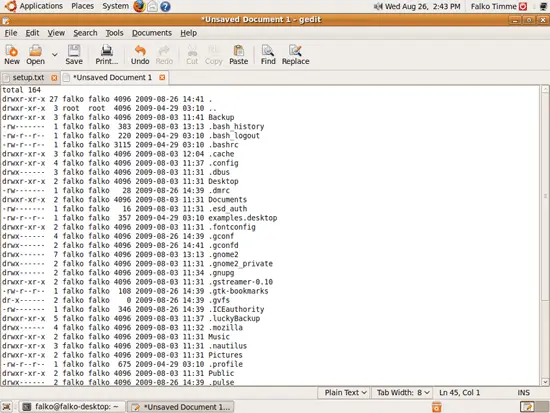
To put the whole contents of a file (e.g. /etc/apt/sources.list) into the clipboard, you'd use xclip as follows:
xclip /etc/apt/sources.list
You can use xclip as well to output the contents of the clipboard:
xclip -o
And to save the contents of the clipboard to a file (e.g. ~/test.txt), you'd call xclip as follows:
xclip -o > ~/test.txt
To learn more about xclip, take a look at its man page:
man xclip





